
惯性聚合 高效追踪和阅读你感兴趣的博客、新闻、科技资讯
阅读原文 在惯性聚合中打开

推荐订阅源

N
News | PayPal Newsroom
Security Archives - TechRepublic
Hacker News: Ask HN
Hacker News: Ask HN
H
Hacker News: Front Page
Apple Machine Learning Research
TaoSecurity Blog
TaoSecurity Blog
Help Net Security
Help Net Security
Threat Intelligence Blog | Flashpoint
V
V2EX
Hugging Face - Blog
Hugging Face - Blog
cs.CV updates on arXiv.org
cs.CL updates on arXiv.org
人人都是产品经理
人人都是产品经理
博客园 - 三生石上(FineUI控件)
Security Latest
Security Latest
Cloudbric
Cloudbric
WordPress大学
WordPress大学
S
SegmentFault 最新的问题
cs.AI updates on arXiv.org
www.infosecurity-magazine.com
Know Your Adversary
Know Your Adversary
A
Arctic Wolf
L
LangChain Blog
Application and Cybersecurity Blog
The GitHub Blog
The GitHub Blog
P
Proofpoint News Feed
W
WeLiveSecurity
freeCodeCamp Programming Tutorials: Python, JavaScript, Git & More
M
MIT News - Artificial intelligence
Google DeepMind News
奇客Solidot–传递最新科技情报
奇客Solidot–传递最新科技情报
The Cloudflare Blog
小众软件
小众软件
NISL@THU
NISL@THU
云风的 BLOG
云风的 BLOG
P
Privacy & Cybersecurity Law Blog
S
Security @ Cisco Blogs
博客园 - 【当耐特】
I
InfoQ
Vercel News
Vercel News
CTFtime.org: upcoming CTF events
P
Proofpoint News Feed
O
OpenAI News
Google DeepMind News
N
News and Events Feed by Topic
K
KPMG report finds enterprise disconnect between AI and its ROI | CIO
K
Kaspersky official blog
T
Threat Research - Cisco Blogs
量子位
宝玉的分享
宝玉的分享

记录生活,精彩一刻 - 更换

鼠标 - 体会动手维修外设的快乐
Typecho更换新域名教程 数据库篇
Huo · 2022-08-28 · via 记录生活,精彩一刻 - 更换

TYPECHO数据库更换域名教程

Typecho-phpMyAdmin修改数据库篇

我是用宝塔面板的,请设置phpMyAdmin启用公共访问权限。

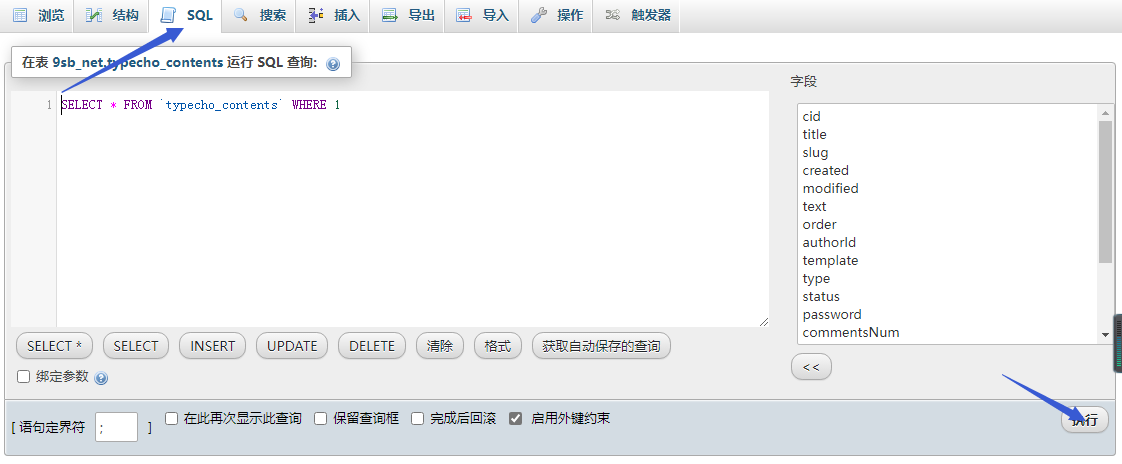
通过phpMyAdmin执行sql语句对数据库的方法对文章和评论的相关域名进行替换。

1、修改设置中的本站域名:位置typecho_options表

UPDATE `typecho_options` SET `value` = '新域名' WHERE `typecho_options`.`name` = 'siteUrl' AND `typecho_options`.`user` =0;
ps:此处新域名建议加上https:// 也可以博客后台设置更改

2、修改文章中相关域名:位置typecho_contents表

UPDATE `typecho_contents` SET `text` = REPLACE(`text`,'旧域名','新域名');

3、修改管理员个人网站:位置typecho_users表

UPDATE `typecho_users` SET `url` = REPLACE(`url`,'旧域名','新域名');
ps:建议网站后台修改即好。

4、修改评论中相关域名:位置typecho_comments 表

UPDATE `typecho_comments` SET `url` = REPLACE(`url`,'旧域名','新域名');
UPDATE `typecho_comments` SET `text` = REPLACE(`text`,'旧域名','新域名');
UPDATE `typecho_comments` SET `mail` = REPLACE(`mail`,'旧邮箱地址','新邮箱地址');

以上操作都可以在phpmyadmin进行。选择对应的数据库,执行sql即可

转自Lam's Blog