


惯性聚合 高效追踪和阅读你感兴趣的博客、新闻、科技资讯
阅读原文 在惯性聚合中打开

推荐订阅源

S
Secure Thoughts
罗磊的独立博客
T
The Blog of Author Tim Ferriss
人人都是产品经理
人人都是产品经理
博客园 - 叶小钗
Last Week in AI
Last Week in AI
美团技术团队
Google Online Security Blog
Application and Cybersecurity Blog
D
Docker
G
Google Developers Blog
大猫的无限游戏
大猫的无限游戏
酷 壳 – CoolShell
酷 壳 – CoolShell
小众软件
小众软件
月光博客
月光博客
L
LINUX DO - 最新话题
cs.AI updates on arXiv.org
CTFtime.org: upcoming CTF events
W
WeLiveSecurity
H
Heimdal Security Blog
Vercel News
Vercel News
SecWiki News
SecWiki News
Forbes - Security
Forbes - Security
Blog — PlanetScale
Blog — PlanetScale
Google DeepMind News
Exploit-DB.com RSS Feed
www.infosecurity-magazine.com
TaoSecurity Blog
TaoSecurity Blog
T
Troy Hunt's Blog
A
About on SuperTechFans
C
Check Point Blog
S
Security Affairs
Hacker News - Newest:
Hacker News - Newest: "LLM"
AI
AI
WordPress大学
WordPress大学
K
KPMG report finds enterprise disconnect between AI and its ROI | CIO
Help Net Security
Help Net Security
博客园_首页
The Last Watchdog
The Last Watchdog
S
SegmentFault 最新的问题
Hugging Face - Blog
Hugging Face - Blog
Security Archives - TechRepublic
Engineering at Meta
Engineering at Meta
cs.CV updates on arXiv.org
I
Intezer
K
Kaspersky official blog
M
MIT News - Artificial intelligence
J
Java Code Geeks
G
GRAHAM CLULEY
P
Palo Alto Networks Blog

记录生活,精彩一刻 - nginx

宝塔Nginx免费防火墙拦截发布的文章的解决办法
nginx下 配置typecho 只能访问主页,其他页面400 或502错误问题
Huo · 2021-11-23 · via 记录生活,精彩一刻 - nginx

问题描述:

在nginx的服务环境下,安装好typecho后,发现只能主页,或者不带?query参数页才能正常访问,其它页面都报错。

分析:

应该是nginx的伪静态设置问题。

nginx设置方法:

        server {
        listen 81;
        root    /usr/share/nginx/typecho;
        index   index.html index.htm index.php;
        include /etc/nginx/default.d/*.conf;

        location ~ .*\.php(\/.*)*$ {
                #fastcgi_split_path_info ^(.+\.php)(/.*)$;
                #设置监听端口
                fastcgi_pass    127.0.0.1:9000;
                #设置nginx的默认首页文件,和上面二选一,可删除
                fastcgi_index   index.php;
                if (!-e $request_filename){
                        rewrite ^(.*)$ /index.php?q=$1 last;
                        break;
                }

                #设置脚本文件请求路径
                fastcgi_param   SCRIPT_FILENAME $document_root$fastcgi_script_name;
                #fastcgi_param  SCRIPT_NAME     $real_script_name;
                #fastcgi_param  PATH_INFO       $path_info;
                #引入FastCGI配置文件
                include fastcgi_params;
                include fastcgi.conf;
                #fastcgi_intercept_errors on;
        }
}

主要是添加下图红色款内这个:
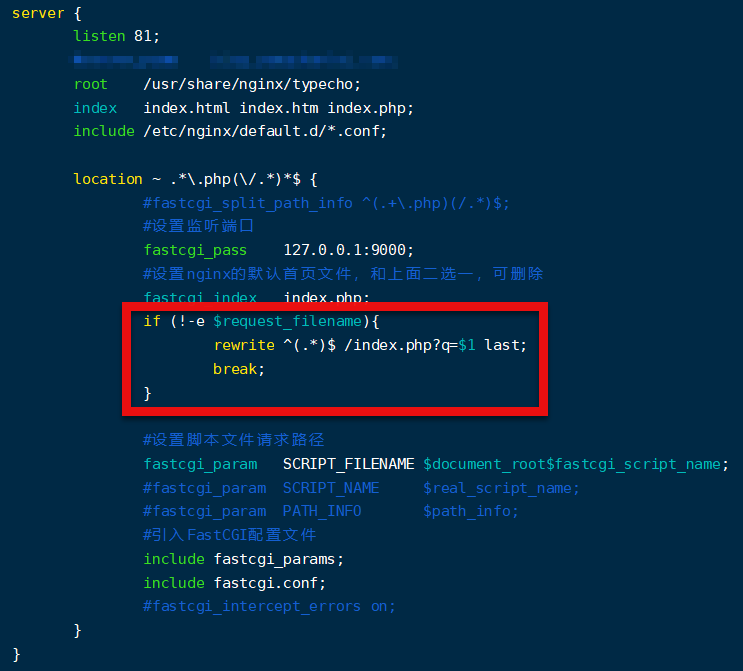
请输入图片描述

版权声明:本文为kimiyang123原创文章,遵循 CC 4.0 BY-SA 版权协议,转载请附上原文出处链接和本声明。
本文链接:https://blog.csdn.net/kimiyang123/article/details/106982980