



惯性聚合 高效追踪和阅读你感兴趣的博客、新闻、科技资讯
阅读原文 在惯性聚合中打开

推荐订阅源

www.infosecurity-magazine.com
Vercel News
Vercel News
G
Google Developers Blog
MyScale Blog
MyScale Blog
The Register - Security
I
InfoQ
Blog — PlanetScale
Blog — PlanetScale
D
DataBreaches.Net
Microsoft Security Blog
V
Visual Studio Blog
V2EX - 技术
V2EX - 技术
F
Fortinet All Blogs
博客园_首页
S
Secure Thoughts
GbyAI
GbyAI
S
Security Affairs
N
News | PayPal Newsroom
Forbes - Security
Forbes - Security
Recent Announcements
H
Hackread – Cybersecurity News, Data Breaches, AI and More
Security Archives - TechRepublic
宝玉的分享
宝玉的分享
Hugging Face - Blog
Hugging Face - Blog
Hacker News - Newest:
Hacker News - Newest: "LLM"
H
Heimdal Security Blog
A
About on SuperTechFans
P
Proofpoint News Feed
H
Help Net Security
Application and Cybersecurity Blog
Exploit-DB.com RSS Feed
Y
Y Combinator Blog
L
LINUX DO - 最新话题
Apple Machine Learning Research
L
LangChain Blog
博客园 - 叶小钗
A
Arctic Wolf
Cisco Talos Blog
Cisco Talos Blog
T
The Exploit Database - CXSecurity.com
人人都是产品经理
人人都是产品经理
T
Threat Research - Cisco Blogs
N
News and Events Feed by Topic
Security Latest
Security Latest
The Hacker News
The Hacker News
T
Tor Project blog
O
OpenAI News
博客园 - 三生石上(FineUI控件)
PCI Perspectives
PCI Perspectives
量子位
大猫的无限游戏
大猫的无限游戏
Stack Overflow Blog
Stack Overflow Blog

News on Xubuntu

Xubuntu – Xubuntu 26.04 Community Wallpaper Contest Winners Xubuntu – Xubuntu 26.04 Wallpaper Voting Open Xubuntu – Xubuntu Anniversary Wallpaper Contests Xubuntu – Public postmortem of the Xubuntu.org download compromise Xubuntu – Xubuntu 25.10 released! Xubuntu – Xubuntu 25.04 released! Xubuntu – Xubuntu 24.10 released! Xubuntu – Xubuntu 24.04 released! Xubuntu – Xubuntu 23.10 released! Xubuntu – Xubuntu 23.04 released! Xubuntu – Xubuntu 22.10 released! Xubuntu – Xubuntu 22.04 released! Xubuntu – Xubuntu 22.04 Community Wallpaper Contest Winners Xubuntu – Xubuntu 22.04 Community Wallpaper Contest Xubuntu – Xubuntu 21.04 released! Xubuntu – Xubuntu 21.04 Testing Week Xubuntu – Xubuntu 20.10 released! Xubuntu – Xubuntu is now on GitHub! Xubuntu – Xubuntu 20.04 released! Xubuntu – Xubuntu 20.04 Community Wallpaper Contest Winners Xubuntu – Xubuntu 20.04 Testing Week Xubuntu – Xubuntu 20.04 community wallpaper contest Xubuntu – Xubuntu 19.10 released! Xubuntu – Xubuntu 19.04 released! Xubuntu – Xubuntu 18.10 released! Xubuntu – Xubuntu 18.04.1 released! Xubuntu – Xubuntu 17.10 EOL Xubuntu – New Wiki pages for Testers Xubuntu – Xubuntu 18.04 released! Xubuntu – Xubuntu 18.04 Community Wallpaper Contest Winners! Xubuntu – Testing for Xubuntu Xubuntu – Xubuntu 18.04 community wallpaper contest Xubuntu – Xubuntu 17.10.1 Release Xubuntu – Xubuntu 17.04 End Of Life Xubuntu – Xubuntu 17.10 released! Xubuntu – Xubuntu Quality Assurance team is spreading out Xubuntu – Xubuntu 17.04 released! Xubuntu – Winners of the #lovexubuntu Competition! Xubuntu – Introducing the Xubuntu Council Xubuntu – Integrating releases to the website Xubuntu – Presenting the Xubuntu status tracker Xubuntu – Xubuntu 16.10 Released Intel cursor bug fix released Xubuntu – Xubuntu 16.04.1 Release Xubuntu – Looking for memorable and fun Xubuntu stories! Xubuntu – Xubuntu 16.04 released! Xubuntu – Xubuntu 16.04 Wallpaper Competition Winners! Xubuntu – The small details: Wallpapers Xubuntu – My media manager: Other alternatives Xubuntu – The small details: Panel layouts Xubuntu – My media manager: The cloud Xubuntu – The small details: Personal information integration Text editor and terminal color schemes Xubuntu – The small details: Shortcut keys Xubuntu – The small details: Menu editing Xubuntu – The small details: Theme configuration Xubuntu – The Small and the Noisy Xubuntu – Xubuntu 16.04 LTS Beta 2 Xubuntu – Introducing Xubuntu core Xubuntu – Xubuntu 12.04 End of Life Xubuntu – Xubuntu 15.04 released! Xubuntu – Xubuntu 15.04 Beta 2 Xubuntu – Xubuntu 15.04 Beta 1 Xubuntu – Xubuntu at Mexican collection agencies Xubuntu – Xubuntu 14.04.2 released Xubuntu – Help the Community with testing and win Xubuntu stickers Xubuntu – Xubuntu 14.10 released! Xubuntu – Xubuntu 14.10 Beta 2 is released! Xubuntu – Xubuntu 14.10 Beta 1 is released! Xubuntu – Using inxi to detect hardware information Fix available for the black screen on unlock bug Xubuntu – 5 Things to Do After Upgrading from 12.04 to 14.04 Xubuntu – Xubuntu 14.04.1 released Xubuntu – Xubuntu 14.04 QA Recap Xubuntu – Xubuntu 14.04 released! Xubuntu – Xubuntu 14.04 Final Beta Xubuntu – Xubuntu 14.04 Beta 1 Xubuntu – Xubuntu Marketing with StartUbuntu Flyer Xubuntu – Reporting is caring Xubuntu – Xubuntu 12.04.4 released Xubuntu – Xubuntu community wallpaper contest winners Xubuntu – Xubuntu 14.04 Alpha 2 Xubuntu – Xubuntu 14.04 Alpha 1 Xubuntu – Help us test Xubuntu 14.04 LTS Xubuntu – Xubuntu 14.04 Default Wallpapers Xubuntu – Xubuntu Natty Artwork Xubuntu – Xubuntu 11.04 alpha 2 released Xubuntu – Xubuntu 11.04 alpha 1 released Xubuntu – Xubuntu 10.10 released Xubuntu – Xubuntu 10.10 RC released Xubuntu – Xubuntu 10.10 alpha 3 released Xubuntu – Xubuntu 9.10 RC released Xubuntu – Xubuntu 9.10 beta released Xubuntu – Free Xubuntu CDs now available Xubuntu – Xubuntu 9.04 Released Xubuntu – Countdown to Xubuntu 9.04 Xubuntu – Xubuntu 9.04 beta released Xubuntu – Xubuntu 8.10 released Xubuntu – Xubuntu 8.10 Release Candidate now available Xubuntu – Countdown to Xubuntu 8.10
Xubuntu – Screen locking in Xubuntu 14.04
2014-05-19 · via News on Xubuntu

Improving screenlocking (or: sessionlocking) has been on our agenda for a few cycles now. We’ve used the old and proven XScreensaver for a few releases, but people have always complained about its antiquated looks (which are also not customizable). Switching to gnome-screensaver wasn’t an option because of the additional package dependencies. Furthermore, after gnome-screensaver 3.6, locking became more tightly integrated into Gnome-Shell, which is why Ubuntu/Unity kept version 3.6 and has maintained it for a few releases now.

Starting with 14.04, Ubuntu/Unity have switched to a new solution for locking, and so have we.
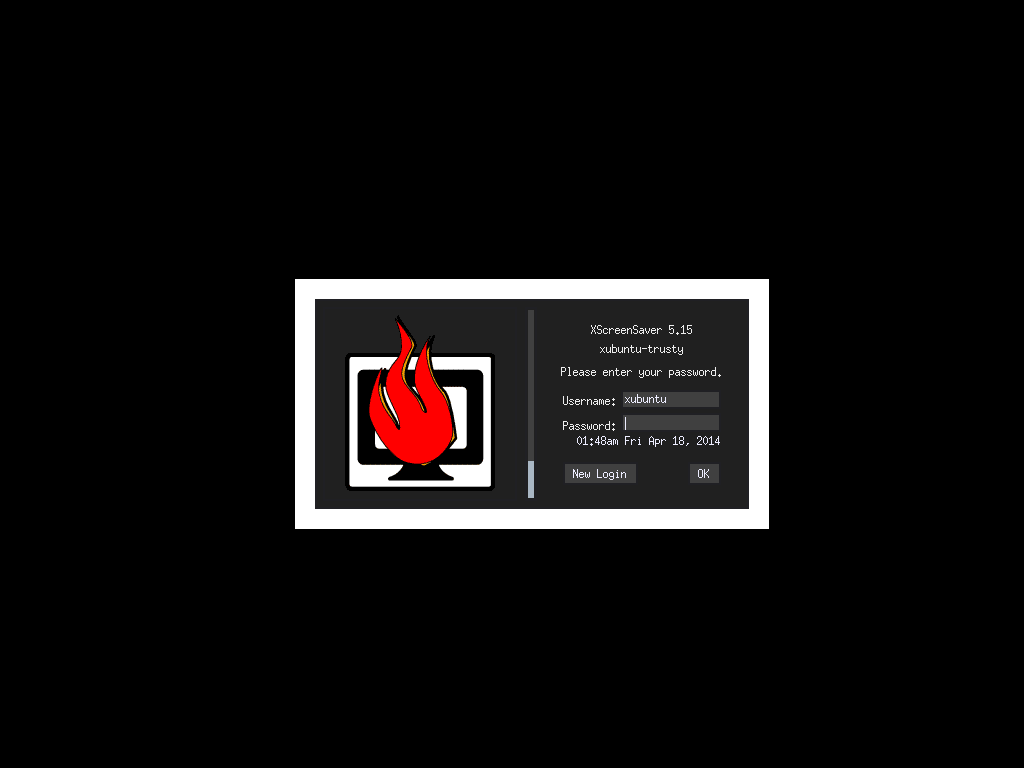
Lockscreen: xscreensaver
Lockscreen: xscreensaver

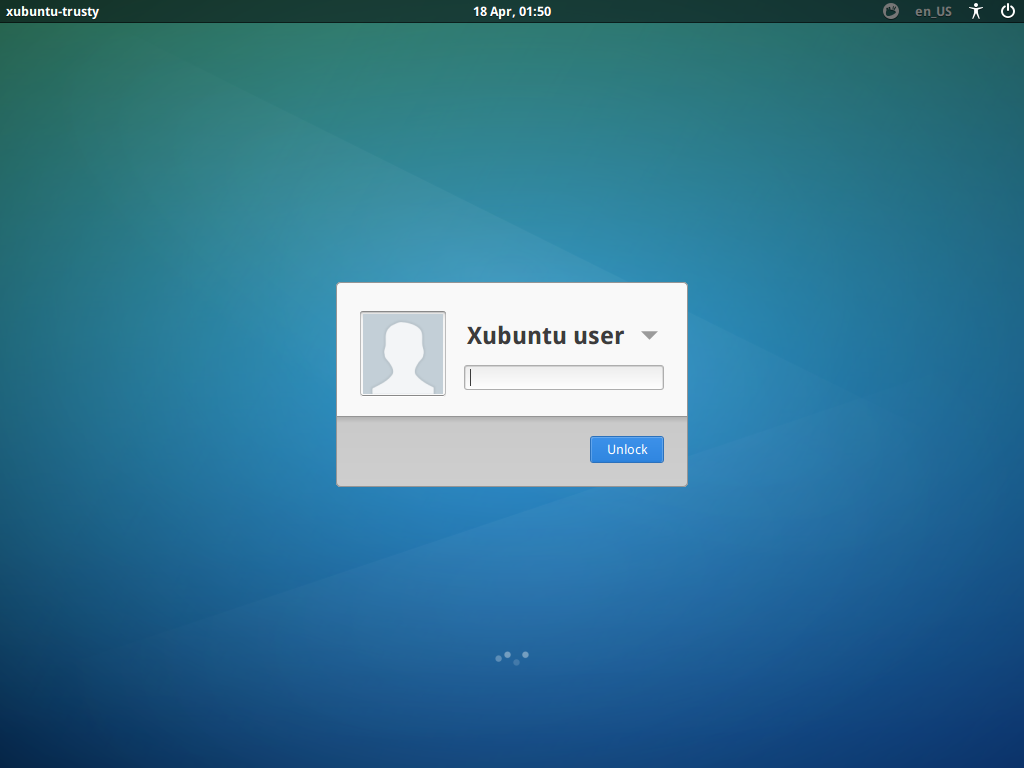
Lockscreen: light-locker

Lockscreen: light-locker

The solution Xubuntu uses in 14.04 is called light-locker. The light-locker project is a fork of gnome-screensaver 3.6, but cut down to a bare minimum (so no gnome-dependencies), using LightDM’s greeter as the lock (and unlock) screen.

How does the screenlocking work?

There aren’t too many changes for users. The light-locker process operates in the background and people can still lock their session in the ways they used to (e.g. through Whiskermenu’s lock launcher or through a keyboard shortcut invoking “xflock4”).

Settings are configurable via a settings dialog developed for Xubuntu 14.04, called Light Locker Settings. The tool can be found in the the Settings Manager. It allows you to configure whether your session should be locked automatically after a timeout and the screen-blank and off times. The dialog is still, for the moment, basic, but it should allow you enough control. Refinements are planned for future cycles/releases.

One thing that changes for users is the fact that locking with LightDM means that a new virtual terminal is opened. In a default single-user session, the user’s X session rests at VT7 (reachable with the keyboard-shortcut Ctrl+Alt+F7). When you lock your session, LightDM sends a lock signal, light-locker locks the session on VT7 and you get forwarded to VT8, where you’re presented with the login greeter, which serves as the unlock dialog.

The aforementioned change introduces one inconvenience you might (or might not) notice: when light-locker switches the VT, there is some screenflickering and it could take a second or two on older machines.

What happened to my music playback?

As your seat becomes inactive, your audio stream is stopped/paused until you log into your session again. This is one of the known issues of light-locker or locking with LightDM in general.

Currently, when locking, it is assumed you are either:

  1. in a public space of sorts (the desktop at home hardly needs locking) and have walked away from the machine
  2. using a system with more than one user

Stopping/pausing playback in both of these scenarios make sense.

However, this might be an annoying change for users used to having their music playback continue even when their session locks. If you don’t like this behavior, there are basically two solutions:

  1. Set light-locker to lock the session “When the screensaver is deactivated”
  2. Switch back to using xscreensaver
  3. Add your user to the “audio” group on your computer and music playback will continue also with light-locker

The first option is a good workaround, because it means that your audio-playback will continue when the screen has been blanked. However, when you wake up your computer, e.g. by touching the mouse, it will pause the music until you log into your session again. The third solution is mentioned last, because it isn’t advised to add your user to the “audio” group (read The Audio Group wiki page for a comprehensive explanation). However, as long as you’re on a single-user system, this might still be an option for you.

Can I have a screensaver other than the blank screen with light-locker?

In a word – no.

If you need a screensaver for whatever reason, perhaps using a TV for a monitor and don’t want a blank screen, then you will need to remove light-locker and install some alternative, like xscreensaver.

Conclusion

From Xubuntu 14.04 on, we can finally provide a visually consistent way of logging in to and locking your session with light-locker. As mentioned above, there is a conceptual change in how we look at locking in Xubuntu (which to some might seem like a small regression), however, there are still good alternatives for those who don’t agree with our vision.

Known Issues

Currently, you might run into this known issue (that we discovered only when the release was already imminent), which we’re already working on fixing:

  1. Xfce4 Power Manager does not restore screen power (1259339) – see the release notes for details and workarounds

Also, upgraders from previous Xubuntu versions might run into trouble because XScreensaver and light-locker are both installed. Just get rid of one of the two to resolve that.