



惯性聚合 高效追踪和阅读你感兴趣的博客、新闻、科技资讯
阅读原文 在惯性聚合中打开

推荐订阅源

Martin Fowler
Martin Fowler
CTFtime.org: upcoming CTF events
A
About on SuperTechFans
Apple Machine Learning Research
The Register - Security
Vercel News
Vercel News
H
Hackread – Cybersecurity News, Data Breaches, AI and More
人人都是产品经理
人人都是产品经理
MyScale Blog
MyScale Blog
云风的 BLOG
云风的 BLOG
博客园_首页
U
Unit 42
T
Tailwind CSS Blog
G
GRAHAM CLULEY
F
Full Disclosure
V
Vulnerabilities – Threatpost
T
Tenable Blog
月光博客
月光博客
P
Privacy & Cybersecurity Law Blog
P
Privacy International News Feed
K
Kaspersky official blog
Scott Helme
Scott Helme
cs.AI updates on arXiv.org
N
News and Events Feed by Topic
T
The Exploit Database - CXSecurity.com
N
News and Events Feed by Topic
有赞技术团队
有赞技术团队
Recent Commits to openclaw:main
L
LINUX DO - 最新话题
Recorded Future
Recorded Future
Application and Cybersecurity Blog
Help Net Security
Help Net Security
The GitHub Blog
The GitHub Blog
Cisco Talos Blog
Cisco Talos Blog
SecWiki News
SecWiki News
P
Proofpoint News Feed
Security Latest
Security Latest
cs.CL updates on arXiv.org
罗磊的独立博客
S
Security Affairs
M
MIT News - Artificial intelligence
L
LINUX DO - 热门话题
美团技术团队
Simon Willison's Weblog
T
Threat Research - Cisco Blogs
Stack Overflow Blog
Stack Overflow Blog
Forbes - Security
Forbes - Security
Hugging Face - Blog
Hugging Face - Blog
博客园 - Franky
V
Visual Studio Blog

Blanboom

移动端 SSH + CLI Coding Agent 的实践与体验优化 HEIF & HEVC 转换器 1.0 发布:压缩 iOS 照片库,释放存储空间 一个 UniFi IPv6 问题的定位与解决 通过自定义 Prompts,让 Readwise Reader 为文章优化标题、添加中文摘要 通过 Waydroid 自动备份 NAS 照片到 Google Photos AirTerminal 2.2:Telnet 服务器、自动重连 将 Logseq 的昨日待办事项自动转移到今天 一次使用 ChatGPT 帮助我学习 L4S 的尝试 AirTerminal 2.0:支持连接多个蓝牙设备
AirTerminal 2.1:自定义字体、颜色主题、退格键映射
2023-10-18 · via Blanboom

AirTerminal 是一个用于 iPhone、iPad 和 Apple Silicon Mac 的蓝牙终端 App,同时支持 XMODEM 文件传输、日志记录等功能,可在 App Store 下载。

AirTerminal 2.1 根据用户的反馈,增加了几个新功能,包括自定义字体、颜色主题、退格键映射等。

自定义字体

旧版本的 AirTerminal 只支持 Menlo、Courier New 两款系统自带字体。在 AirTerminal 2.1 中,用户可以选择自己安装的仁义等宽字体。

由于 iOS 系统的限制,安装字体的方式比较麻烦,需要依赖第三方 App。推荐使用 Adobe Creative Cloud,软件中内置了大量来自 Adobe 和 Google 字体,其中著名的编程字体 Source Code Pro,就可以在这款 App 中找到。

AirTerminal 只支持等宽字体。为了确保安装的字体在 AirTerminal 中可以,建议在使用 Adobe Creative Cloud 时,过滤只显示等宽字体:
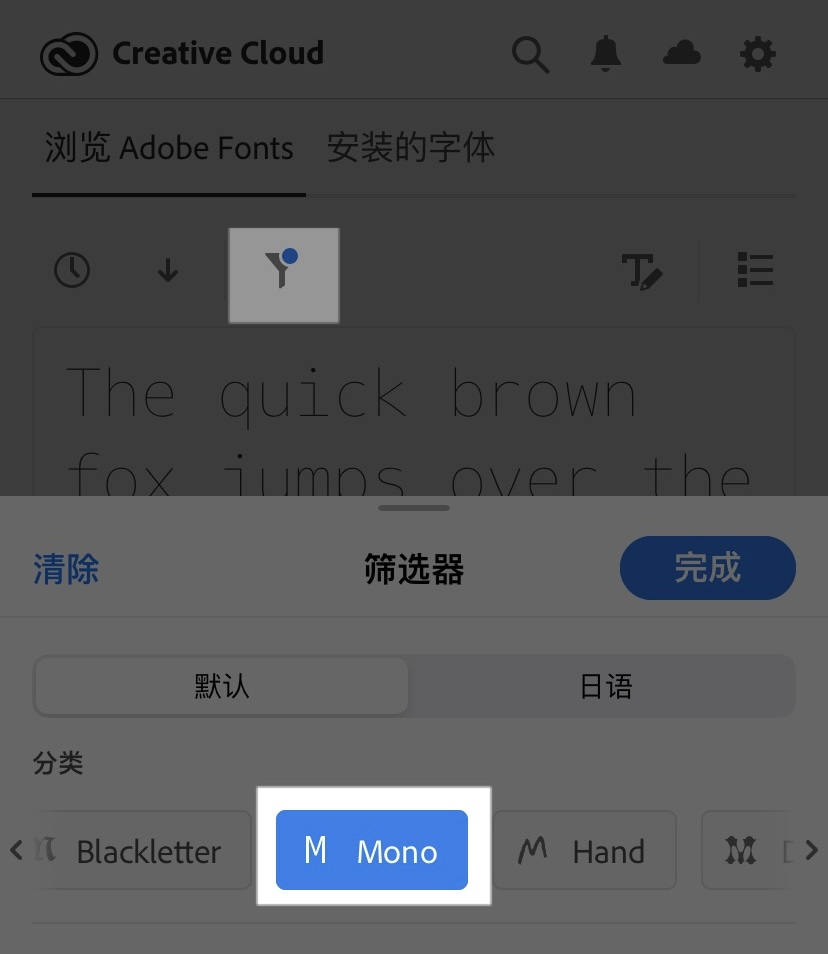
在 Adobe Creative Cloud 中,可选择「筛选器」,然后选择「Mono」,来过滤等宽字体

如果 Adobe Creative Cloud 中没有自己需要的字体,还可以使用 FontcaseiFont 等工具,安装自己在网上下载的任意字体。具体操作步骤可参考如下视频:

颜色主题

在 AirTerminal 2.1 中,我添加了如下六款颜色主题:

这些颜色主题是根据自己的喜好添加的。如果有其他喜欢的主题(可在 iterm2colorschemes.com 查找),请通过此链接 反馈到 GitHub Issue 中,我会在后续版本添加。

退格键映射

当按下退格键时,AirTerminal 默认发送 Ctrl-?,也就是 ASCII 码 127。但根据用户反馈,部分设备不支持将 Ctrl-? 做为退格键,而是使用了 Ctrl-H。

于是我开始调研其他类似的工具是如何解决这个问题的。我看到了在 PuTTY 中,用户可以自定义退格键发送的字符:
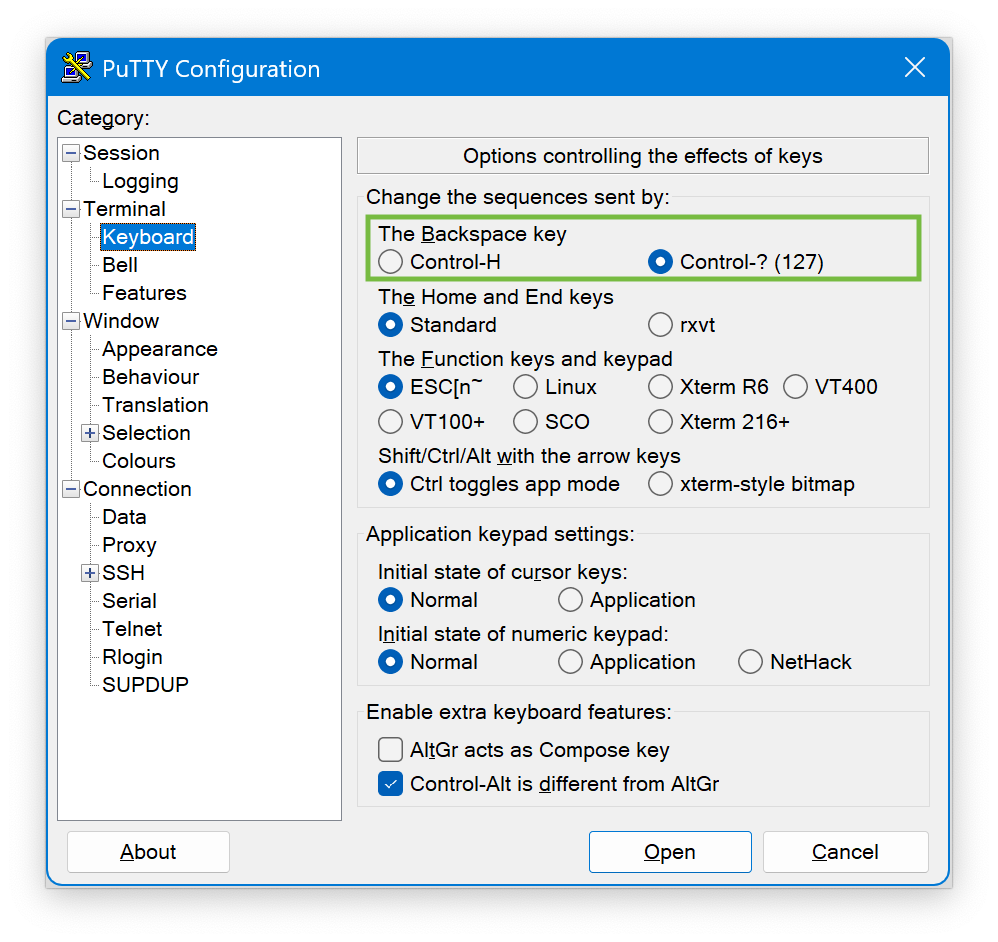
PuTTY 中退格键的设置,可自定义退格键发送的字符

所以,在 AirTerminal 2.1 中,我也增加了相同的功能。用户可以针对不同的蓝牙设备,设置不同的退格键发送字符。

更多

AirTerminal 2.1 还增加了对 Dark Mode、CJK 字符的初步支持。相关功能目前还不是特别完善,欢迎体验并反馈问题。

为了更方便地收集和跟踪问题,我创建了一个 GitHub Repo。如果在使用 AirTerminal 的过程中遇到问题,欢迎通过如下链接反馈:


备注:

  • 题图来源:使用 DALL·E 3 生成