惯性聚合 高效追踪和阅读你感兴趣的博客、新闻、科技资讯
阅读原文 在惯性聚合中打开

推荐订阅源

T
Threat Research - Cisco Blogs
V
V2EX
爱范儿
爱范儿
Martin Fowler
Martin Fowler
T
The Blog of Author Tim Ferriss
Cyber Security Advisories - MS-ISAC
C
Check Point Blog
罗磊的独立博客
A
About on SuperTechFans
MyScale Blog
MyScale Blog
S
Security @ Cisco Blogs
博客园 - 聂微东
Simon Willison's Weblog
Cyberwarzone
Cyberwarzone
云风的 BLOG
云风的 BLOG
U
Unit 42
Latest news
Latest news
Apple Machine Learning Research
Security Latest
Security Latest
Y
Y Combinator Blog
cs.CL updates on arXiv.org
The Hacker News
The Hacker News
C
Cyber Attacks, Cyber Crime and Cyber Security
Cisco Talos Blog
Cisco Talos Blog
AWS News Blog
AWS News Blog
NISL@THU
NISL@THU
美团技术团队
S
Securelist
P
Privacy International News Feed
T
Tenable Blog
酷 壳 – CoolShell
酷 壳 – CoolShell
人人都是产品经理
人人都是产品经理
S
SegmentFault 最新的问题
Hugging Face - Blog
Hugging Face - Blog
cs.CV updates on arXiv.org
K
Kaspersky official blog
Google Online Security Blog
cs.AI updates on arXiv.org
www.infosecurity-magazine.com
D
Darknet – Hacking Tools, Hacker News & Cyber Security
B
Blog RSS Feed
W
WeLiveSecurity
A
Arctic Wolf
Hacker News - Newest:
Hacker News - Newest: "LLM"
Google DeepMind News
让小产品的独立变现更简单 - ezindie.com
Recent Commits to openclaw:main
N
Netflix TechBlog - Medium
有赞技术团队
有赞技术团队
V2EX - 技术
V2EX - 技术

Keenwon's Blog

Mac 安装 Ollama 和 Open WebUI 快速排序第 N 趟的可能结果 - Keenwon's Blog ubuntu crontab 定时执行 node 程序 Node.js SEA - Keenwon's Blog 基于 Web Vitals 的前端性能优化实践 - Keenwon's Blog CSS 奇技淫巧 —— 绝对居中布局 - Keenwon's Blog Fresh 快速入门 - Keenwon's Blog Islands Architecture - Keenwon's Blog Awesome Command-line Utilities - Keenwon's Blog
PVE 动态分配虚拟机的内存 - Keenwon's Blog
semanwmj@gma · 2024-09-06 · via Keenwon's Blog

今年 6 月的时候,买了个小主机(极摩客 M5 锐龙R7 5700U),用起来非常爽。很多工具和软件都部署在了小主机上,WSL2 也弃用了,现在都是使用 VSCode 远程开发,感觉我这台台式机还能再多战几年了。

不过使用的过程中也发现一些问题,比如 pve 的内存升上去就降不下来了,虽然说没太大影响,但我看着非常别扭。我并没有完整的看过 pve 的文档,先入为主的认为内存是动态管理的,一番检索下来发现并不是这么回事儿,还是要自己配置一番的。

启用动态内存#

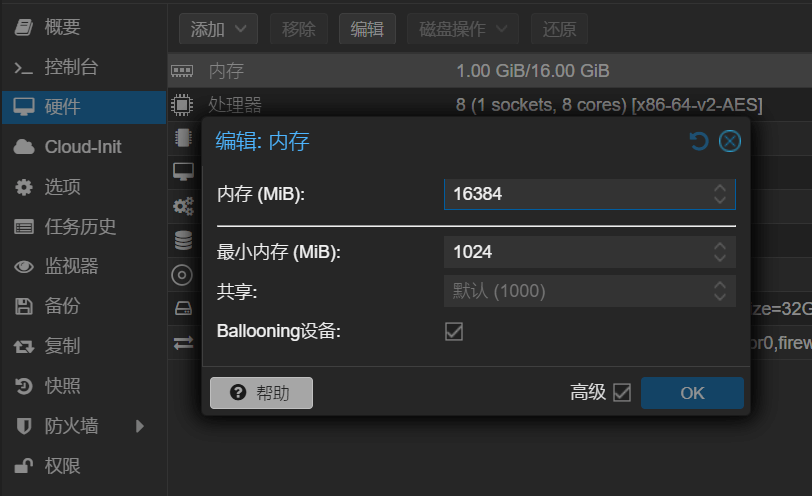
打开「虚拟机 - 硬件 - 内存」,展开高级配置,设置最大、最小内存,选上 Ballooning 设备
安装并配置 QEMU Guest Agent#

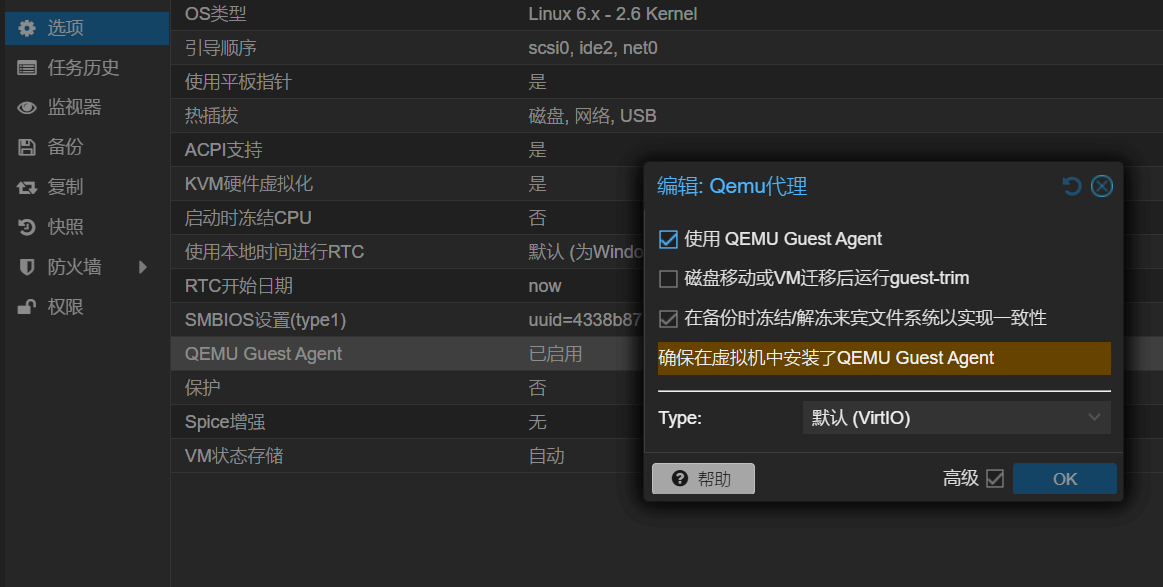
打开「虚拟机 - 选项」,开启「QEMU Guest Agent」

有可能需要关闭虚拟机操作,我是关闭操作,再开机安装 qemu-guest-agent

进入虚拟安装 qemu-guest-agent

# 安装
apt install qemu-guest-agent

# 启动
systemctl start qemu-guest-agent

# 设置开机自动运行
systemctl enable qemu-guest-agent

安装完成后可在「概要页」看到虚拟机的 IPs,「选项页」也能看到 QEMU Guest Agent 的状态是「已启用」。

参考#