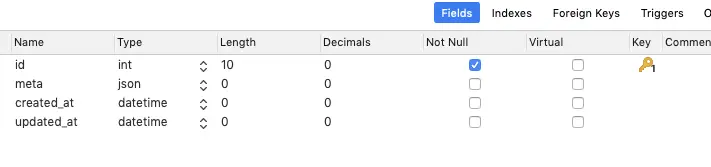
MySQL5.7.8 起支持定义JSON类型
这里已经建了一张表,叫 my_json,注意 meta 是 json 类型
建立相关的模型
<?php
namespace Modules\Models;

use Illuminate\Database\Eloquent\Model;

class MyJson extends Model
{

    public $table = 'my_json';


    public $fillable = [
         'meta'
    ];

    /**
     * The attributes that should be casted to native types.
     *
     * @var  array
     */
    protected $casts = [
        'id'             => 'number',
        'meta'           => 'array',
    ];
}
操作
// 新增
$model = new MyJson();
$model->meta =['name' => 'jack', 'age' => 18];
$model->save();

// 更新
$result = MyJson::query()
  ->where('id', 1)
  ->update(['meta->name' => 'lily', 'meta->age' => 28]);


//  可以插入复杂些的内容
$model = new MyJson();
$model->meta =[
   'deviceInfo' => [
          [
            'name' => '消防栓',
            'fields' => [
                ['id' => 1, 'type' => '1', 'label' => '消火栓箱体外观无破损现象'],
                ['id' => 2, 'type' => '2', 'label' => '消火栓箱箱门正面有标志牌,标注“消火栓”字样'],
                ['id' => 3, 'type' => '1', 'label' => '消火栓箱门开启角度可大于160度']
            ]
          ],
          [
            'name' => '灭火器',
            'fields' => [
                ['id' => 1, 'type' => '1', 'label' => '灭火器外观无破损现象'],
                ['id' => 2, 'type' => '2', 'label' => '灭火器正面有标志牌'],
            ]
          ]
        ]
      ];
$model->save();

// 当然更新时候会稍微麻烦些
$model = MyJson::query()->find(4);
$tmp = $model->meta;
$tmp['deviceInfo'][0]['name'] = 'll';
$model->meta = $tmp;
$model->save();
$result = MyJson::query()->find(4)->meta;
存到数据库里会自动转为JSON
总结:使用 Laravel 操作 MySQL 的 json类型还是很方便的,主要是建立表时要考虑好
https://www.cnblogs.com/wshenjin/p/10276678.htmlhttps://learnku.com/laravel/t/13185/in-depth-understanding-of-json-data-type-of-mysql-nosql-in-relational-database
此内容由惯性聚合(RSS阅读器)自动聚合整理,仅供阅读参考。 原文来自 — 版权归原作者所有。