



POML 是微软团队开源的一款管理 prompt 的工具,下面一起来探索下使用方式。
POML(Prompt Orchestration Markup Language),提示词编排标记语言,使用 .poml 扩展名的文件来定义。主要特点如下:
<role>、<task>、<output-format> 等;<poml>
<role>You are a patient teacher explaining concepts to a 10-year-old.</role>
<task>Explain the concept of photosynthesis using the provided image as a reference.</task>
<output-format>
Keep the explanation simple, engaging, and under 100 words.
Start with "Hey there, future scientist!".
</output-format>
</poml>
<stylesheet> 定义或内联属性修改样式;{{ }} )、循环( for )、条件( if )和变量定义( <let> ),用于动态生成复杂的数据驱动提示;对于前端开发来说,POML 的语法看起来相当简单,毕竟熟悉了 HTML、React 这类标签语法,所以使用 POML 只需要学习内部定义的一些标签的名称即可。
在 POML 的 Components 这篇文档中定义了所有 POML 支持的标签名称,常见的有以下这些:
poml 主要用于提示符的根元素,也可以在其他位置使用。如果第一个元素是纯文本内容,则将添加<poml syntax="text">;如果第一个元素是POML 组件,则自动在顶层添加 <poml syntax="markdown">。<poml>标签可以设置以下属性:
syntax:值可以是 markdown, html, json, yaml, xml, text;speaker:当前内容的角色,可以是 human, ai, system;className:定义 markdown 渲染的样式;tokenLimit:限制 prompt 的 token 数量,有些 LLM 有输入限制,超出限制则会被截断;charLimit:内容字符长度限制;priority:token 限制是从父级向下应用的——先处理子节点的限制/优先级,再按 priority(优先级)排序、删除低优先级内容,最后再对剩下的内容进行截断。也就是说,你可以在 <poml tokenLimit="N"> 上控制整个块的 token 预算,并用 priority 控制哪些子节点先保留。<role>标签定义 AI 角色,可以使用caption定义role标签渲染的 markdown title 的文本,默认显示为 Role,示例如下:
<role>You are a Senior Front end Engineer</role>
<task> 表示希望语言模型执行的操作。<task> 通常是简洁明了的陈述,还可以包括完成任务的步骤或说明列表。
<task>Cook a recipe on how to prepare a beef dish.</task>
<output-format>标签表示输出格式,可以是特定格式,例如 JSON,XML 或 CSV,或者是 story,图表或指令的步骤等通用格式,但是不要指定 PDF 或者视频。示例:
<output-format>Respond with a JSON without additional characters or punctuations.</output-format>
h 或者 <header> 用来定义标题。
<h syntax="markdown">Section Title</h>
<p>标签用于定义段落。
<p>Contents of the paragraph.</p>
<b>标签用于定义加粗文本。
<p><b>Task:</b> Do something.</p>
<cp> 表示 CaptionedParagraph,也就是标题段落,用来定义一个带标题的段落,这样就可以把其他元素包含进去。示例:
<cp caption="USER REQUEST">
  <div whiteSpace="pre">
  {{ prompt }}
  </div>
</cp>
<list> 和 <item> 标签在一起配合使用,用来定义列表,比如程序的功能模块,AI 处理步骤等;可以使用 listStyle 属性来设置列表在 markdown 渲染的样式,可以设置为 star, dash, plus, decimal, latin。示例:
<list listStyle="decimal">
  <item>Item 1</item>
  <item>Item 2</item>
</list>
<list> 和 <item> 可以嵌套使用,并且通常放在 <cp> 内部使用,例如:
<cp caption="PROCEDURE (MUST follow strictly)">
<list listStyle="latin">
  <item>
    <b>Clarify Scope</b>
    <list listStyle="dash">
      <item>Restate the objective in your own words; if unclear, ask one concise question.</item>
      <item>Sketch a high-level plan of how to meet the objective.</item>
    </list>
  </item>
  <item>
    <b>Locate exact code edit point</b>
    <list listStyle="dash">
      <item>Work <b>only</b> inside the given code files.</item>
      <item>Quote the <b>smallest</b> relevant snippet (line numbers) you need to change.</item>
    </list>
  </item>
</list>
</cp>
<code>用于定义行内或者代码块。示例:
行内代码
<code inline="true">const x = 42;</code>

代码块
<code lang="javascript">
const x = 42;
</code>
<obj> 表示对象内容或者 JSON。
<Object syntax="json" data="{ key: 'value' }" />
<table> 用来定义表格数据或者 excel。
<table records="{{[{ name: 'Alice', age: 20 }, { name: 'Bob', age: 30 }]}}" />

excel

<table src="data.xlsx" parser="excel" maxRecords="10" syntax="csv" />
<document> 表示 PDF,TXT 或 DOCX 之类的外部文档,使用 multimedia 属性表示是否为多媒体。
<Document src="sample.docx" multimedia="false"/>
<webpage> 表示展示网页内容,可以使用 selector 属性来定义一个 CSS 选择器,用于从页面中提取特定内容显示。
<webpage url="https://example.com" selector="main article" />
<img> 表示图像。可以使用 maxWidth、maxHeight、resize 来定义图片的尺寸。
<img src="path/to/image.jpg" alt="Image description" position="bottom" />
audio标签用于输入音频,可使用src或者base64属性来定义文件链接,如果定义src,那么文件会被转换成base64。示例:
<Audio src="path/to/audio.mp3" />

或

<Audio src="data:audio/mpeg;base64,[data]" />
<example>标签用于提供示例上下文,帮助模型了解预期的输入和输出。一般和 <input> 和 <output> 一起使用,<input> 用来定义输入内容,<output> 定义示例问题的输出。示例:
<example>
  <input>What is the capital of France?</input>
  <output>Paris</output>
</example>
VS Code POML 扩展 能够帮助开发者在 VSCode 内使用 POML 语法编辑 prompt,该扩展主要包含以下功能:
.poml 后缀文件内编辑时提供 POML 语法提示;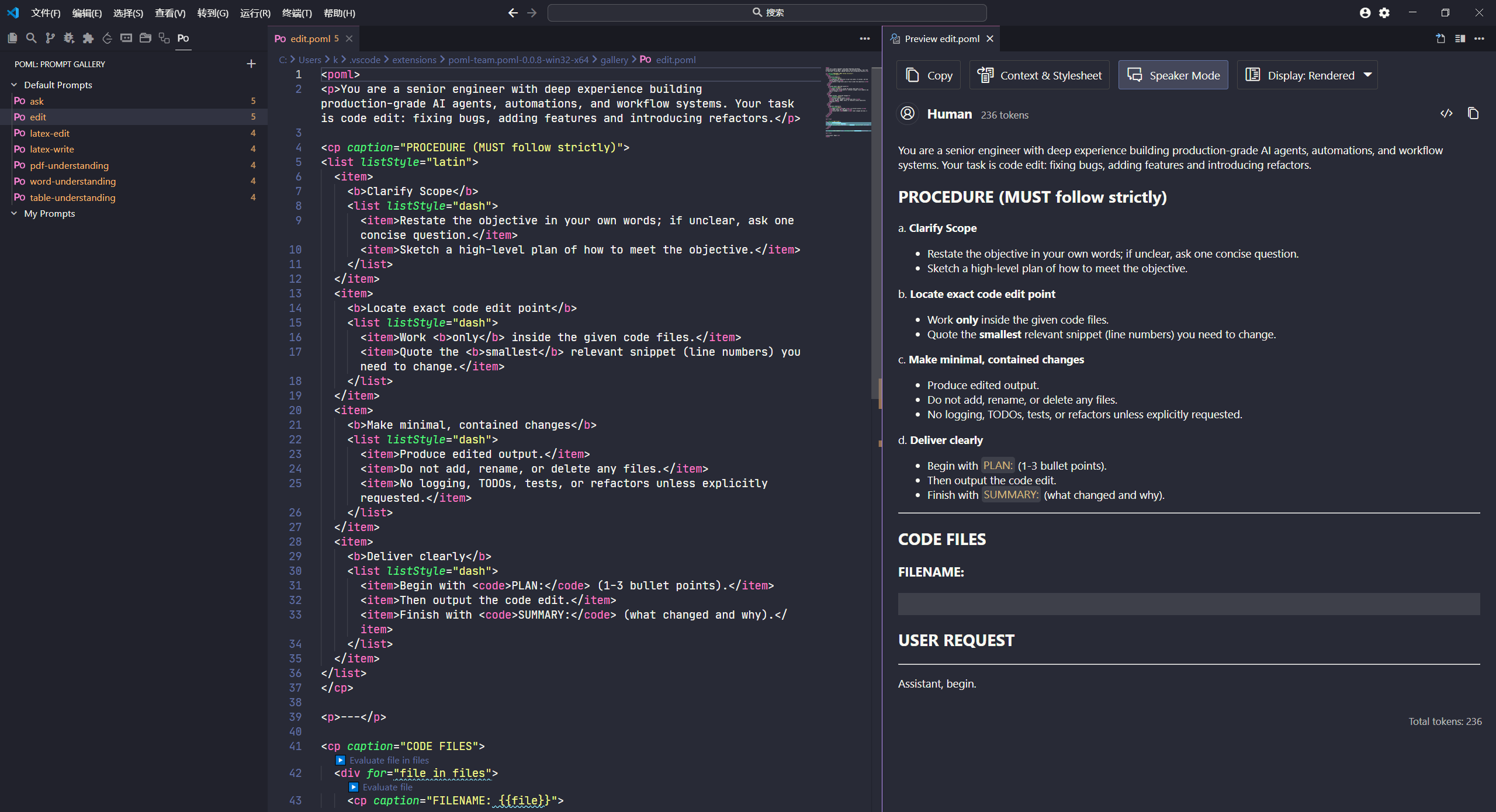
pomljs 是 POML 提供的 TypeScript SDK,其内部包含:
read 和 write 方法来读取和渲染 JSX 编写的 Prompt。备注
0.0.8 版本及以下的 pomljs 存在组件和类型定义导出声明的问题,目前不建议使用。
此内容由惯性聚合(RSS阅读器)自动聚合整理,仅供阅读参考。 原文来自 — 版权归原作者所有。