


惯性聚合 高效追踪和阅读你感兴趣的博客、新闻、科技资讯
阅读原文 在惯性聚合中打开

推荐订阅源

aimingoo的专栏
aimingoo的专栏
宝玉的分享
宝玉的分享
博客园 - 【当耐特】
博客园 - 司徒正美
L
LangChain Blog
有赞技术团队
有赞技术团队
大猫的无限游戏
大猫的无限游戏
Stack Overflow Blog
Stack Overflow Blog
Engineering at Meta
Engineering at Meta
U
Unit 42
Microsoft Azure Blog
I
InfoQ
博客园 - 叶小钗
H
Hackread – Cybersecurity News, Data Breaches, AI and More
J
Java Code Geeks
月光博客
月光博客
量子位
让小产品的独立变现更简单 - ezindie.com
博客园_首页
Last Week in AI
Last Week in AI
人人都是产品经理
人人都是产品经理
Google DeepMind News
云风的 BLOG
云风的 BLOG
D
DataBreaches.Net

皓子的小站

网站字体应用之坑——font-family 篇 糟糕的 meta name="theme-color" How to Automatically Track Newly Supported ESLint Rules in Oxlint How to Gradually Migrate from ESLint to Oxlint (Without Breaking Everything) 静态资源预压缩:零运行时开销,极致节省带宽 CVE-2025-70886 Proof of Concept (PoC) | A Script to Crash Halo CMS Comment Backend 自定义网页鼠标指针——一段曲折的旅程 CVE-2025-70886 漏洞复现/PoC | 一个脚本让 Halo CMS 评论后台瘫痪 2025 年终总结 & 博客两周年 老用户专享!已有 Halo 专业版授权可免费升级商业版 自动追踪 Oxlint 对 ESLint 规则的新增支持 Halo 贡献者证书与实体周边盲盒开箱 博客评论系统指南 CDN 回源跟随配置导致登录异常问题排查 SCDN 免费赞助计划:助力高质量博客&博客圈 锐捷校园网:网络共享与带宽叠加方案(哈理工案例) ESLint 到 Oxlint 渐进式迁移快速上手指南 Fixing Vite Breaking Inline JS & CSS in Thymeleaf Templates 解决 Vite 破坏 Thymeleaf 模板内联 JS & CSS 的方法 我的博客,为什么是月更? 博客俱乐部一周年纪念品开箱 网站字体加载之坑——format 篇 经历 1000000000 次 DDoS 请求攻击后,我总结了三条经验 题解分享:[AtCoder Beginner Contest 414 E] Count A%B=C 题解分享:[蓝桥杯 2025 国 Python A] 杨辉三角 P12876 FiF口语训练破解刷分教程(适用于 Windows) 不要与蠢人辩论 小心网络地雷·续篇 当心网络组织“开往”·续篇 当心网络组织“开往”
Fixing docker pull image "ghcr.io..." Unauthori...
HowieHz · 2024-11-19 · via 皓子的小站

此文章有中文版本/This article is available in Chinese

Phenomenon

Error screenshot related to docker pull image GHCR unauthorized error

Solution

Everything went smoothly during the initial build, but when I started writing a tutorial, I encountered repeated Unauthorized errors while pulling the image.

URL to Adjust Settings

https://github.com/orgs/[XXX]/packages/container/[YYY]/settings

Replace [XXX] with your GitHub username and [YYY] with the project name.
For instance, after forking, my repository became HowieHz/umami. So, I accessed the following URL:
https://github.com/orgs/HowieHz/packages/container/umami/settings

Adjusting Settings

  1. Navigate to the settings page using the URL constructed above.
  2. Enter the project name in the designated field.
  3. Click the red button to save changes.

Once the settings are updated, you'll be able to pull the image successfully without encountering the error.
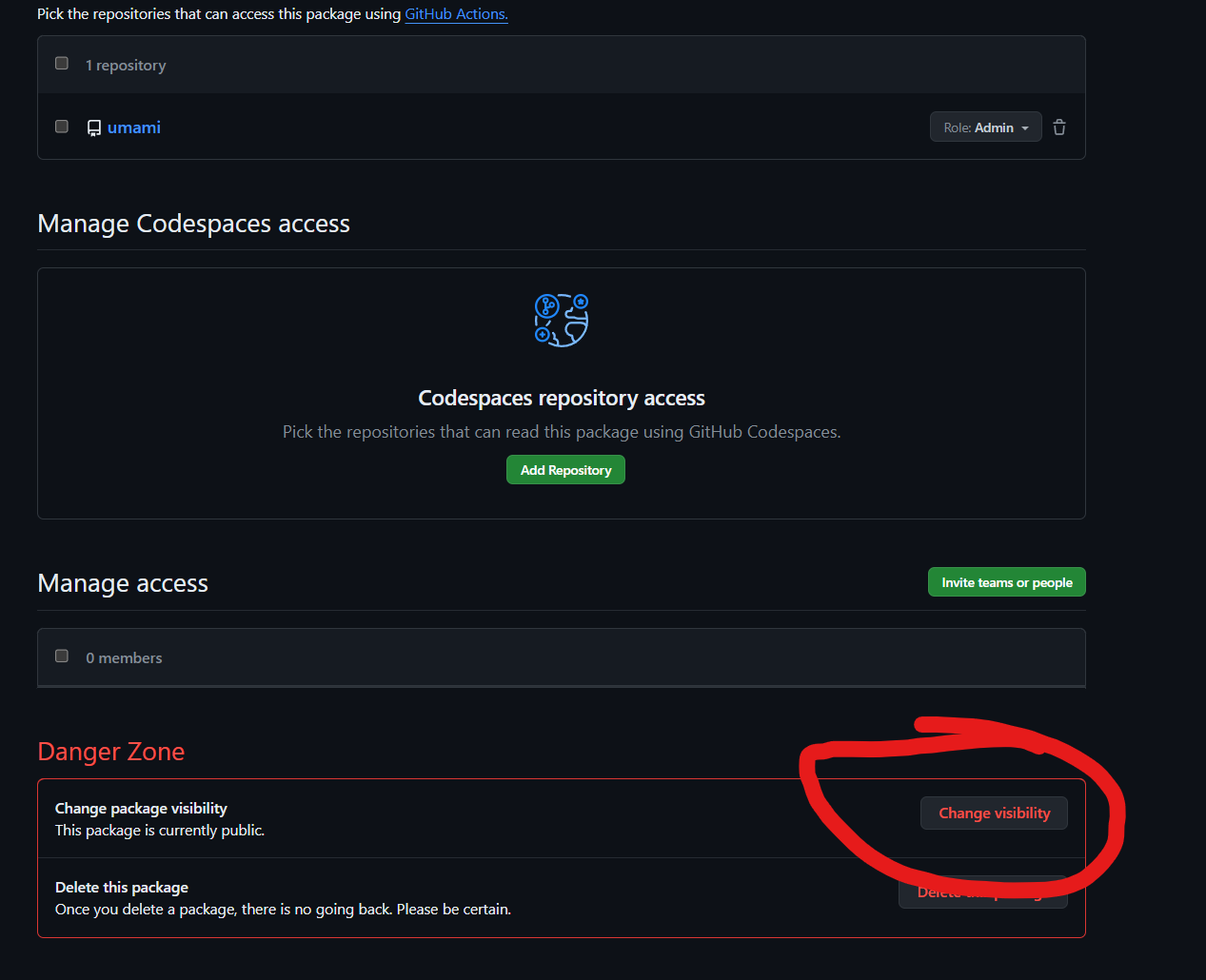
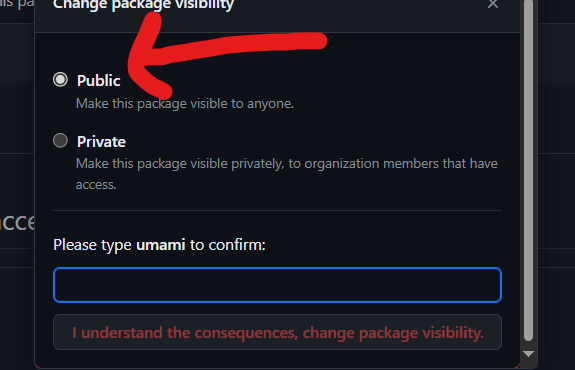
Step-by-step screenshots of the solution
Additional steps for resolving the issue

To make searching easier, this article and the one linked above were extracted from the following article:
Addressing the Umami Active API Latency Issue