惯性聚合 高效追踪和阅读你感兴趣的博客、新闻、科技资讯
阅读原文 在惯性聚合中打开

推荐订阅源

V
Visual Studio Blog
C
Cisco Blogs
Help Net Security
Help Net Security
D
Darknet – Hacking Tools, Hacker News & Cyber Security
Scott Helme
Scott Helme
Cyber Security Advisories - MS-ISAC
M
MIT News - Artificial intelligence
L
LINUX DO - 热门话题
I
InfoQ
GbyAI
GbyAI
NISL@THU
NISL@THU
Exploit-DB.com RSS Feed
Engineering at Meta
Engineering at Meta
H
Hackread – Cybersecurity News, Data Breaches, AI and More
TaoSecurity Blog
TaoSecurity Blog
Simon Willison's Weblog
A
About on SuperTechFans
Spread Privacy
Spread Privacy
月光博客
月光博客
W
WeLiveSecurity
AWS News Blog
AWS News Blog
云风的 BLOG
云风的 BLOG
有赞技术团队
有赞技术团队
Security Latest
Security Latest
人人都是产品经理
人人都是产品经理
PCI Perspectives
PCI Perspectives
Recent Commits to openclaw:main
Microsoft Azure Blog
Hugging Face - Blog
Hugging Face - Blog
S
SegmentFault 最新的问题
T
Troy Hunt's Blog
Martin Fowler
Martin Fowler
The Hacker News
The Hacker News
T
Tor Project blog
C
CERT Recently Published Vulnerability Notes
Apple Machine Learning Research
Stack Overflow Blog
Stack Overflow Blog
K
Kaspersky official blog
Cloudbric
Cloudbric
H
Help Net Security
钛媒体:引领未来商业与生活新知
钛媒体:引领未来商业与生活新知
C
Cybersecurity and Infrastructure Security Agency CISA
T
Tailwind CSS Blog
D
DataBreaches.Net
Security Archives - TechRepublic
T
Tenable Blog
cs.AI updates on arXiv.org
博客园 - Franky
L
LINUX DO - 最新话题
MyScale Blog
MyScale Blog

講評世界

My App Defaults 2023 读书的意义 そして、次の曲が始まるのです 从零开始的 RSSHub Docker 私有化部署指南 使用 TypeScript 为 Vue 组件的 prop 标注类型 【译文】Grid 用于布局, Flexbox 用于组件 【译文】IndexedDB 为什么这么慢?如何更好的使用呢? Hello 2022 「他山之石」零贰 「他山之石」零壹 「言論」 零壹 给 icarus 主题增加所有文章的字数统计 hexo 无法在本地实时预览 JavaScript 立即调用的函数表达式(IIFE) 解决 nvm 无法在 arm 架构下安装 V15 以下的 node 版本 的问题 m1 芯片安装 nvm 提示 command not found 如何在 JavaScript 完美的确定一个数据的类型 Cookie?小饼干! 使用 RSS 在推荐算法中获取主动权
使用 Homebrew 安装 Typora 的 0.11.18 版本
Moeyua · 2022-06-27 · via 講評世界

Typora 虽然现在已经变成付费制软件,但是官方还是保持 1.0 版本之前的版本为免费应用,而且还把下载链接藏了起来。 虽然我们依然能够从官网下载到最后一个免费版本 0.11.18,但是程序员我们可能还不仅限于此,习惯使用 Homebrew 的人更倾向于使用 Homebrew 来管理自己的大部分软件。手快的同学可能已经发现 Homebrew 上根本找不到旧版本的 Typora 包。 这里我就记录一下如何使用 Homebrew 下载 Typora,改方法理论上同样适用于其他 Homebrew 不提供的旧版本软件。

被官方藏了起来的下载链接:Typora-0.11.18.dmg,懒得折腾的同学可以直接下载安装。

  1. 查看一下 Typora 的信息 brew info typora
 brew info typora
typora: 1.3.7 (auto_updates)
https://typora.io/
Not installed
From: https://github.com/Homebrew/homebrew-cask/blob/HEAD/Casks/typora.rb
==> Name
Typora
==> Description
Configurable document editor that supports Markdown
==> Artifacts
Typora.app (App)
==> Analytics
install: 715 (30 days), 1,947 (90 days), 14,205 (365 days)

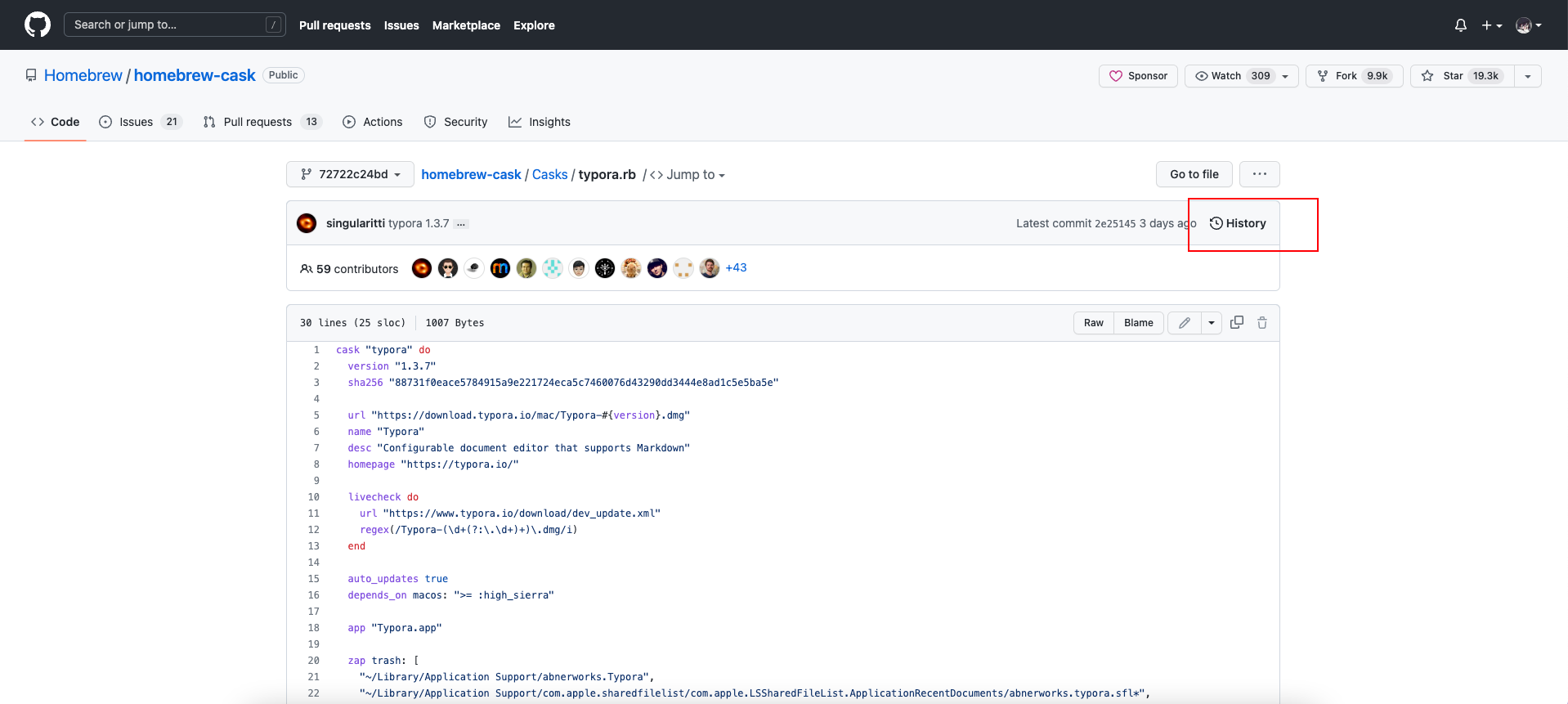
From: https://github.com/Homebrew/homebrew-cask/blob/HEAD/Casks/typora.rb 这里给我们提供了 Typora 的下载脚本地址,我们直接访问这个地址。

  1. 查看这个脚本的历史提交记录: image-20220624125205567

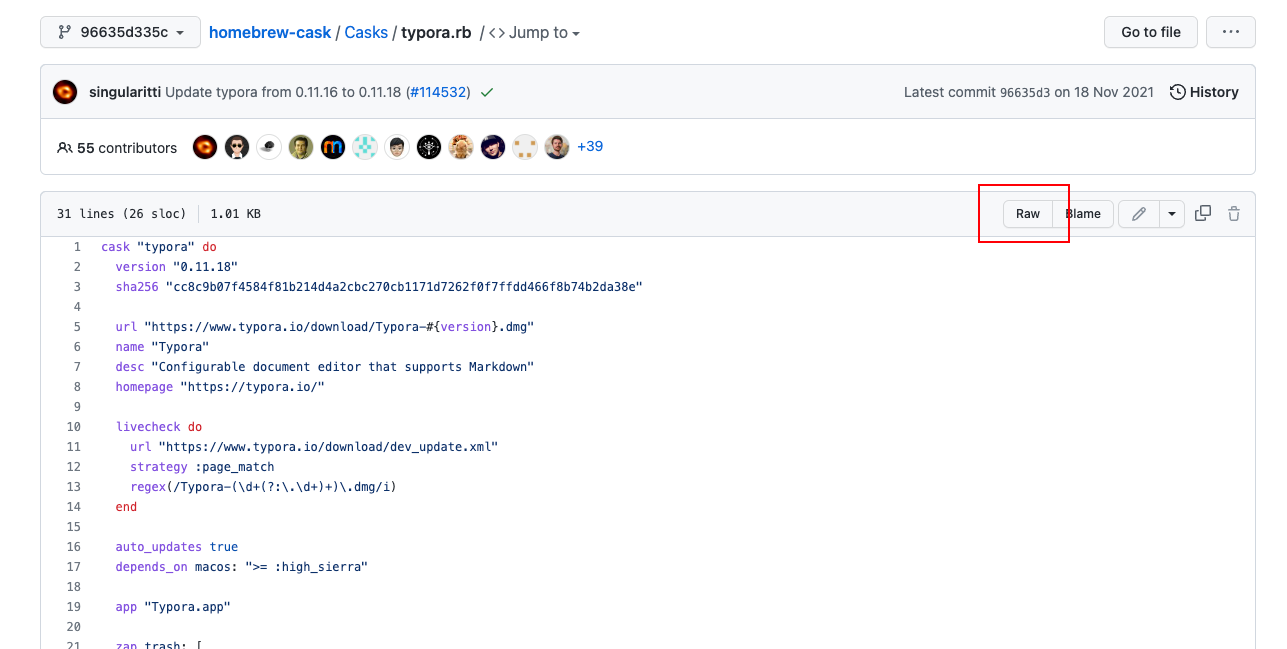
  2. 找到我们需要的历史提交版本 image-20220624125303673

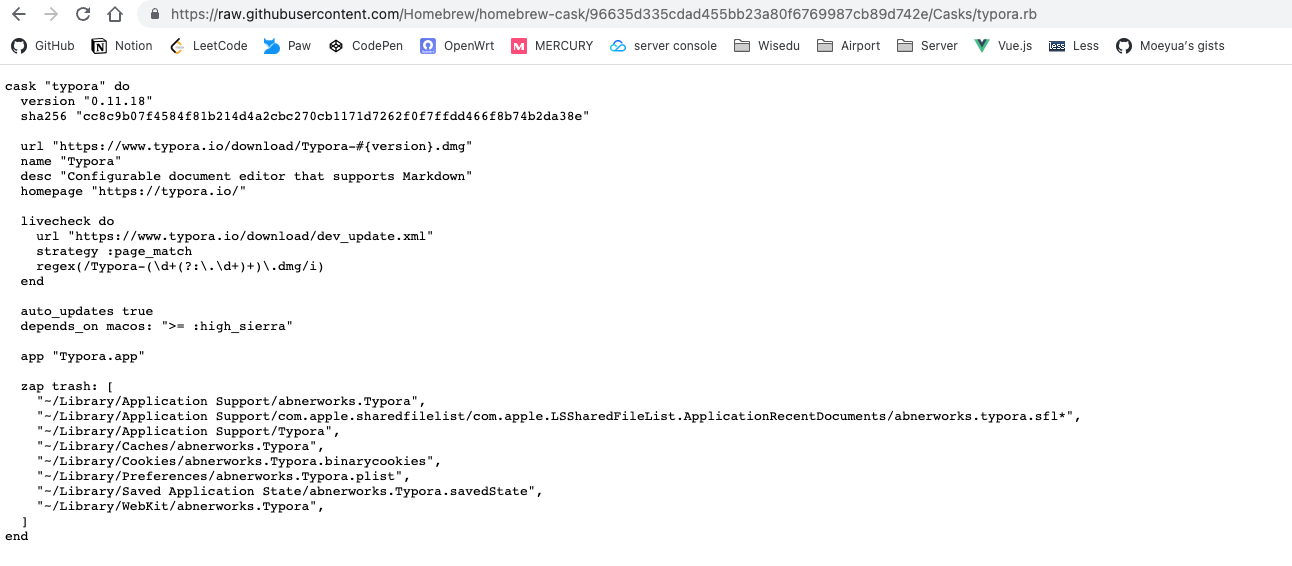
  3. 下载这个文件 image-20220624125408151 image-20220624125452425

网页右键选择「另存为/储存为」,将这个文件保存到本地

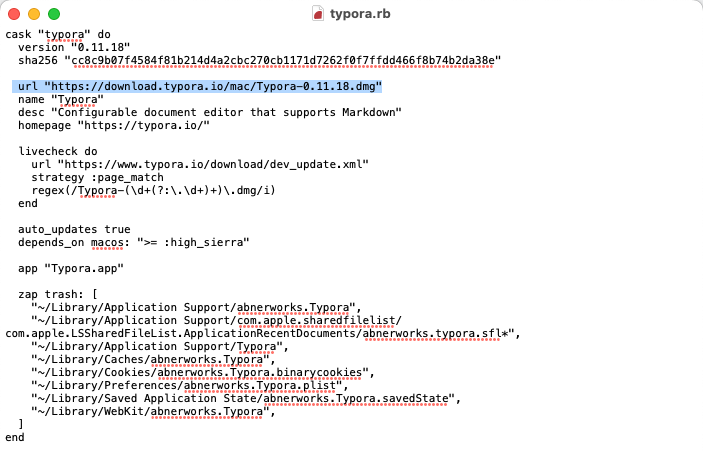
  1. 用任意的文本编辑器,例如「记事本」/「文本编辑」或者 IDE 将 URL 修改为官网提供的地址:https://download.typora.io/mac/Typora-0.11.18.dmg image-20220624125819271
  2. 执行 brew install {下载的文件路径} --cask

     brew install ./Downloads/typora.rb --cask
    ==> Downloading https://download.typora.io/mac/Typora-0.11.18.dmg
    ######################################################################## 100.0%
    ==> Installing Cask typora
    ==> Moving App 'Typora.app' to '/Applications/Typora.app'
    🍺  typora was successfully installed!