





Flowable 作为一个强大的开源工作流引擎,不仅支持传统的 BPMN 工作流,还提供了 CMMN 案例管理的能力,能够同时应对结构化和非结构化的业务场景。
本文将通过一个实际的服务台(Helpdesk)系统示例,详细介绍如何使用 Spring Boot 集成 Flowable,实现 BPMN 工作流与 CMMN 案例管理的完美结合。通过这个示例,你将学习到:
让我们开始这段整合之旅吧!
在开始之前,让我们先了解 BPMN 和 CMMN 的区别:
首先创建一个 Spring Boot 项目,在 pom.xml 中添加以下依赖:
<?xml version="1.0" encoding="UTF-8"?>
<project xmlns="http://maven.apache.org/POM/4.0.0"
         xmlns:xsi="http://www.w3.org/2001/XMLSchema-instance"
         xsi:schemaLocation="http://maven.apache.org/POM/4.0.0 http://maven.apache.org/xsd/maven-4.0.0.xsd">
    <modelVersion>4.0.0</modelVersion>

    <groupId>com.flowable</groupId>
    <artifactId>flowable-springboot-starter</artifactId>
    <version>1.0-SNAPSHOT</version>

    <parent>
        <groupId>org.springframework.boot</groupId>
        <artifactId>spring-boot-starter-parent</artifactId>
        <version>2.7.18</version>
    </parent>

    <properties>
        <java.version>8</java.version>
        <flowable.version>6.8.0</flowable.version>
    </properties>

    <dependencies>
        <!-- Spring Boot -->
        <dependency>
            <groupId>org.springframework.boot</groupId>
            <artifactId>spring-boot-starter-web</artifactId>
        </dependency>

        <!-- Flowable -->
        <dependency>
            <groupId>org.flowable</groupId>
            <artifactId>flowable-spring-boot-starter-rest</artifactId>
            <version>${flowable.version}</version>
        </dependency>
        <dependency>
            <groupId>org.flowable</groupId>
            <artifactId>flowable-spring-boot-starter-basic</artifactId>
            <version>${flowable.version}</version>
        </dependency>

        <!-- Database -->
        <dependency>
            <groupId>com.h2database</groupId>
            <artifactId>h2</artifactId>
            <scope>runtime</scope>
        </dependency>

        <!-- Lombok -->
        <dependency>
            <groupId>org.projectlombok</groupId>
            <artifactId>lombok</artifactId>
            <optional>true</optional>
        </dependency>
    </dependencies>

    <build>
        <plugins>
            <plugin>
                <groupId>org.springframework.boot</groupId>
                <artifactId>spring-boot-maven-plugin</artifactId>
                <configuration>
                    <excludes>
                        <exclude>
                            <groupId>org.projectlombok</groupId>
                            <artifactId>lombok</artifactId>
                        </exclude>
                    </excludes>
                </configuration>
            </plugin>
        </plugins>
    </build>
</project>
在 src/main/resources/application.yml 中添加以下配置:
server:
  port: 8080

spring:
  datasource:
    url: jdbc:h2:mem:flowable;DB_CLOSE_DELAY=-1
    username: sa
    password:
    driver-class-name: org.h2.Driver
  h2:
    console:
      enabled: true
      path: /h2-console

flowable:
  database-schema-update: true
  async-executor-activate: false
  bpmn:
    enabled: true
  cmmn:
    enabled: true
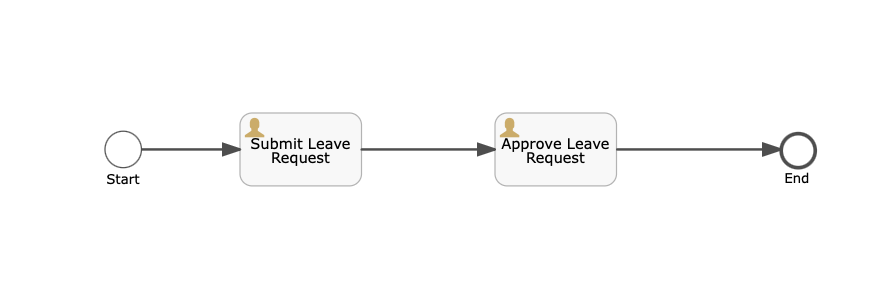
在 src/main/resources/processes 目录下创建 helpdesk.bpmn20.xml 文件:
<?xml version="1.0" encoding="UTF-8"?>
<definitions xmlns="http://www.omg.org/spec/BPMN/20100524/MODEL"
             xmlns:flowable="http://flowable.org/bpmn"
             targetNamespace="http://flowable.org/examples">

    <process id="leaveProcess" name="Leave Process">
        <startEvent id="startEvent" name="Start"/>
        <sequenceFlow id="flow1" sourceRef="startEvent" targetRef="submitTask"/>

        <userTask id="submitTask" name="Submit Leave Request"
                  flowable:assignee="${applicant}"/>
        <sequenceFlow id="flow2" sourceRef="submitTask" targetRef="approveTask"/>

        <userTask id="approveTask" name="Approve Leave Request"
                  flowable:candidateGroups="managers"/>
        <sequenceFlow id="flow3" sourceRef="approveTask" targetRef="endEvent"/>

        <endEvent id="endEvent" name="End"/>
    </process>

</definitions>
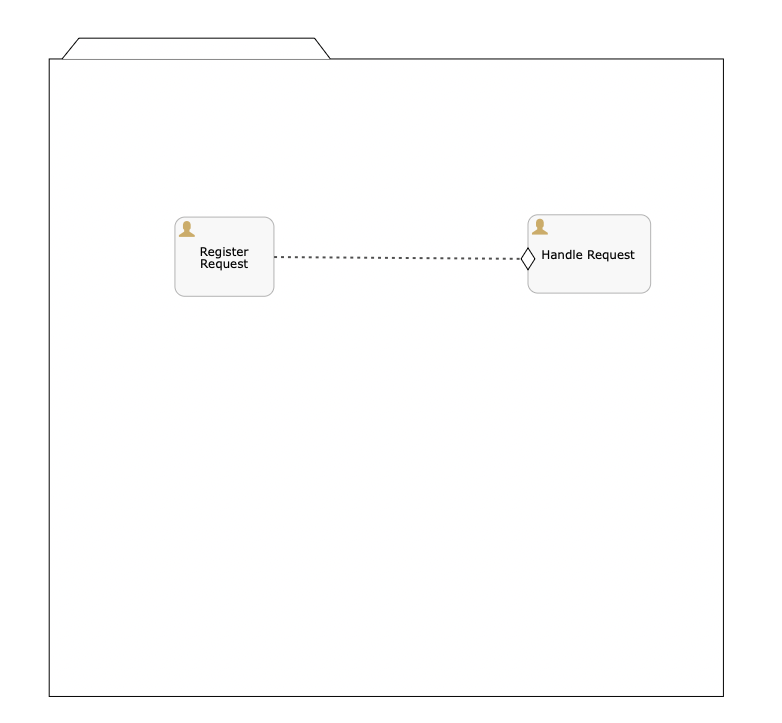
在 src/main/resources/cases 目录下创建 helpdesk-case.cmmn.xml 文件:
<?xml version="1.0" encoding="UTF-8"?>
<definitions xmlns="http://www.omg.org/spec/CMMN/20151109/MODEL"
             xmlns:xsi="http://www.w3.org/2001/XMLSchema-instance"
             xmlns:flowable="http://flowable.org/cmmn"
             xmlns:cmmndi="http://www.omg.org/spec/CMMN/20151109/CMMNDI"
             xmlns:dc="http://www.omg.org/spec/CMMN/20151109/DC"
             xmlns:di="http://www.omg.org/spec/CMMN/20151109/DI"
             targetNamespace="http://www.flowable.org/casedef"
             exporter="Flowable Open Source Modeler"
             exporterVersion="6.8.0">

    <case id="helpDeskCase" name="Help Desk Case" flowable:initiatorVariableName="initiator">
        <documentation>Help Desk Case for handling support requests</documentation>
        <casePlanModel id="casePlanModel" flowable:formFieldValidation="true">
            <planItem id="planItem1" name="Register Request" definitionRef="sid-D23F3A7F-E35E-491B-A801-CAE2A8DF141D"></planItem>
            <planItem id="planItem2" name="Handle Request" definitionRef="sid-43B74981-CB5A-441E-ABDD-D0509AD0A4F8">
                <entryCriterion id="sid-C006CACE-99AC-47CD-AF5D-6102F52D856A" sentryRef="sentry1"></entryCriterion>
            </planItem>

            <sentry id="sentry1">
                <planItemOnPart id="sentryOnPart1" sourceRef="planItem1">
                    <standardEvent>complete</standardEvent>
                </planItemOnPart>
            </sentry>

            <humanTask id="sid-D23F3A7F-E35E-491B-A801-CAE2A8DF141D" name="Register Request" flowable:formFieldValidation="true"></humanTask>
            <humanTask id="sid-43B74981-CB5A-441E-ABDD-D0509AD0A4F8" name="Handle Request" flowable:formFieldValidation="true"></humanTask>
        </casePlanModel>
    </case>

    <cmmndi:CMMNDI>
        <cmmndi:CMMNDiagram id="CMMNDiagram_helpdeskCase">
            <cmmndi:CMMNShape id="CMMNShape_casePlanModel" cmmnElementRef="casePlanModel">
                <dc:Bounds height="714.0" width="718.0" x="40.0" y="40.0"></dc:Bounds>
                <cmmndi:CMMNLabel></cmmndi:CMMNLabel>
            </cmmndi:CMMNShape>
            <cmmndi:CMMNShape id="CMMNShape_planItem1" cmmnElementRef="planItem1">
                <dc:Bounds height="80.0" width="100.0" x="167.0" y="189.57881699604252"></dc:Bounds>
                <cmmndi:CMMNLabel></cmmndi:CMMNLabel>
            </cmmndi:CMMNShape>
            <cmmndi:CMMNShape id="CMMNShape_planItem2" cmmnElementRef="planItem2">
                <dc:Bounds height="80.0" width="100.0" x="555.0" y="185.0"></dc:Bounds>
                <cmmndi:CMMNLabel></cmmndi:CMMNLabel>
            </cmmndi:CMMNShape>
            <cmmndi:CMMNShape id="CMMNShape_sid-C006CACE-99AC-47CD-AF5D-6102F52D856A" cmmnElementRef="sid-C006CACE-99AC-47CD-AF5D-6102F52D856A">
                <dc:Bounds height="22.0" width="14.0" x="547.6330130435323" y="218.57881699604252"></dc:Bounds>
                <cmmndi:CMMNLabel></cmmndi:CMMNLabel>
            </cmmndi:CMMNShape>
            <cmmndi:CMMNEdge id="CMMNEdge_sid-E0987438-F457-41CD-9AD9-61A0E53EC4D0" cmmnElementRef="planItem1" targetCMMNElementRef="sid-C006CACE-99AC-47CD-AF5D-6102F52D856A">
                <di:extension>
                    <flowable:docker type="source" x="50.0" y="40.0"></flowable:docker>
                    <flowable:docker type="target" x="7.0" y="11.0"></flowable:docker>
                </di:extension>
                <di:waypoint x="266.95000000000005" y="229.57881699604252"></di:waypoint>
                <di:waypoint x="547.6330130435323" y="229.57881699604252"></di:waypoint>
                <cmmndi:CMMNLabel></cmmndi:CMMNLabel>
            </cmmndi:CMMNEdge>
        </cmmndi:CMMNDiagram>
    </cmmndi:CMMNDI>
</definitions>
@RestController
@RequestMapping("/bpmn")
@RequiredArgsConstructor
public class BpmnController {
    private final RuntimeService runtimeService;
    private final TaskService taskService;
    private final HistoryService historyService;
    private final RepositoryService repositoryService;

    @PostMapping("/process/start")
    public Map<String, Object> startProcess(@RequestBody Map<String, Object> variables) {
        variables.put("initiator", variables.getOrDefault("userId", "unknown"));

        ProcessInstance processInstance = runtimeService.createProcessInstanceBuilder()
                .processDefinitionKey("helpDeskProcess")
                .variables(variables)
                .start();

        Map<String, Object> result = new HashMap<>();
        result.put("processInstanceId", processInstance.getId());
        result.put("processDefinitionId", processInstance.getProcessDefinitionId());
        result.put("variables", variables);
        return result;
    }

    // ... 其他 BPMN 相关接口
}
@RestController
@RequestMapping("/cmmn")
@RequiredArgsConstructor
public class CmmnController {
    private final CmmnRuntimeService cmmnRuntimeService;
    private final CmmnTaskService cmmnTaskService;
    private final CmmnHistoryService cmmnHistoryService;
    private final CmmnRepositoryService cmmnRepositoryService;

    // ... 其他代码见GitHub仓库
}
# 启动流程
curl -X POST "http://localhost:8080/bpmn/process/start" \
     -H "Content-Type: application/json" \
     -d '{"userId": "john"}'

# 查询任务
curl "http://localhost:8080/bpmn/tasks?assignee=john"

# 完成任务
curl -X POST "http://localhost:8080/bpmn/tasks/{taskId}/complete" \
     -H "Content-Type: application/json" \
     -d '{"approved": true}'
# 启动案例
curl -X POST "http://localhost:8080/cmmn/helpdesk/start" \
     -H "Content-Type: application/json" \
     -d '{"userId": "john"}'

# 查询任务
curl "http://localhost:8080/cmmn/tasks?assignee=john"

# 完成任务
curl -X POST "http://localhost:8080/cmmn/tasks/69e07941-d34a-11ee-9b85-0242ac110002/complete" \
     -H "Content-Type: application/json" \
     -d '{"analysis": "网络连接问题"}'

# 查询支持组任务
curl "http://localhost:8080/cmmn/tasks?candidateGroup=support"

# 认领任务
curl -X POST "http://localhost:8080/cmmn/tasks/7a1b8c52-d34a-11ee-9b85-0242ac110002/claim?userId=mary"
// 启动流程实例
ProcessInstance processInstance = runtimeService.createProcessInstanceBuilder()
    .processDefinitionKey("helpDeskProcess")
    .variables(variables)
    .start();

// 触发信号事件
runtimeService.signalEventReceived("signalName");

// 设置流程变量
runtimeService.setVariable(processInstanceId, "varName", value);

// 删除流程实例
runtimeService.deleteProcessInstance(processInstanceId, "reason");
// 查询任务
List<Task> tasks = taskService.createTaskQuery()
    .taskAssignee("john")
    .active()
    .list();

// 完成任务
taskService.complete(taskId);

// 认领任务
taskService.claim(taskId, userId);

// 设置任务变量
taskService.setVariable(taskId, "varName", value);
// 部署流程定义
Deployment deployment = repositoryService.createDeployment()
    .addClasspathResource("processes/helpdesk.bpmn20.xml")
    .deploy();

// 查询流程定义
ProcessDefinition processDefinition = repositoryService.createProcessDefinitionQuery()
    .processDefinitionKey("helpDeskProcess")
    .latestVersion()
    .singleResult();
// 查询历史流程实例
List<HistoricProcessInstance> historicProcessInstances = historyService
    .createHistoricProcessInstanceQuery()
    .finished()
    .list();

// 查询历史任务
List<HistoricTaskInstance> historicTasks = historyService
    .createHistoricTaskInstanceQuery()
    .taskAssignee("john")
    .finished()
    .list();
// 启动案例实例
CaseInstance caseInstance = cmmnRuntimeService.createCaseInstanceBuilder()
    .caseDefinitionKey("helpDeskCase")
    .variables(variables)
    .start();

// 终止案例实例
cmmnRuntimeService.terminateCaseInstance(caseInstanceId);

// 查询案例实例
CaseInstance caseInstance = cmmnRuntimeService.createCaseInstanceQuery()
    .caseInstanceId(caseInstanceId)
    .singleResult();
// 查询任务
List<Task> tasks = cmmnTaskService.createTaskQuery()
    .taskAssignee("john")
    .list();

// 完成任务
cmmnTaskService.complete(taskId, variables);

// 认领任务
cmmnTaskService.claim(taskId, userId);

// 委派任务
cmmnTaskService.delegateTask(taskId, userId);
// 部署案例定义
CmmnDeployment deployment = cmmnRepositoryService.createDeployment()
    .addClasspathResource("cases/helpdesk.cmmn")
    .deploy();

// 查询案例定义
CaseDefinition caseDefinition = cmmnRepositoryService.createCaseDefinitionQuery()
    .caseDefinitionKey("helpDeskCase")
    .latestVersion()
    .singleResult();
// 查询历史案例实例
List<HistoricCaseInstance> historicCases = cmmnHistoryService
    .createHistoricCaseInstanceQuery()
    .finished()
    .list();

// 查询历史任务
List<HistoricTaskInstance> historicTasks = cmmnHistoryService
    .createHistoricTaskInstanceQuery()
    .taskAssignee("john")
    .finished()
    .list();

// 查询历史变量
List<HistoricVariableInstance> historicVariables = cmmnHistoryService
    .createHistoricVariableInstanceQuery()
    .caseInstanceId(caseInstanceId)
    .list();
Flowable 的查询 API 提供了丰富的链式调用方法:
// 通用的查询方法
.asc()/.desc()           // 排序
.listPage(start, size)   // 分页查询
.count()                 // 计数
.singleResult()          // 获取单个结果
.list()                  // 获取列表结果

// 时间相关查询
.before(date)            // 在指定时间之前
.after(date)             // 在指定时间之后

// 排序方法
.orderByTaskCreateTime()
.orderByProcessInstanceId()
.orderByCaseInstanceId()
Flowable 支持多种类型的变量:
// 设置变量
Map<String, Object> variables = new HashMap<>();
variables.put("stringVar", "value");
variables.put("numberVar", 123);
variables.put("dateVar", new Date());
variables.put("booleanVar", true);

// 在流程/案例中使用变量
runtimeService.setVariables(processInstanceId, variables);
cmmnRuntimeService.setVariables(caseInstanceId, variables);

// 获取变量
Map<String, Object> processVariables = runtimeService.getVariables(processInstanceId);
Map<String, Object> caseVariables = cmmnRuntimeService.getVariables(caseInstanceId);
选择合适的模型
流程与案例的集成
数据共享
完整源码请访问:GitHub - flowable-springboot-starter
此内容由惯性聚合(RSS阅读器)自动聚合整理,仅供阅读参考。 原文来自 — 版权归原作者所有。