

惯性聚合 高效追踪和阅读你感兴趣的博客、新闻、科技资讯
阅读原文 在惯性聚合中打开

推荐订阅源

博客园 - 【当耐特】
K
Kaspersky official blog
V
Vulnerabilities – Threatpost
Hacker News - Newest:
Hacker News - Newest: "LLM"
Security Archives - TechRepublic
S
Secure Thoughts
I
Intezer
TaoSecurity Blog
TaoSecurity Blog
K
KPMG report finds enterprise disconnect between AI and its ROI | CIO
Spread Privacy
Spread Privacy
A
About on SuperTechFans
NISL@THU
NISL@THU
The GitHub Blog
The GitHub Blog
Hugging Face - Blog
Hugging Face - Blog
S
Security @ Cisco Blogs
S
SegmentFault 最新的问题
G
Google Developers Blog
B
Blog
N
News and Events Feed by Topic
H
Hackread – Cybersecurity News, Data Breaches, AI and More
Google DeepMind News
V2EX - 技术
V2EX - 技术
V
Visual Studio Blog
MyScale Blog
MyScale Blog
Webroot Blog
Webroot Blog
Vercel News
Vercel News
IT之家
IT之家
Microsoft Security Blog
Last Week in AI
Last Week in AI
Y
Y Combinator Blog
S
Security Affairs
Application and Cybersecurity Blog
Stack Overflow Blog
Stack Overflow Blog
P
Proofpoint News Feed
L
Lohrmann on Cybersecurity
博客园 - 叶小钗
www.infosecurity-magazine.com
Exploit-DB.com RSS Feed
Know Your Adversary
Know Your Adversary
T
Tailwind CSS Blog
F
Fortinet All Blogs
D
DataBreaches.Net
博客园 - Franky
博客园_首页
H
Heimdal Security Blog
宝玉的分享
宝玉的分享
阮一峰的网络日志
阮一峰的网络日志
Attack and Defense Labs
Project Zero
Project Zero
雷峰网
雷峰网

Wang Fenjin

SwanLake: An Arrow Flight SQL Datalake Service Built on DuckDB + DuckLake SwanLake:一个基于 DuckDB + DuckLake 的 Arrow Flight SQL 数据湖服务 2026 年的软件开发流程,会被 AI 改成什么样? 感恩字节 duckdb-rs will be the offical DuckDB rust client duckdb-rs 即将成为 DuckDB 官方 rust 客户端 基于 apache-arrow 的 duckdb rust 客户端 Simple: SQLite3 结巴分词插件 xeus-clickhouse: Jupyter 的 ClickHouse 内核 Spacemacs Intro Simple: 一个支持中文和拼音搜索的 sqlite fts5插件 About Showcase
用 od 查看 ClickHouse 的索引文件
:: Wang Fenjin · 2020-03-18 · via Wang Fenjin

背景⌗

学习 ClickHouse (后面简称 CH) 的时候,会对 CH 到底怎么组织磁盘上的 MergeTree 文件有很多疑惑。关于 MergeTree 的介绍可以参考[1],但是如果想具体看下磁盘上的文件,没有现成的工具。本文参考 [2] 介绍通过 od 查看磁盘文件的方法,感兴趣的话可以自己试一下,会对 MergeTree 有更深的理解。

本文以 官方Tutorial 中的 hits_v1 表为例来说明。下面主要描述怎么看 primary.idx 文件和 [column].mrk 文件。在 MergeTree 数据结构中,primary.idx 可认为是一级索引,mrk 文件是用作定位具体文件偏移量的,他们的行数是相同且一一对应。

查看 primary.idx⌗

primary.idx 里面的文件是把主键的索引写入到磁盘文件中,hits_v1 的主键为 order by 语句中的字段,即 ORDER BY (CounterID, EventDate, intHash32(UserID)),CounterID 类型是 uint32,存储为4字节;EventDate 类型是 Date,存储是 2字节整型;intHash32 是4字节整型。CH 的文件内容非常紧凑,每个字段是紧挨着写入的,没有其他类似空格符等浪费。所以 primary.idx 的存储格式是 4+2+4,然后每隔 8192 行写一行索引。查看内容的方法为:

# sql 选择第一行索引的内容
Select CounterID,toRelativeDayNum(EventDate),intHash32(UserID) from tutorial.hits_v1 limit 0,1;

# od 查看 3 个字段
od -An -i -j 0 -N 4 primary.idx
od -An -i -j 4 -N 2 primary.idx
od -An -i -j 6 -N 4 primary.idx

# 类似的,sql 选择第二行索引的内容
Select CounterID,toRelativeDayNum(EventDate),intHash32(UserID) from tutorial.hits_v1 limit 8192,1;

# od 查看 3 个字段
od -An -i -j 10 -N 4 primary.idx
od -An -i -j 14 -N 2 primary.idx
od -An -i -j 16 -N 4 primary.idx

关于 od 的选项介绍如下:

  • -An 是不让输出偏移只输出文本内容
  • -i 是说把选择的位当作长度为 4 的整型输出;对于 EventDate 虽然存储的是 2, 但是我们把它当作 4 位输出也没问题,主要控制在 -j -N
  • -j 偏移的起始字节数
  • -N 从偏移量开始读取的字节数

-A,-j, -N 这几个选项是必须有的,-i 得看数据类型是啥,还支持其他的比如字符、浮点类型等

从上面可以看到,想查看 primary.idx 的文件,需要知道主键的排列顺序和主键的类型,没办法像 parquet tools 一样很简单地写一个通用程序来直接查看文件。

查看 [column].mrk⌗

mrk 文件是辅助定位 bin 文件设置的。bin 文件被分成小的数据块,每个数据块压缩后存放到一起。可以参考从 [1] 中的截图: ch-bin-file
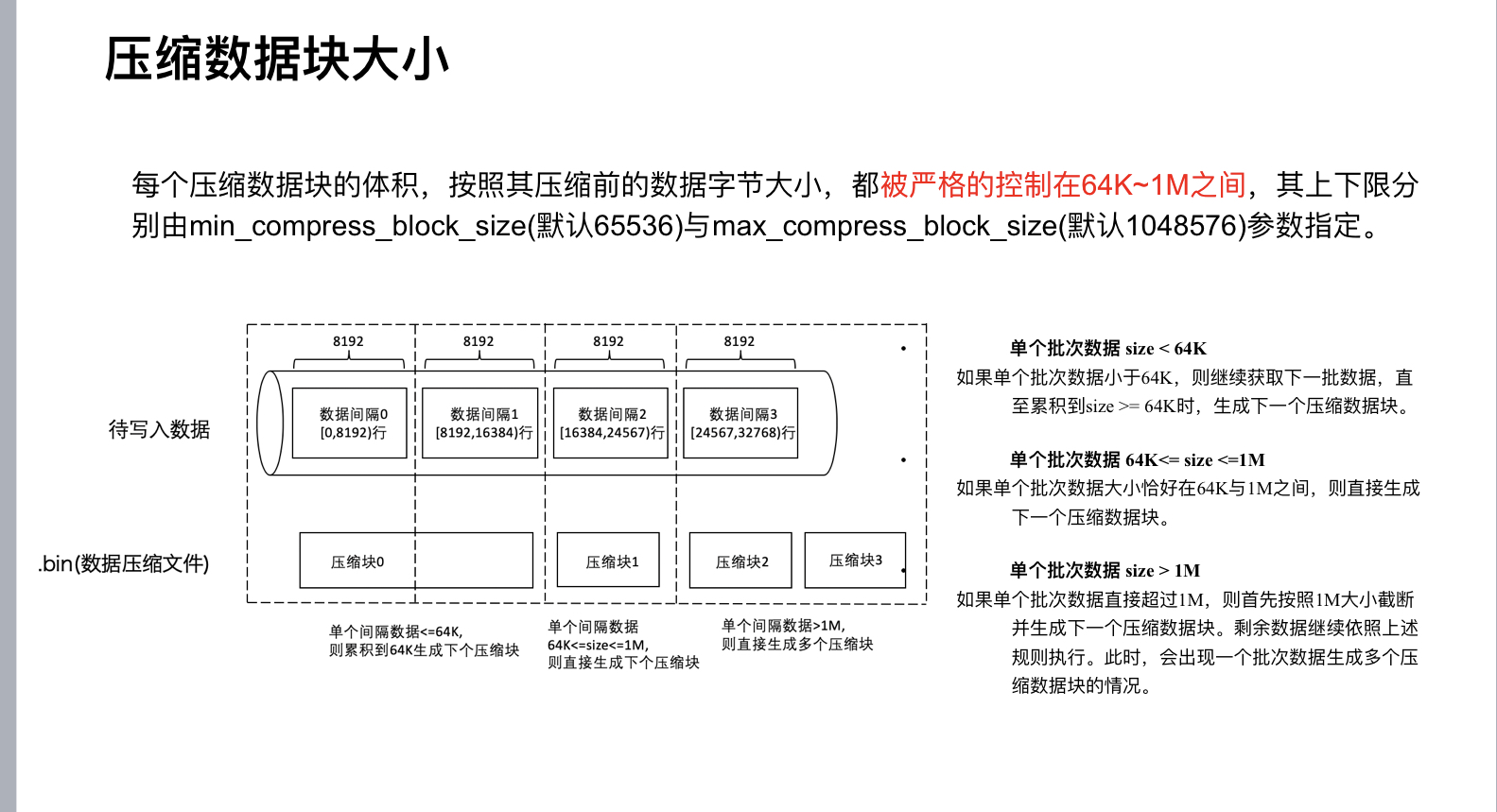
mrk 文件行数与 idx 文件一致,每行包含两个固定为 8 字节的整型,第一个整型是 [column].bin 文件的偏移量定位到具体的数据块,第二个整型是把数据块解压后定位解压后的文件偏移。查看 mrk 的脚本如下:

#!/bin/bash

if [ -z "$1" ]; then
    echo "Missing filename, mrk.sh file.mrk"
    exit 1
fi

filename=$1
len=$(wc -c < $filename)
offset=0
maxline=10
if [ $((len/16)) -gt $maxline ]; then
    echo "$filename first $maxline lines:"
else
    echo "$filename content:"
fi
while [ $((offset+16)) -le $len ] && [ $maxline -gt 0 ]; do
    line=$(od -An -t d8 -j $offset -N 8 $filename)","$(od -An -t d8 -j $((offset+8)) -N 8 $filename)
    echo $line
    offset=$(($offset+16))
    maxline=$(($maxline-1))
done

查看 mrk 文件的脚本是通用的,传入文件名就可以了。它的正确性也是可以验证的,比如对于 UserID 这个字段,它是 uint64 型,即占用 8 个字节,8192 行就是 65536 个字节;刚好 bin 文件中数据块的默认最小值是 65536,所以会发现 UserID.mrk 文件第二列的值永远为 0,因为刚好解压缩后的偏移量是 0。

对于 CounterID.mrk 文件,它是 int32 占用 4 个字节,所以能看到第二列的值是可能出现非 0 的。

总结⌗

CH 没有提供简单的方案查看 idx 和 mrk 文件的内容,我们可以通过 od 来模拟实现,能帮助我们更好了解 MergeTree 这个数据结构。

参考⌗

  1. 朱凯老师关于 MergeTree 的介绍:https://github.com/ClickHouse/clickhouse-presentations/blob/master/meetup32/朱凯.ppt
  2. 一个俄语的 PPT 提到 od 的使用,想自己看 PPT 的话可以用 Google 翻译:https://github.com/ClickHouse/clickhouse-presentations/blob/master/meetup27/adaptive_index_granularity.pdf