


惯性聚合 高效追踪和阅读你感兴趣的博客、新闻、科技资讯
阅读原文 在惯性聚合中打开

推荐订阅源

S
Schneier on Security
有赞技术团队
有赞技术团队
T
The Blog of Author Tim Ferriss
F
Fortinet All Blogs
D
DataBreaches.Net
F
Full Disclosure
腾讯CDC
博客园 - 【当耐特】
MyScale Blog
MyScale Blog
Stack Overflow Blog
Stack Overflow Blog
小众软件
小众软件
Hugging Face - Blog
Hugging Face - Blog
Last Week in AI
Last Week in AI
OSCHINA 社区最新新闻
OSCHINA 社区最新新闻
爱范儿
爱范儿
The GitHub Blog
The GitHub Blog
Engineering at Meta
Engineering at Meta
大猫的无限游戏
大猫的无限游戏
freeCodeCamp Programming Tutorials: Python, JavaScript, Git & More
S
SegmentFault 最新的问题
The Register - Security
WordPress大学
WordPress大学
博客园 - 聂微东
雷峰网
雷峰网
J
Java Code Geeks
Exploit-DB.com RSS Feed
P
Privacy International News Feed
酷 壳 – CoolShell
酷 壳 – CoolShell
A
Arctic Wolf
Scott Helme
Scott Helme
C
Cyber Attacks, Cyber Crime and Cyber Security
T
Tor Project blog
博客园 - 三生石上(FineUI控件)
Know Your Adversary
Know Your Adversary
AWS News Blog
AWS News Blog
G
Google Developers Blog
www.infosecurity-magazine.com
C
CERT Recently Published Vulnerability Notes
O
OpenAI News
Project Zero
Project Zero
K
KPMG report finds enterprise disconnect between AI and its ROI | CIO
Application and Cybersecurity Blog
云风的 BLOG
云风的 BLOG
N
News and Events Feed by Topic
MongoDB | Blog
MongoDB | Blog
让小产品的独立变现更简单 - ezindie.com
Microsoft Security Blog
Cisco Talos Blog
Cisco Talos Blog
P
Palo Alto Networks Blog
Schneier on Security

阿方的博客

[已下线] 博客分布式电源管理系统已上线 - 阿方的博客 在 MCU 部署边缘 AI —— 以 RA6E2 天气预测为例 GD32VW553-IoT 实现 SoftAP 配网 - 阿方的博客 24MHz 8CH 开源逻辑分析仪指南 - 阿方的博客 从光谱到 RGB - 阿方的博客 记一次 XSS 攻击非法钓鱼网站 - 阿方的博客 MM32:配置开发环境并点亮第一颗 LED - 阿方的博客 DG-LAB APP 郊狼波形导出二维码的解析 - 阿方的博客 新头像!福瑞 OC! - 阿方的博客 【补档】从零开始制作一个矿石作物 Addon - 阿方的博客 关于我 - 阿方的博客
嘉立创双十一金豆活动秒杀脚本 - 阿方的博客
Fang_Zhijian · 2025-11-05 · via 阿方的博客

嘉立创双十一金豆活动秒杀脚本

async function performFetches(requestCount, categoryAccessId, goodsDetailAccessId) {
  const url = "https://www.jlc.com/api/integral/seckill/exchangeSeckillGoods";
  const options = {
    "headers": {
      "accept": "application/json, text/plain, */*",
      "accept-language": "zh-CN,zh;q=0.9,en;q=0.8,en-GB;q=0.7,en-US;q=0.6",
      "cache-control": "no-cache",
      "content-type": "application/json",
      "pragma": "no-cache",
      "priority": "u=1, i",
      "sec-ch-ua": "\"Microsoft Edge\";v=\"137\", \"Chromium\";v=\"137\", \"Not/A)Brand\";v=\"24\"",
      "sec-ch-ua-mobile": "?0",
      "sec-ch-ua-platform": "\"Windows\"",
      "sec-fetch-dest": "empty",
      "sec-fetch-mode": "cors",
      "sec-fetch-site": "same-origin"
    },
    "referrerPolicy": "strict-origin-when-cross-origin",
    "body": JSON.stringify({ "goodsDetailAccessId": goodsDetailAccessId, "categoryAccessId": categoryAccessId, "source": 4 }),
    "method": "POST",
    "mode": "cors",
    "credentials": "include"
  };

  for (let i = 0; i < requestCount; i++) {
    console.log(`--- Performing fetch request ${i + 1}/${requestCount} for ID: ${goodsDetailAccessId} ---`);
    try {
      const response = await fetch(url, options);
      const data = await response.json();
      console.log(`Request ${i + 1} successful:`, data);
    } catch (error) {
      console.error(`Request ${i + 1} failed:`, error);
    }
  }
}

// 第1个参数是请求连续次数,第2个参数是 categoryAccessId,第3个参数是 voucherSeckillActivityDetailAccessId
performFetches(1, "c3a1089a00a341aeae7c83b55e70523f", "db25dc2516f54e698a6bd782399d9079");

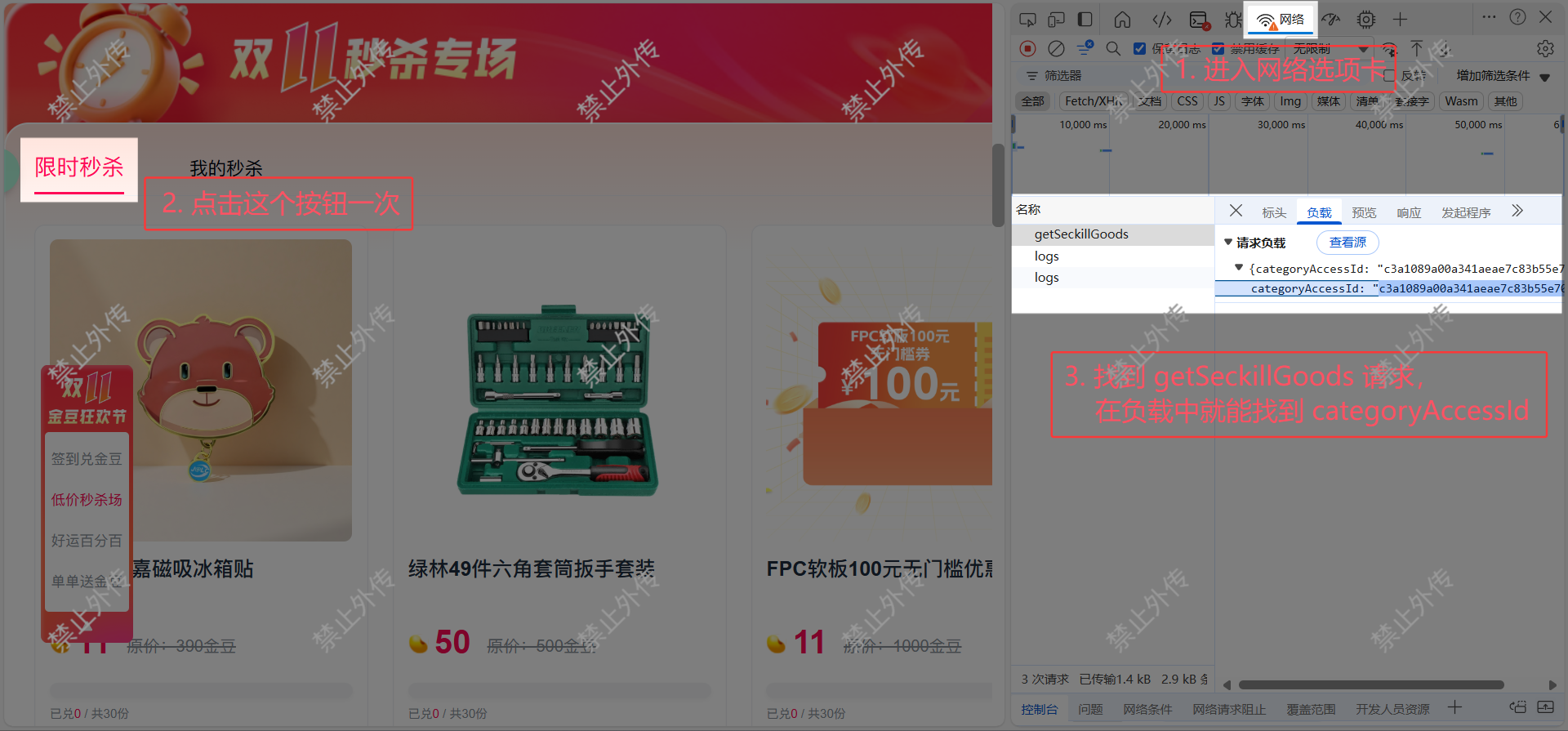
categoryAccessId

F12 打开 DevTools 后进入“网络(Network)”选项卡,点击“限时秒杀”按钮一次

找到 getSeckillGoods 请求,在负载中就能看到 categoryAccessId
2025-11-01-17-59-03-image.png

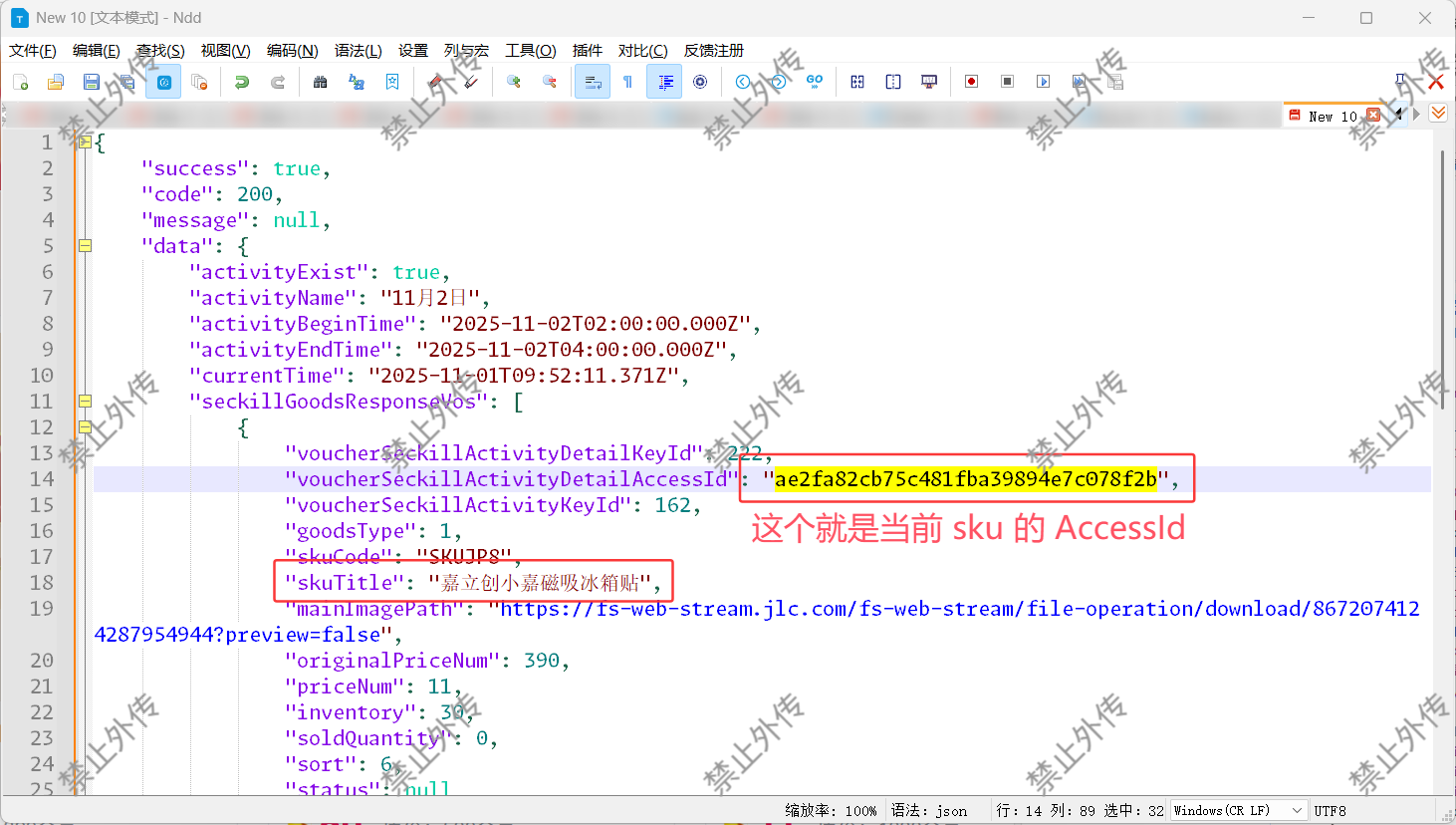
voucherSeckillActivityDetailAccessId

同样在这个 getSeckillGoods 请求中,在预览中可以看到当前所有 sku,展开即可看到 voucherSeckillActivityDetailAccessId
2025-11-01-18-03-05-image.png

如何使用?

电脑端打开:https://www.jlc.com/portal/anniversary-doubleActivity

将脚本粘贴到 DevTools 的“控制台(Console)”按回车即可使用

提前填好参数,在开始秒杀前几秒运行脚本,注意设置合理的请求次数(过于频繁可能被封禁)