惯性聚合 高效追踪和阅读你感兴趣的博客、新闻、科技资讯
阅读原文 在惯性聚合中打开

推荐订阅源

奇客Solidot–传递最新科技情报
奇客Solidot–传递最新科技情报
cs.AI updates on arXiv.org
T
Threatpost
P
Privacy International News Feed
T
Tenable Blog
Know Your Adversary
Know Your Adversary
C
Cisco Blogs
P
Proofpoint News Feed
Spread Privacy
Spread Privacy
G
GRAHAM CLULEY
爱范儿
爱范儿
U
Unit 42
K
Kaspersky official blog
C
Cybersecurity and Infrastructure Security Agency CISA
Jina AI
Jina AI
O
OpenAI News
L
LangChain Blog
PCI Perspectives
PCI Perspectives
P
Privacy & Cybersecurity Law Blog
Latest news
Latest news
Cisco Talos Blog
Cisco Talos Blog
F
Full Disclosure
L
Lohrmann on Cybersecurity
V
V2EX
L
LINUX DO - 热门话题
S
Security Affairs
量子位
Martin Fowler
Martin Fowler
云风的 BLOG
云风的 BLOG
Schneier on Security
月光博客
月光博客
MyScale Blog
MyScale Blog
C
CERT Recently Published Vulnerability Notes
AWS News Blog
AWS News Blog
博客园 - 叶小钗
Forbes - Security
Forbes - Security
W
WeLiveSecurity
T
Troy Hunt's Blog
J
Java Code Geeks
Hacker News - Newest:
Hacker News - Newest: "LLM"
Google DeepMind News
Attack and Defense Labs
Apple Machine Learning Research
雷峰网
雷峰网
Google Online Security Blog
CTFtime.org: upcoming CTF events
TaoSecurity Blog
TaoSecurity Blog
H
Help Net Security
The Cloudflare Blog
让小产品的独立变现更简单 - ezindie.com

小锋博客

php的ob系列函数中flush()与ob_flush()的区别-小锋博客 nginx服务器中ob_flush函数和flush函数不起作用的解决方案-小锋博客 php中strpos字符串函数用法详解-小锋博客 2023-11-23-小锋博客 2023-09-24-小锋博客 2022.02.01-小锋博客 2020.08.23-小锋博客 2020.04.06-小锋博客 2020.02.14-小锋博客
mac无法删除软件,提示已锁定的解决方法-小锋博客
XiaoFeng · 2024-03-12 · via 小锋博客

删除或卸载软件时提示:不能完成此操作,因为项目“xxx”已被锁定。

mac无法删除软件,提示已锁定的解决方法 Mac相关 第1张

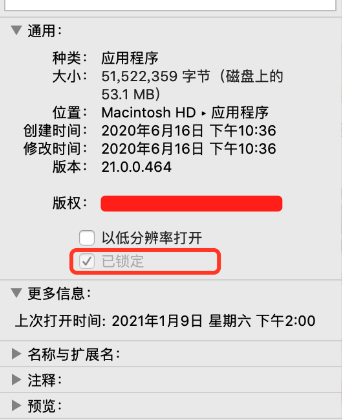
右键-显示简介里可以看到软件被锁定了:

mac无法删除软件,提示已锁定的解决方法 Mac相关 第2张

有些可以去掉前面的勾选,就可以删除或卸载软件了。

不能勾选的话,我们需要使用终端来处理:

sudo rm -rf xxx.app

但这样也不一定可以,有时候会提示:xxxx,Operation not permitted

终极办法是:

1. /bin/ls -dleO@ 你APP的路径(可以直接从应用管理里面拖进来)
2. sudo /usr/bin/chflags -R noschg 你APP的路径

然后就会发现软件已解除锁定,就可以常规办法进行删除或卸载软件了。