








In this guide, we compare GTmetrix to WebPageTest, a similar web performance testing tool.
Overview
WebPageTest is a tool that is highly similar to GTmetrix in test methodology.
It is also one of the few tools that have been around for longer than GTmetrix, having being launched in 2008 (GTmetrix launched in 2010).
While WebPageTest used to be similar to GTmetrix in spirit, the tool has undergone a few changes over the past few years after its acquisition by Catchpoint.
In this post, we cover the Pros and Cons of WebPageTest for web performance analysis and how they compare to GTmetrix.
Implementation Differences Between GTmetrix and WebPageTest
GTmetrix and WebPageTest are similar in many ways as both tools provide Lighthouse metrics, load your page using a real Chrome browser, and the results are based on the observed performance i.e., what they saw at the time of the test.
Here’s how they compare on various aspects:
¹ Note that WebPageTest offers two types of tests. Their default/standard test launches a real browser using the specified configuration, but uses its own calculation and measurements to capture the different Lighthouse metrics (i.e., Web Vitals) from the Chrome trace data. You can also run a dedicated Lighthouse test from within WebPageTest, whose results will differ from their standard test.
“Tests” vs “Runs”
WebPageTest has monthly limits for “runs” rather than tests. This is due to the concepts of First View and Repeat View.
- First View refers to loading your page with a fresh browser profile (i.e., no cache/cookies), akin to what a first time visitor would experience.
- Repeat View refers to loading your page again without clearing the cookies and cache, similar to what a returning visitor would experience.
- For stability reasons, each test usually involves a total of 6 runs by default (3 runs each with First and Repeat Views); this is reduced to 3 runs if you disable Repeat View.
- You can further change the number of runs to 2 or 1, if needed.
In GTmetrix, each test launches a new browser profile (i.e., no cache/cookies) for First View analysis. However, you can pass through cookies to emulate different user scenarios, including Repeat Views.
Pros of WebPageTest
- Real browser loads:
- WebPageTest loads your page on a real browser from the chosen location and using the specified Analysis Options, akin to GTmetrix.
- You can test your page in multiple locations, devices, browsers to see how your page renders across different environments.
- Detailed technical insights and customizable testing options:
- Reports provide key user-centric metrics (including Web Vitals), filmstrip, video playback, Waterfall Chart, page breakdown, and basic diagnostic checks similar to audits.
- You can change many test options (i.e., device, location, connection speed, screen resolution, etc.) and apply a number of developer options to test your page in various scenarios.
- Free and PRO plans available:
- Free plan (Starter plan) offers 100 monthly runs, customizable Analysis Options, access to 10 test locations, and 60 day report retention.
- Paid plans (PRO plan) start at $18.75/month and unlock more monthly runs, API access, queue priority, no-code experiments, testing in 40 locations, and longer report retention.
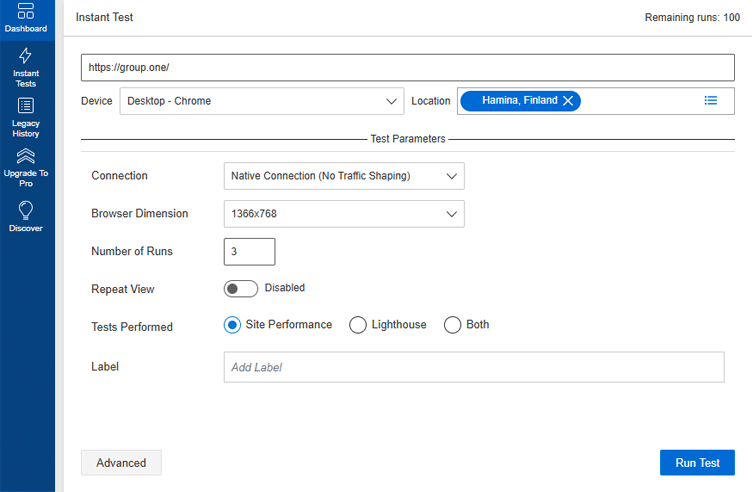
WebPageTest offers a wide variety of Analysis Options, similar to GTmetrix
Cons of WebPageTest
- Lack of Monitoring:
- WebPageTest focuses more on individual manual tests, and the only way to automate them is through the API (available on the PRO plan), which requires development effort.
- Scheduled Tests (aka monitoring), as well as Real User Monitoring (RUM) are only available on the Expert plan, which has a very high starting price ($11,988/year).
- In comparison, the GTmetrix Free plan allows you to monitor 1 page from our default location and bulk test upto 10 pages, with higher limits for PRO plans.
- Steeper learning curve:
- WebPageTest reports are more technical than GTmetrix Reports, requiring a more detailed understanding of various metrics and web performance jargon to learn how to parse the report data.
- Non-technical users may find it harder to pinpoint what is specifically slowing down their page and how to fix it.
- More Complicated UI/UX:
- User workflows in general require more steps and effort on WebPageTest.
- For example, GTmetrix allows you to start single/bulk tests, enable/disable monitoring and alerts, compare reports, export report histories, filter and categorize reports directly from the Dashboard with just a few clicks.
- On WebPageTest, it is more complicated to export report histories and filter reports while bulk testing and monitoring are not even available on the PRO plans (Expert plan only).
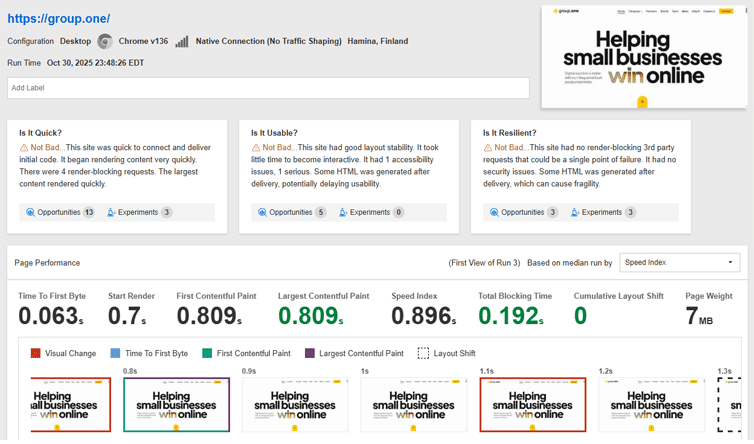
WebPageTest Report.
Conclusion
WebPageTest is a solid pick if you need deep, customized testing and real-time results.
But it does come with a steeper learning curve as you’ll need to be highly comfortable with web performance troubleshooting to get the most value out of it. Moreover, monitoring is limited to Enterprise plans, so most users won’t have ongoing visibility into how their site is performing day-to-day.
GTmetrix, on the other hand, gives you powerful insights in a much clearer, easier-to-digest format.
You get straightforward, actionable recommendations without needing expert-level knowledge, plus built-in monitoring and alerts to help you catch issues early and fix them before your visitors notice.
In summary, WebPageTest is great for advanced, one-off deep dives; but GTmetrix gives you everyday performance tracking and management in one accessible platform.
Get started with a Free GTmetrix account now and give us a try!
Keep an eye on your site with Monitoring and Alerts
Let GTmetrix automatically test your page on your chosen frequency and alert you before performance drops affect your visitors.
Available in all PRO plans.
Other features include: More Test Locations, More Monitored Slots (select plans), Remote Location Monitoring, Priority access for tests, Bulk testing, Advanced Analysis Options, and more!