




Last Updated:
Get GTmetrix to use a custom DNS when performing tests.
Overview
There are a number reasons why you may need GTmetrix to use a custom DNS:
- Redirecting development/staging sites to the production site’s real hostname
- Accessing geoblocked resources
- Blackholing resources to test for effects on overall performance
With our DNS Override feature, you can specify a hostname and IP address to ensure that your site is analyzed the way you need it to be.
What does DNS Override Do?
In simple terms, a DNS acts like a phone directory between domain names and IP addresses.
For example, typing facebook.com in your address bar would send that domain to a DNS server, which would then route it to something computers understand better, like an IP address (e.g., 31.13.69.228).
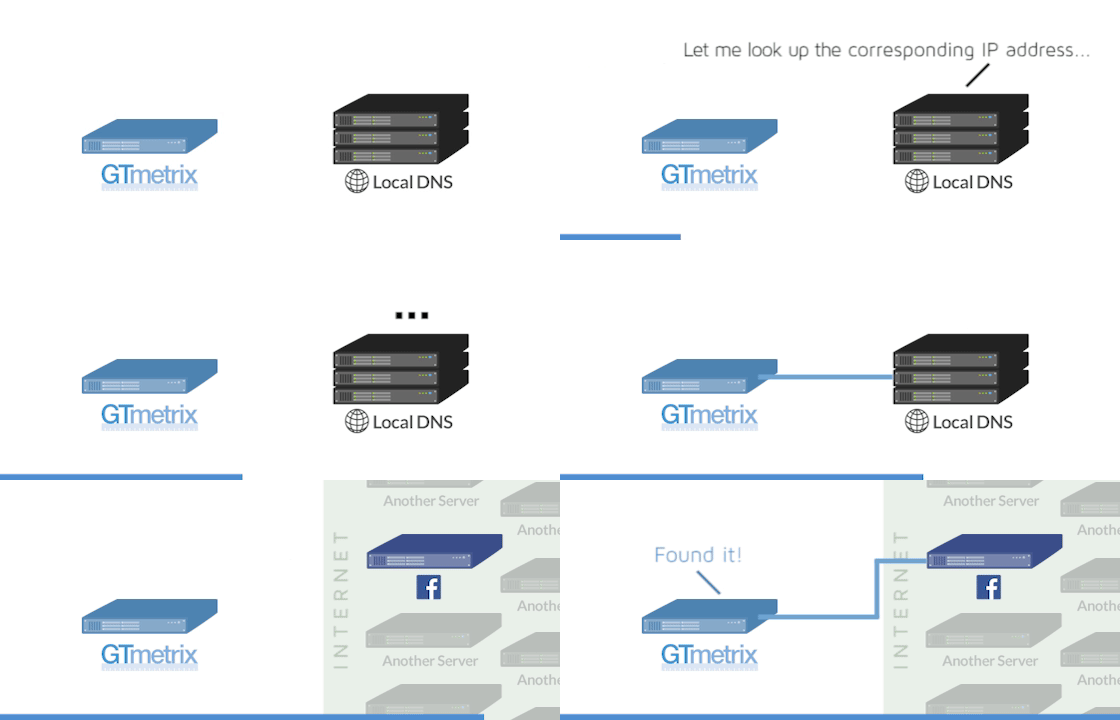
A local DNS looks up hostnames and matches them to their corresponding IP address for computers to understand better.
Most DNS servers are operated by Internet Service Providers (ISPs) who keep them updated constantly. However, there are occasions where you may want the domain name to be routed differently – this is where a custom DNS would be useful.
Overriding your DNS would essentially tell domain names to go to IP addresses you designate, and not what the general DNS servers would typically define.

Overriding a DNS lets you tell GTmetrix where to go instead of the proper destination.
GTmetrix simply provides the ability to override hosts and IP addresses to direct them to your desired server.
How to Use It
To override your DNS, follow the steps below:
1) Enter your URL into the Analyze field, and click on Analysis Options
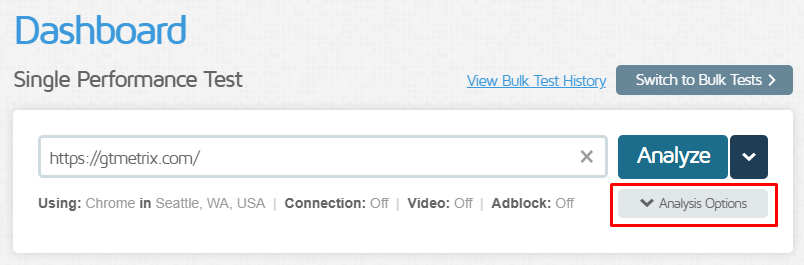
Click on “Analysis Options” to expand the Analysis Options module.
2) Expand the Advanced Options field
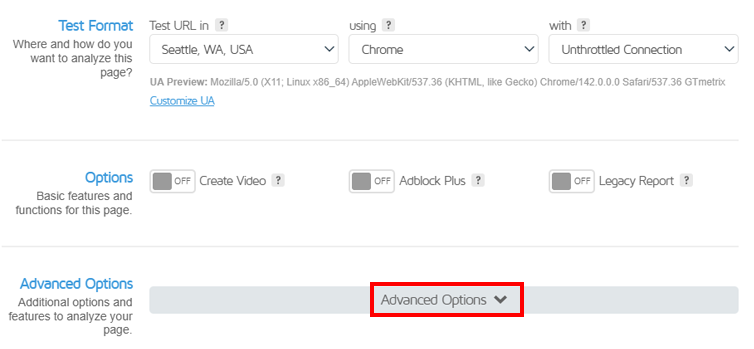
Expand the Advanced Options field to reveal the DNS Override feature.
3) Click “Add a Custom DNS” under the DNS Override section
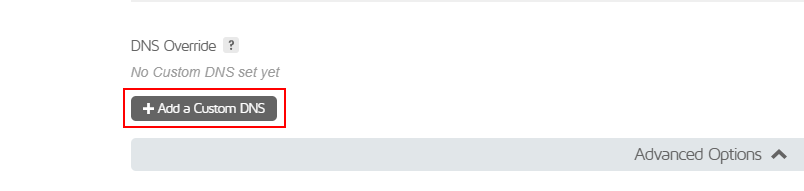
Click on “Add a Custom DNS” to reveal the Host and IP Address fields.
A Host field and IP Address field will appear.
4) Input the host and IP address corresponding to your custom DNS
For example:
Host: facebook.com
IP: 12.34.56.78
When you analyze your page, GTmetrix will use the custom DNS settings you’ve inputted.
Note: Sites using https:// and SSL will still require the newly pointed server to have their SSL certificate properly set up, or GTmetrix will be unable to analyze.
Save it as a Preset!
For convenient access, be sure to save your custom DNS as a Preset.
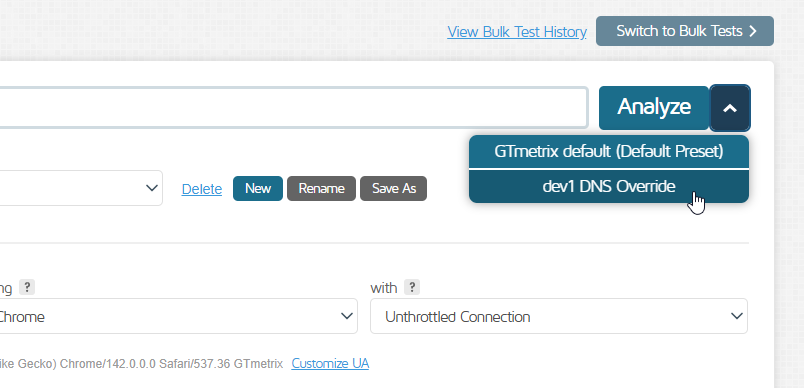
Create a custom DNS preset for quick analysis.
Learn more about how to use GTmetrix Analysis Presets.
Frequently Asked Questions (FAQ)
Here are some common questions about overring your DNS in GTmetrix.
What is DNS Override in GTmetrix?
The DNS Override feature lets you manually map a hostname to a specific IP address, allowing GTmetrix to test a site using a custom server destination.
Why would I use DNS Override?
Common use cases include:
- Testing staging or development environments
- Accessing geoblocked content
- Blocking specific resources (e.g., scripts or domains) to see how they affect performance
How does DNS work in this context?
Normally, DNS resolves a domain (e.g., example.com) to its default IP address. Overriding your DNS means replacing that with a custom IP for testing.
Who can use DNS Override?
This feature is available to all users, even on Basic/Free accounts.
How do I set up DNS Override in GTmetrix?
Go to Analysis Options -> Advanced Options -> Add a Custom DNS, then enter:
- Host (domain name)
- IP address
What happens after I set a custom DNS?
GTmetrix will route requests to the IP address you specified, instead of the domain’s default destination.
Can I override multiple domains?
You can add multiple host-to-IP mappings, depending on your testing needs.
Why does the analysis fail when testing my HTTPS site with a custom DNS?
Make sure that the target server has a valid SSL certificate for the hostname. Otherwise, GTmetrix may not be able to complete the test.
Can I save DNS Override settings for reuse?
Yes, you can save them as part of an Analysis Preset for quick access.
Fine-tune your site performance with Hourly Monitoring
Get more frequent analysis done and keep a closer eye on your site performance with Hourly monitoring.
Available with select PRO plans.
Other features include: Priority access for tests, More Locations, More Monitored Slots, More On-Demand Tests, Remote Location Monitoring, and more!