Then after merging a pull request, you might return back to your computer and pull main and remove the bug branch:
git checkout main
git pull origin main
git branch -d hotfix-bug
And then you could go back to the feature you were working on:
git checkout feature-login
git stash pop
Phew. Where were we?
The mental overhead of switching around, reloading files, reinstalling node_modules based on whatever changed, and so on, is a lot. The context switching burden is heavy.
Now, this is a basic example, but sometimes developers would work around this kind of chaos with doing some more complicated git stash commands, or even multiple clones of the same repo (I’m guilty of that one).
Until… worktrees!
Context switching with worktrees
With worktrees, you never leave your branch and you never stash, and your editor context for your original feature stays untouched.
git worktree add ../hotfix-workspace -b hotfix-bug main
This instantly creates a sibling folder called hotfix-workspace, and bases it on main, and checks out a new branch called hotfix-bug.
Now you can open that folder in a new editor window (or cd into it) and fix the bug. Your original editor window stays exactly as you left it.
You merge the pull request online just like before, and once it’s merged, you can simply delete the temporary folder.
cd ../main-project
git worktree remove ../hotfix-workspace
This is so much smoother! There’s zero risk of stash conflicts, there’s no editor disruption, and you can truly work in parallel.
So… why now?
For a really long time, worktrees were relatively unknown. Most developers had never heard of them, because either Git GUIs didn’t support them (or treated them as second-class citizens), or because they just usually followed the known pattern of feature branch, then work, then PR, then merge, then repeat.
Now, our work as developers has changed. AI has made us work in parallel more than we ever have before in the history of software development. Developers run so many sessions in parallel, and “code review culture” is growing beyond “code writing culture.”
Agents and humans can do more in parallel with worktrees. It’s the default mode for the GitHub Copilot app, and for many other modern tools.
What’s the catch?
Worktrees do solve a whole lot of issues, but there’s definitely some things to watch out for.
Dependency bloat: each worktree folder requires its own copy of your project dependencies. If you’re running npm install or pip install across multiple of them, your computer might get very full, very quickly.
Folder management: you have to delete the worktree folders, to avoid cluttering your parent directory over time. Apps like the GitHub Copilot app do often handle this for you, but it’s still something you might have to do yourself if you’re operating in the terminal yourself.
Global .gitignore requirements: if you create worktree folders inside your main repo directory, you have to manually add them to .gitignore to not accidentally track them. You can make these worktrees outside of your main repo (and many apps do that by default), but it’s worth noting.
One branch limits: Git prevents you from checking out the exact same branch in two different worktrees at the same time to prevent data corruption.
How do I use worktrees in the GitHub Copilot app?
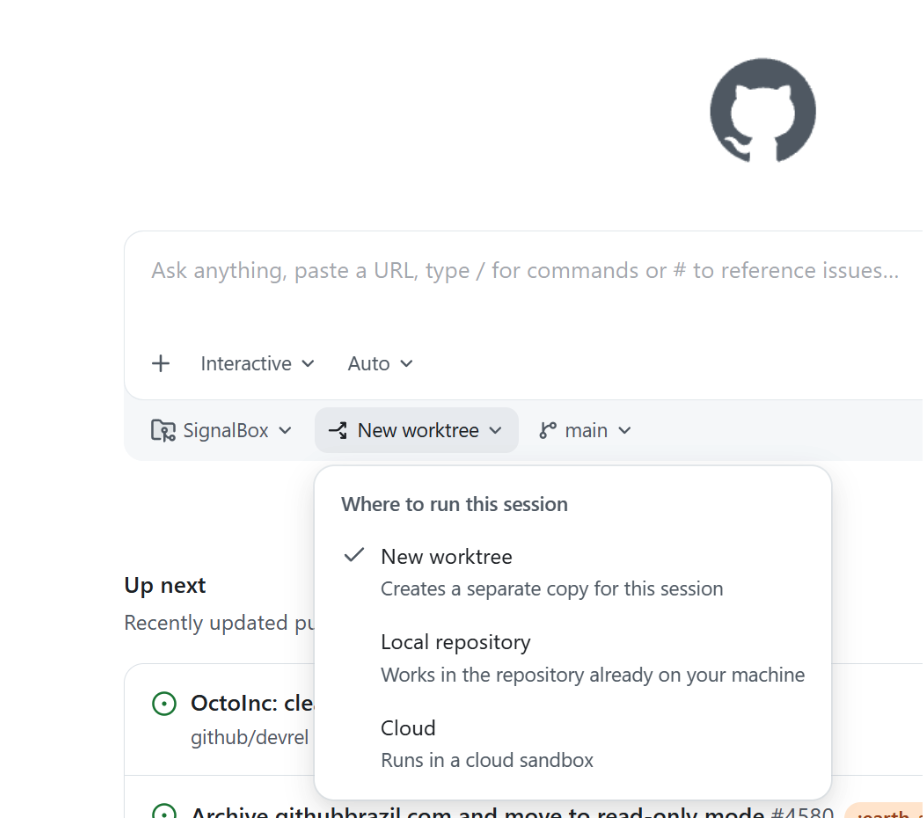
Great question! What’s awesome is… they “just work” out of the box. When you open the app, there’s a dropdown that asks you where you want to run your new session on the home screen. The default is a new worktree.
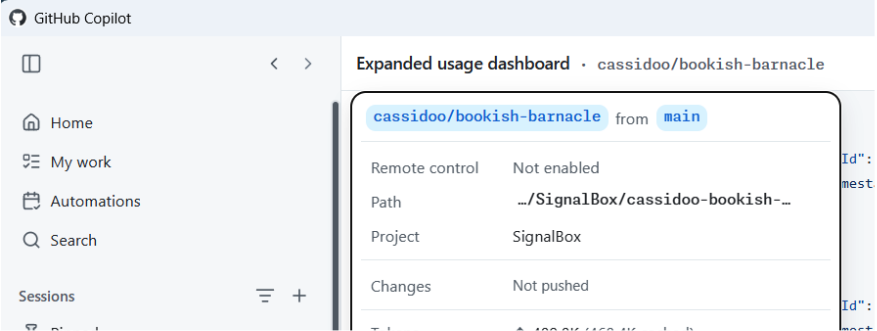
Then, once you kick off a new session, you can click the session name at the top of the app, and you’ll see the (fun!) generated name of your worktree, as well as the bath where it’s located, the project that worktree is for, and details about the changes that you’ve made.
Easy peasy lemon squeezy!
Should I use worktrees?
I will give you the most senior developer answer I can: It depends! You might prefer working in one way or another. You might not do as much work in parallel and like the mental model of branches and stashing. You might only do worktrees from now on. You might want to do both!
The world’s your oyster, and you can try them all in the GitHub Copilot app today.
Written by
Cassidy is senior director for developer advocacy here at GitHub. She enjoys building software, advising startups, and teaching developers how to build better. She has a weekly newsletter at cassidoo.co/newsletter where you can get her updates, practice coding problems, and a joke in your inbox!
Related posts
Explore more from GitHub
Docs
Everything you need to master GitHub, all in one place.