








Teachers are essential in training the next generation of software developers. In order to do your best work as an educator and support your students, you need tools that meet your unique needs and use cases. With the power of open source, you can now build the features that you would like to see in the GitHub Classroom extension for the GitHub CLI.
The GitHub CLI is a free and open source tool that brings the features of GitHub to your terminal. The GitHub Classroom extension adds powerful and easy to use commands that enhance the functionality of the GitHub CLI, specifically tailored for educators using GitHub Classroom. This post will walk you through the steps to create a new command customized to you and contribute back to the open source community!
The GitHub Classroom extension for the GitHub CLI is a Go based project. Your contributions will be made through a pull request from your personal fork of the repository. The instructions to set up your development environment and fork are described step by step in our contribution guidelines!
We acknowledge that every classroom is unique and we want to support broader personalization of the GitHub Classroom CLI. At the time of writing this tutorial, the following commands are available:
Have a feature in mind? Be sure to open an issue before you begin your work.
Looking for a way to contribute but don’t know where to start? Check out the open feature requests and bug issues in the gh-classroom repository. If you decide to work on one of these issues, assign yourself and link the issue to your pull request!
The GitHub Classroom API documentation has the most up-to-date information about the available REST endpoints. You will need to ensure that you can request the data needed for your feature from one or more of these endpoints. To make it even simpler, there is already a helper library in the project to query these endpoints.
As an example in this tutorial, let’s look at the assignment-grades command. In order to build this feature, we had to make use of the /assignment/:id/grades endpoint.
func GetAssignmentGrades(client api.RESTClient, assignmentID int) ([]AssignmentGrade, error) {
    var response []AssignmentGrade
    err := client.Get(fmt.Sprintf("assignments/%v/grades", assignmentID), &response)
    if err != nil {
        return nil, err
    }
    return response, nil
}
What if the data you need isn’t available through any of the public API endpoints? If you run into this roadblock, don’t worry, we’re here to help. Simply open an issue describing the information you need for your feature. We will triage this issue as soon as possible in order to unblock you.
Each command is contained within a Go package. Following the same example as above, the assignment-grades package is titled grades.
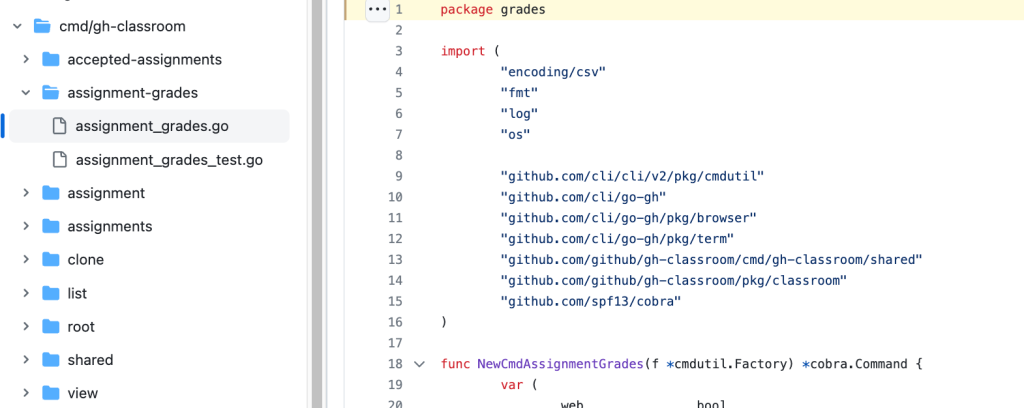
To start building your new command, create a new package directory and files from the root of your fork using the commands below:
mkdir ./cmd/gh-classroom/$my-feature-name && cd ./cmd/gh-classroom/$my-feature-name
touch $my-feature-name.go $my-feature-name-test.go
Within each of your newly created files on the first line, write package $my-feature-name to include it in your package.
It’s your time to write your shiny new feature and shine as a software developer! If you’re feeling stuck, check out the code and tests for the existing commands in the cmd/gh-classroom directory.
When you’re done coding up a storm, run the tests using the following commands from the root of your fork:
go test -v ./…
golangci-lint run
Be sure that all of your code is tested and that all tests pass before moving on to the next steps. Reviewers will require this before your changes can be merged.
In order for your feature to work in the CLI, your package needs to be included in the root package using the AddCommand helper function.
cmd.AddCommand(assignmentgrades.NewCmdAssignmentGrades(f))
Once you’re done writing your feature, you will need to commit the code and push it up to your fork. Before opening a pull request ensure that you have read the contribution guidelines to increase the likelihood of your changes being accepted. Finally, you can open a pull request against the official gh-classroom repository.
You’re almost at the finish line! At this point you can sit back and wait for our comments, request for changes, or approval. The GitHub Classroom CLI is maintained by GitHub staff and the community. We will do our best to respond in a timely manner.
Please kindly note that there may be instances where a feature is not one that we would like to support. We cannot guarantee that your feature will be approved.
If your pull request is accepted you can merge it into the main branch of gh-classroom. Next, one of our administrators will create a new release that will trigger a GitHub Action. Once the action is successfully completed, you can update the CLI in your terminal using gh extension upgrade classroom. The next time you run gh classroom -h you will see your new command.
Voila, you are now an open source contributor to the GitHub Classroom CLI!
This post walked you through the power of open source, and showed how to build custom features in the Classroom extension for the GitHub CLI. We’re thrilled that you’ve taken the time to consider contributing to this project. Your help is essential for ensuring that this tool is, and continues to be great.
We’d love to hear from you! If you have any questions or have feedback, please feel free to open an issue in the gh-classroom repository.

Get free virtual tickets to the global developer event for AI, security, and DevEx.
此内容由惯性聚合(RSS阅读器)自动聚合整理,仅供阅读参考。 原文来自 — 版权归原作者所有。


