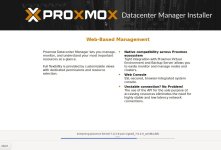
I am new to setting up Proxmox VE and PDM. I have Proxmox VE 9.2.2 installed. I setup a new VM to install PDM 1.1. I downloaded the PDM ISO and attach it to the VM. I start the installer and it always gets stuck at 66%, extracting proxmox-kernel-7.0.2-6-pve-signed_7.0.2-6_amd64.deb. The hardware that Proxmox is running on is a Dell PowerEdge R630. The drives are in a RAID10 config.
Since I am new to setting all this up any and all help to get PDM installed would be greatly appreciated.
I ran Get-FileHash "C:\Path\To\Your\file.iso" -Algorithm SHA256 in Powershell on my PC and the checksum matched. I downloaded the PDM ISO from the Proxmox website.
It has been sitting since Thursday and it is still stuck at 66%.
I am installing PDM through Proxmox VE 9.2.2. I am creating a new VM and attaching the PDM ISO, which I uploaded to the ISO Images folder in Proxmox. I then power on the VM and boot to the ISO.
I also created a bootable USB. Attached it to the server then added the USB in passthrough to the new VM. I get the same results. Stuck at 66%
I have tried pressing Ctrl+Alt+F2 and Ctrl+Alt+F3, but nothing happens (I did this while it was stuck.) I restarted the install and right after it started I pressed Ctrl+Alt+F2. It gets stuck at the same spot with no additional info.