惯性聚合 高效追踪和阅读你感兴趣的博客、新闻、科技资讯
阅读原文 在惯性聚合中打开

推荐订阅源

WordPress大学
WordPress大学
小众软件
小众软件
MongoDB | Blog
MongoDB | Blog
Hugging Face - Blog
Hugging Face - Blog
Jina AI
Jina AI
Cyber Security Advisories - MS-ISAC
Stack Overflow Blog
Stack Overflow Blog
L
LangChain Blog
大猫的无限游戏
大猫的无限游戏
量子位
A
About on SuperTechFans
G
Google Developers Blog
雷峰网
雷峰网
奇客Solidot–传递最新科技情报
奇客Solidot–传递最新科技情报
IT之家
IT之家
钛媒体:引领未来商业与生活新知
钛媒体:引领未来商业与生活新知
博客园_首页
H
Hackread – Cybersecurity News, Data Breaches, AI and More
Vercel News
Vercel News
V
Visual Studio Blog
OSCHINA 社区最新新闻
OSCHINA 社区最新新闻
博客园 - 聂微东
U
Unit 42
Apple Machine Learning Research

Proxmox Support Forum

[SOLVED] - Github Auth for Mirrors-Kernel Repo? [Automation] Mass migration tool for MS Win11/Server Proxmox GUI hang - not response is it possible to reject or quarantine spam based on conditions I set ? The PVENode task list in PVE9 is partially obscured due to the terminal font being too large. About 100% error reporting due to pveproxy.service hooks Kubernetes overlay networking breaks when upgrading from PVE 9.1 to PVE 9.2.3 Zentraler Speicher No space left on device Combine datastore and direct file archival to tape Kernel panic VFS: Unable to mount root fs on unknown-block (0,0) sobald ein 7.x Kernel verwendet wird. How to migrate disk of a VM from one ZFS to another Windows Server 2025 fails to boot after PVE 9.2 / Linux 7.0 Kernel upgrade Cannot Install Proxmox on T610 Poweredge with H700 PERC card sdn Config. gateway not reachable How to safely change domain/FQDN? Welche Filterquote erreicht ihr? NFS Share status unknown on 2 of 5 nodes Can't connect to PVE9 consoles [solved] Can't connect to PVE9 consoles [solved] [SOLVED] - Use secondary network for PVE commands Created cluster, one node storage gone BUG: proxmox mail gateway FROM = null bypass spam filtering Moving existing PBS from VMWare workstation to PVE cluster Does eBGP SDN fabric support external peering? Bug: PDM 1.1 not recognizing valid license status Proxmox GUI hang - not response PVE crashes unexpectedly Proxmox Backup Server 4.2 released! Advice
Passing Through Hardcoded Windows SLIC License from Physi...
invalid@exam · 2026-06-22 · via Proxmox Support Forum

Dear all

I am currently working on passing a hardcoded Windows SLIC license from my physical host to a Proxmox VM. I would like the VM to recognize the SLIC information so that Windows activates properly. However, I have encountered an issue where some details, such as the "Manufacturer" field, are not detected within the VM.

Here is what I have tried so far:

  1. Configured the VM with machine: q35 and bios: ovmf.
  2. Attempted to pass through SMBIOS settings using the args and smbios1 parameters in the VM configuration file.
  3. Verified that the SLIC table exists on the host system by dumping the ACPI tables.

Despite these efforts, the VM still does not recognize the manufacturer and other related SLIC fields correctly.

Questions:

  • Are there specific smbios1 settings or arguments that need to be configured to ensure that the SLIC details, especially the manufacturer, are passed correctly?
  • Has anyone successfully passed a hardcoded SLIC from a physical machine to a Proxmox VM and could share their configuration?
  • Would usingacpi_add_table or modifying OVMF variables be a potential solution?

Any insights, tips, or configuration examples would be greatly appreciated!

Thanks in advance for your help!

Best regards,
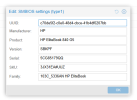
1740235145949.png

1740235167780.png

Code:

agent: 1,fstrim_cloned_disks=1
args: -acpitable file=/etc/pve/nodes/PVE01/qemu-server/slic_table
bios: ovmf
boot: order=ide0;scsi0
cores: 2
cpu: host
efidisk0: rpool-nvme:vm-100-disk-0,efitype=4m,pre-enrolled-keys=1,size=1M
hostpci0: 0000:af:01.7,device-id=0x1e30,mdev=nvidia-527,sub-device-id=0x129e,sub-vendor-id=0x10de,vendor-id=0x10de
ide0: none,media=cdrom
machine: pc-q35-9.0
memory: 32768
meta: creation-qemu=6.1.0,ctime=1639151327
name: VWS-100
net0: virtio=FA:CE:A2:71:4C:99,bridge=vmbr0,firewall=1,tag=2
numa: 1
ostype: win11
scsi0: rpool-nvme:vm-100-disk-3,discard=on,iothread=1,size=250G,ssd=1
scsihw: virtio-scsi-single
smbios1: uuid=c70de5f2-c0e0-48d4-cbce-41b4df0207bb,manufacturer=SFA=,product=SFAgRWxpdGVCb29rIDg0MCBHNQ==,version=U0JLUEY=,serial=NUNHODUxNzlRUQ==,sku=M0pYMzFFQSNVVVo=,family=MTAzQ181MzM2QU4gSFAgRWxpdGVCb29r,base64=1
sockets: 2
tags: Power
tpmstate0: rpool-nvme:vm-100-disk-2,size=4M,version=v2.0
unused0: rpool-nvme:vm-100-disk-1
vmgenid: 13c5d756-d288-4037-b43e-4773addb9d49