







In this post, I will show you how to set up Semgrep for your project, give examples of common code issues that it can detect, and provide best practices for using Semgrep in code review. By the end, you will have a better understanding of how Semgrep can improve your code review process and make your code more secure, reliable and maintainable.
Introduction to Semgrep and why it is Useful for Code Review#
Code review is an essential part of the SDLC(software development live cycle). It helps ensure that the code is correct, maintainable, secure, and follows the agreed-upon standards and conventions. However, manual code review can be time-consuming and error-prone, especially for large codebases with many contributors or long time history.
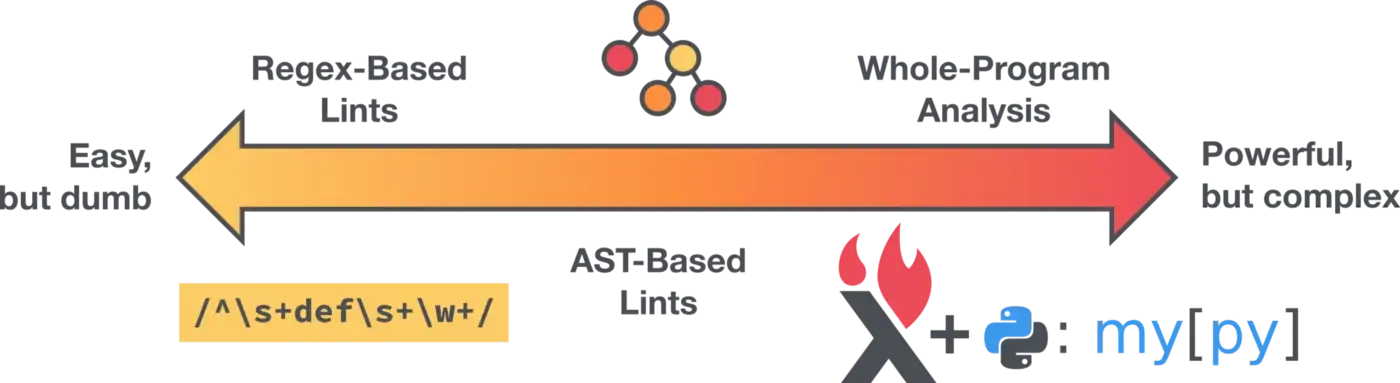
Enter Semgrep, a tool for statically analyzing code and detecting common issues. Semgrep runs mostly language-agnostic analysis on analysis-friendly IR(intermediate language) which translate by AST(abstract syntax tree) tree. This process will not generate AST tree via your compile project with dependencies like CodeQL. So semgrep can run it quick and easy to create rules to find and fix common problems in your code, such as security vulnerabilities, logical errors, and style violations.
Setting up Semgrep for Your Project#
To use Semgrep, you need to install the semgrep command-line tool on your system. The installation process varies depending on your operating system and package manager, but in general, you can use the following command:
Once you have installed Semgrep, you can use it to scan your codebase for specific patterns. For example, the following command will search for instances of the strcpy function, which is considered insecure and should not be used:
semgrep --config p/python --pattern 'strcpy(x, y)' path/to/codebash
The --config option specifies the configuration to use for the scan, and the --pattern option specifies the rule to match. In this case, I are using the p/python configuration, which includes rules for detecting common issues in Python code, and I are looking for occurrences of the strcpy function.
You can also finding more rules on the semgrep registry on your project, there are a lot of open source rules provide from semgrep community, link to registry ↗.
Once you have set up Semgrep and run a scan, you can use the results to identify and fix potential problems in your code. This can save time and effort during code review, as it allows you to automatically detect and address common issues before they are reviewed by your team.
Examples of Common Code Issues that Semgrep Can Detect#
Semgrep can detect a wide range of code issues, depending on the configuration and rules that you use. Here are some examples of common code issues that Semgrep can help you find and fix:
- Security vulnerabilities, such as SQL injection ↗ and Cross-Site Scripting (XSS) ↗ vulnerabilities, or you can use OWASP Top 10 ↗ ruleset for common web security vulnerabilities.
- Deprecated or unsafe API usage, such as the use of strcpy in C or eval in JavaScript
- Misconfgration, such as dockerfile ↗, docker-compose ↗ settings.
- Hard-coded secret, such as the secret ↗ ruleset.
- Style violations, such as inconsistent indentation, unused variables, catch default issues and overly complex expressions
- Permission issue, such as forgot add permission check. Need to write custom rules.
By using Semgrep to detect these issues, you can prevent bugs and security risks in your code and improve its overall quality. This can save time and effort during code review, as it allows you to focus on higher-level design and architecture issues instead of catching low-level mistakes.
In the next section, I will share some best practices when I using Semgrep in code review.
or create your own configuration and rules to customize Semgrep for your project. For more information, see the Semgrep documentation, link to docs ↗.
Best Practices for Using Semgrep in Code Review#
To get the most out of Semgrep in code review, you should follow these best practices:
How to Integrate Semgrep into Your Code Review Workflow#
- Set up Semgrep as part of your continuous integration (CI) pipeline, so that it automatically runs on every code change. This can help you catch potential issues early and prevent them from being merged into the main codebase.
- Use the output of Semgrep as input for your code review tool, such as GitHub Pull Requests or Gerrit. This can help you quickly identify and address the issues that Semgrep has detected.
- Use Semgrep as part of your team’s code review standards and guidelines. This can help your team members understand the expectations for code quality and avoid common pitfalls.
- Starting to write costom rules for your project. This will building you team knowledge base for your codebases, new team member can easily and fast know the reason, and avoid issues.
How to Write effective Semgrep Rules#
- Keep your rules simple and focused: avoid using complex regular expressions or matching patterns that are too broad.
- Use concrete examples to illustrate the code that the rule should match and the code that it should not match. This can help you and others understand the rule and avoid false positives or false negatives.
- Test your rules on a representative sample of your codebase before using them in code review. This can help you fine-tune the rules and make sure they work as expected.
- If possible provide fix suggestion or direct using fix field in the rule for time saving.
- Document your rules and share them with your team. This can help others understand the rationale behind the rules and improve the consistency of your codebase.
By following these best practices, you can make Semgrep an integral part of your code review process and improve the overall quality of your code. In the next section, I will discuss some tips and tricks for getting the most out of Semgrep.
Tips and Tricks for Getting the Most out of Semgrep#
To get the most out of Semgrep, here are some tips and tricks that you can use:
- Use the
--severityoption to filter the output of Semgrep based on the severity of the issues that it detects. This can help you focus on the most important or critical issues first. - Use the
--metrics offor set environment variablesSEMGREP_SEND_METRICS=offif you not want to send anything to Semgrep server, avoiding the information exposure. - Use the
--json,--junit-xmlor--sarifas output, can easily to integrate your workflow. - Use the
--autofixwith simple code style ruleset as lint, run it in your team member’s pre-commit hook.
By using these tips and tricks, you can customize Semgrep to fit your specific needs and workflows, and get even more value from it. In the next and final section, I will discuss the conclusion and next steps for improving your code review process with Semgrep.
Conclusion and next Steps for Improving Your Code Review Process with Semgrep#
In this post, I have shown you how to use Semgrep to improve your code review process. I have discussed the benefits of using Semgrep, the steps for setting it up, the types of code issues that it can detect, and the best practices for using it in code review. I have also provided some tips and tricks for getting the most out of Semgrep.
By using Semgrep in your code review process, you can save time and effort, improve the quality of your code, and prevent bugs and security risks. If you want to learn more about Semgrep and how it can help you, here are some next steps that you can take:
- Read the Semgrep documentation to learn more about the features and capabilities of Semgrep, link to docs ↗.
- Try Semgrep on your own codebase to see how it works and what it can find.
- Learning how to write semgrep rules on official tutorial, link to learning center ↗.
- Join the Semgrep community to ask questions, share experiences, and contribute to the development of Semgrep, Slack ↗, Twitter ↗.
I hope that this post has been helpful and that you will consider using Semgrep in your code review process. Happy coding!