







After a number of years running benchmarks on various single board computers for reviews and curiosity, I realised I needed to make a change. With life taking up more and more time, and priorities changing in certain areas, I couldn’t continue in my old, inefficient ways..
Sure, once you run the benchmark itself it’s (mostly) set-and-forget, but the configuration of the operating system, sourcing the benchmarks, setting them up, and then running the next when one finishes is rather tedious at scale.
If I wanted to continue writing reviews and articles on SBCs, I needed to change that, and that’s where sbc.compare comes in.

sbc.compare is the outcome of me deciding a long, long time ago that I should create proper automation and data storage for everything I do. Google Sheets is really fun (said nobody ever) for manual data entry and whilst I’d love to continue doing that, automation has cut testing time down from a couple of days to a matter of hours, and best of all? I don’t have to do a thing. You may already have seen data from it in my recent ArmSoM AIM7 Review, the graphs there are generated using data from the new website!
Now, working on and off for 9 months to save a few hours per benchmark may sound like insanity but on launch I have 80 single board computers available for comparison, so if we say the average benchmark run is now 4 hours (down from 48 from start to finish) then 44hrs x 80 test runs should mean I’ve saved about 146 days. Still not quite 9 months but stick with me..
I started out with the BASH scripts to automate the setup, sourcing of tests, and then the running/result parsing. Once I had that running, the database was put together to store everything and I thought “hang on, this would probably be useful for others too, it can’t be that hard to stick a frontend over this”.
The initial idea was just to have the previously mentioned integration for my website. Run tests, generate quick graphs, and focus on the fun bit, the rambling nonsense that you see before you.
Well, it didn’t quite turn out that way thanks to life but we got there in the end, and I learned a lot along the way!
This won’t be a deep dive as I go into that a little more on the sbc.compare testing methodology page, but in essence, I have a workbench in my office with 3 3D printed shrouds for Noctua industrial fans, TC66 USB-C power monitors, and Raspberry Pi’s 45W USB-C PSUs (the latter were released just at the right time!)
We have a 10Gbit iPerf3 endpoint (running on a LattePanda Mu) and everything goes through my lovely Ubiquiti network setup, though WiFi isn’t something I’ve included in the 1st set of tests. Perhaps in round 2, everything is there for it in the tests/backend!
Other than that, I make liberal use of the big heatsinks from the Dickson Industries Pi 4/CM4 passive heatsink/cases with thermal pads to ensure that there’s no thermal throttling at any point.
As a disclaimer though, I’ve tested 80 boards in the space of a couple of months. I’ve looked at every set of results that go through the site, but it’s still possible I’ve made a mistake somewhere, I’m still human myself! If you spot something strange, let me know.
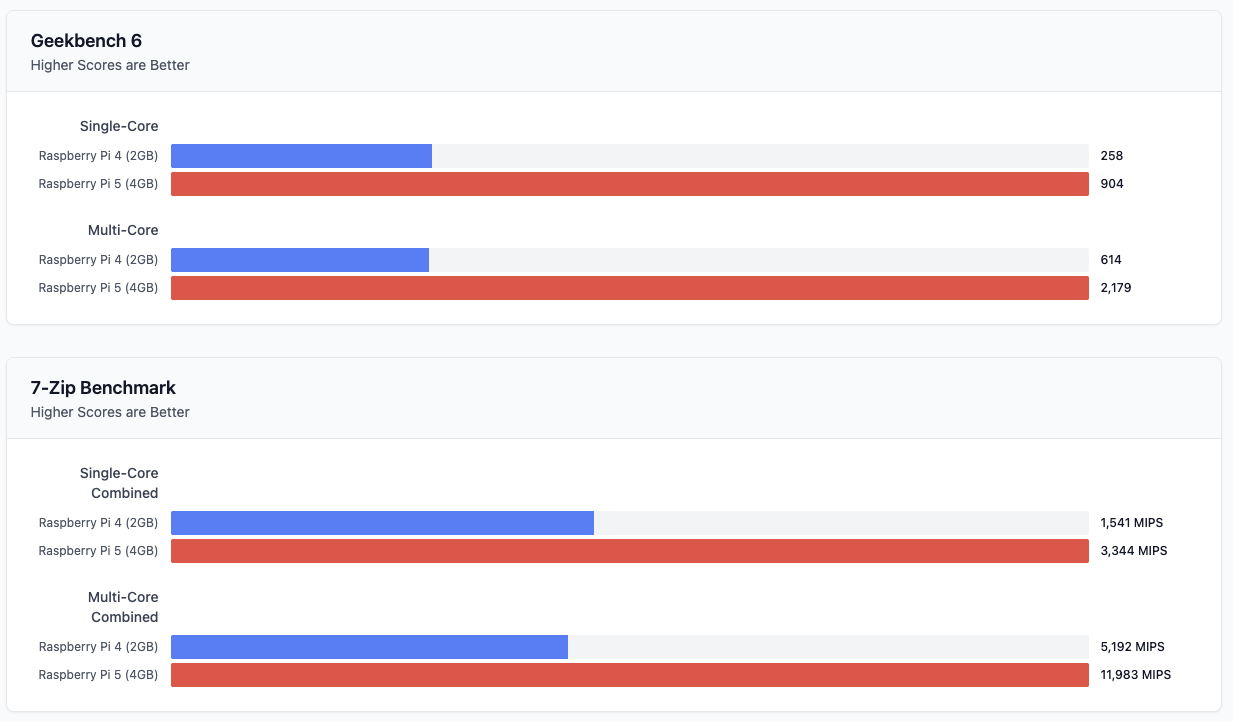
I could have gone crazy trying to come up with overall scores, awards, and other flashy metrics but at the end of the day, I just wanted something to store and view my data. The comparison pages (such as this Raspberry Pi 4 vs Raspberry Pi 5 comparison) show some easy to digest numbers at the top, but if you scroll down, you can open up a table with all of the data. It’s almost overwhelming at times.

I always wanted to keep my opinions/thoughts here and have sbc.compare be somewhere to go and get the data quickly. Hopefully you guys will agree with me, but I think the site serves its purpose. That’s not to say that I don’t have additional features and ideas for it, because I do, and some are almost ready to be unleashed!
For now, the sbc.compare enables you to:
Whilst 80 is the current count, a few boards sadly let out the magic smoke during setup so replacements are on the way. On top of that, we already have a handful of boards on the way from vendors keen to get their SBCs up for comparison which feels both crazy, and validating at the same time given it was purely off the back of an early preview.
Other than that, I’d love to hear from you guys about why you’re comparing SBCs, and what you’re using them for so that I can add new tests that are relevant to you. I really wanted to include GPU/NPU bits in the 1st run of testing but the amount of work to handle all of the individual setups and ensuring that things were somewhat comparable was simply too much work to undertake.
I already have some more specific memory-related ideas, as well as a note to look into tests that would help with those looking to compare the plethora of boards that seem to be coming out recently (or is it just Radxa skewing that in my brain and I’m seeing things) with multiple NICs for heavier network use.
To finish this section off, the reviews and articles here on bret.dk are going nowhere (au contraire, mes amis) and will be coming a little more frequently. The updated data and integration I have now means I can focus on writing, as well as updating existing articles with fresh data!
The foundations for sbc.compare were built for myself, but I hope that someone out there will find it useful. It’s been a source of great pleasure and learning over the last few months, and whilst there’ll always be things to tweak and add, the foundations mean that I’m a great place to keep this going.
If you have any feedback or ideas to make things more useful, let me know by emailing me at [email protected] or by tagging/DMing either @bretweber or @sbccompare on X!
Likewise, if you’re a vendor that wants to get either your back catalogue, or latest and greatest up on the website for comparison, you can do the same <3

Bret has worked with Raspberry Pi computers for almost 10 years now and in that time he's benchmarked and tested over 30 Single Board computers. In his day job, he's a systems administrator for a large cloud computing provider.
此内容由惯性聚合(RSS阅读器)自动聚合整理,仅供阅读参考。 原文来自 — 版权归原作者所有。