


Imagine this horror story: you hand an AI agent an API key and walk away. The agent gets stuck in a loop overnight and makes thousands of calls to a paid LLM before you notice. Nothing stops it.
A person clicks a few times a minute, while an agent loops, retries, fans out, and keeps going while you're asleep. Every one of those calls consumes tokens, puts load on something downstream, and ultimately costs you money.
The question isn't only whether an agent can call an API. That's important, but you also need to ask who stops the agent when it goes wrong. That control can't live inside the agent because a misbehaving agent is the last thing you'd trust to limit itself. The limit has to live somewhere else.
In this post, I'll use agentgateway to put a token budget in front of an OpenAI model. We'll start with a local rate limit, show how it breaks when the gateway scales to multiple replicas, and then replace it with one shared budget that applies across the whole gateway fleet.
The examples use OpenAI's gpt-4o-mini and a deliberately small budget of 150 tokens per minute, so running the demo costs a fraction of a cent. But the same approach can be used for other providers, models, and token budgets.
Traditional APIs are often rate limited by request count—for example, 100 requests per minute. That works when requests have roughly the same cost, but LLM requests can vary significantly.
One request might ask for a one-word answer, while another sends a long context window and generates several pages of output. Counting both as one request doesn't tell you much about cost. For LLM traffic, the useful unit is the number of tokens. This includes prompt and completion tokens consumed by the request.
This is where a gateway helps. Every call already passes through it, and agentgateway understands LLM request and response formats, including token usage. That makes it a natural place to enforce the budget.
There are two ways to keep the counter:
Rendering diagram…
Both configurations say "150 tokens per minute," but only one means 150 tokens across the whole deployment.
Before we start, you'll need:
You can get all files used in the example from the demo repository.
Install agentgateway and check that the binary is available:
curl -sL https://agentgateway.dev/install | bash
agentgateway --version
Then export your OpenAI API key:
export OPENAI_API_KEY='sk-...'
Let's start with one gateway and a local budget of 150 tokens per minute. The following configuration creates an HTTP listener on port 4000, routes requests to gpt-4o-mini, and attaches a token-based local rate limit to the route:
# gateway-local.yaml
binds:
  - port: 4000
    listeners:
      - protocol: HTTP
        routes:
          - name: llm
            policies:
              localRateLimit:
                - maxTokens: 150
                  tokensPerFill: 150
                  fillInterval: 60s
                  type: tokens
              backendAuth:
                key: "$OPENAI_API_KEY"
            backends:
              - ai:
                  name: openai
                  provider:
                    openAI:
                      model: gpt-4o-mini
The local limiter uses a token bucket. maxTokens is the bucket capacity, tokensPerFill is the number of tokens added on each refill, and fillInterval controls how often that refill happens.
Start the gateway in one terminal:
agentgateway -f gateway-local.yaml # listens on :4000; leave it running
In a second terminal, send a series of chat completions through it. The load script sends an x-agent-id header and prints the HTTP status, tokens used by the response, and the running total:
./load.sh 4000 scraper 12
The load script and gateway configurations are available in the demo repository.
The exact token count varies slightly between responses, but the output looks like this:
[scraper @ :4000] req  1  ->  HTTP 200   used: 38   spent: 38   remaining: —
[scraper @ :4000] req  2  ->  HTTP 200   used: 40   spent: 78   remaining: —
...
[scraper @ :4000] req  N  ->  HTTP 200   used: 39   spent: 155  remaining: —
[scraper @ :4000] req N+1 ->  HTTP 429   used: n/a  spent: 155  remaining: 0
The request that pushes the total over the budget still completes. Once its usage has been charged, subsequent requests get a 429 Too Many Requests response. We'll come back to why that happens later.
With one gateway, this looks correct. The agent consumes the budget and then gets blocked.
In production, you usually run more than one gateway behind a load balancer. To see what happens, start a second instance with the same configuration on port 4001 in a third terminal:
ADMIN_ADDR=localhost:15100 \
STATS_ADDR='[::]:15120' \
READINESS_ADDR='[::]:15121' \
agentgateway -f gateway-local-b.yaml    # listens on :4001; leave it running
The environment variables give the second process its own admin, metrics, and readiness listeners. Without them, both standalone gateways try to bind the default management ports (15000, 15020, and 15021), and the second process exits with an "address already in use" error.
From the load-generator terminal, send the same agent to Gateway B:
./load.sh 4001 scraper 12
[scraper @ :4001] req  1  ->  HTTP 200   used: 38   spent: 38
[scraper @ :4001] req  2  ->  HTTP 200   used: 40   spent: 78
...
The same agent has a full budget again. Nothing from the first gateway carried over because the counters live in separate processes.
Rendering diagram…
A local limit isn't a limit on the agent. It's a limit per copy of the gateway. With two replicas, a 150-token limit can become 300. With ten replicas, it can become 1,500. The budget changes when the deployment scales, even though nobody changed the rate-limit configuration.
Local rate limiting is still useful for protecting an individual process from short traffic spikes. It just isn't the right mechanism for a fleet-wide quota or a customer budget.
To make the limit independent of the number of gateway replicas, we need to move the counter out of the gateway. Agentgateway supports the Envoy rate-limit gRPC protocol, so it can use any compatible external rate-limit service.
For this example, I'll use Envoy's reference rate-limit service with Redis as its backing store:
Rendering diagram…
The gateway still decides which identity and cost to send. The rate-limit service matches that identity to a rule, while Redis keeps the shared counter.
Create a Docker Compose file for Redis and the rate-limit service:
# docker-compose.yml
services:
  redis:
    image: redis:7-alpine
    ports: ["6379:6379"]

  ratelimit:
    image: envoyproxy/ratelimit:master
    command: ["/bin/ratelimit"]
    depends_on: [redis]
    ports: ["8081:8081"]
    environment:
      REDIS_SOCKET_TYPE: tcp
      REDIS_URL: redis:6379
      RUNTIME_ROOT: /data
      RUNTIME_SUBDIRECTORY: ratelimit
      RUNTIME_WATCH_ROOT: "false"
      USE_STATSD: "false"
    volumes:
      - ./ratelimit-config:/data/ratelimit/config
The actual budgets live in the rate-limit service configuration. This rule gives every agent 150 tokens per minute and gives trusted-agent a larger 5,000-token budget:
# ratelimit-config/config.yaml
domain: agentgateway
descriptors:
  - key: agent
    rate_limit:
      unit: minute
      requests_per_unit: 150      # 150 tokens/min per agent

  - key: agent
    value: trusted-agent
    rate_limit:
      unit: minute
      requests_per_unit: 5000
The field is named requests_per_unit because this is a general-purpose rate limit service. Agentgateway sends the token cost for each LLM response, so each unit in this rule represents one LLM token rather than one HTTP request.
The gateway configuration stays mostly the same. Replace localRateLimit with remoteRateLimit, point it at the shared service, and add a descriptor that extracts the agent identity from the request:
# gateway-a.yaml (gateway-b.yaml is identical except for port: 4001)
binds:
  - port: 4000
    listeners:
      - protocol: HTTP
        routes:
          - name: llm
            policies:
              remoteRateLimit:
                host: localhost:8081
                domain: agentgateway
                descriptors:
                  - entries:
                      - key: agent
                        value: 'request.headers["x-agent-id"]'
                    type: tokens
              backendAuth:
                key: "$OPENAI_API_KEY"
            backends:
              - ai:
                  name: openai
                  provider:
                    openAI:
                      model: gpt-4o-mini
request.headers["x-agent-id"] is a Common Expression Language (CEL) expression. It reads the header and sends a descriptor such as agent=scraper to the rate-limit service. The descriptor key and the domain must match the values in the service configuration.
Bring up Redis and the rate-limit service:
docker compose up -d
docker compose ps
Start Gateway A in another terminal:
agentgateway -f gateway-a.yaml # listens on :4000; leave it running
Start Gateway B in a third terminal:
ADMIN_ADDR=localhost:15100 \
STATS_ADDR='[::]:15120' \
READINESS_ADDR='[::]:15121' \
agentgateway -f gateway-b.yaml          # listens on :4001; leave it running
Now drain the scraper budget through the first gateway and send another request through the second:
./load.sh 4000 scraper 10
./load.sh 4001 scraper 10
[scraper @ :4000] req  N  ->  HTTP 200   used: 41   spent: 154
[scraper @ :4000] req N+1 ->  HTTP 429   used: n/a  spent: 154
...
[scraper @ :4001] req  1  ->  HTTP 429   used: n/a  spent: 0
The first request sent to Gateway B is rejected immediately. Both gateways are checking the same scraper counter, so changing replicas no longer gives the agent a fresh budget.
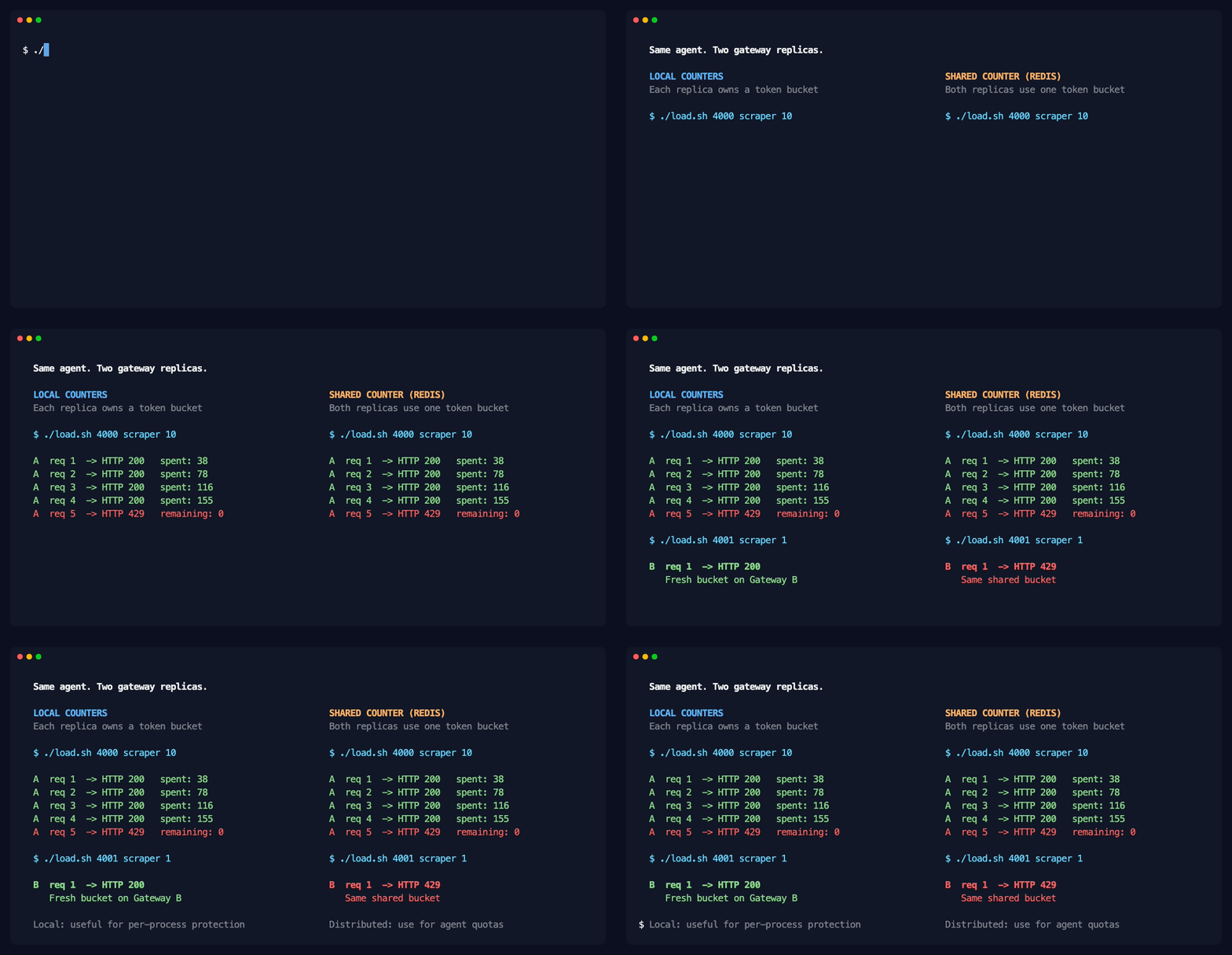
The side-by-side run highlights the difference: Gateway B starts with a fresh local bucket, but the distributed setup keeps enforcing the budget consumed through Gateway A.
The descriptor also gives each agent its own counter. A different agent starts with a full budget, while the trusted agent gets the larger limit from the service configuration:
./load.sh 4001 analyst 4         # different agent, separate budget
./load.sh 4001 trusted-agent 8   # 5,000-token budget
Different agents, different limits, configured in one place and enforced by every gateway replica.
There are three implementation details that matter when you move this pattern from a demo into production.
The gateway gets the authoritative token count from the LLM response. This means the request that pushes an agent over its budget can still complete. Subsequent requests receive a 429 after that usage has been charged.
For example, if an agent has 100 tokens left and the next response consumes 150, that response is returned to the agent. Its following request is blocked until the window resets. Streaming responses work the same way because the total isn't known until the stream completes.
Agentgateway can also estimate prompt tokens before forwarding a request when tokenization is enabled on the AI backend. It still has to reconcile that estimate with the actual usage returned by the model.
I used an x-agent-id header to keep the demo easy to follow, but a caller can put any value in that header. An agent could call itself trusted-agent and get the larger budget.
In production, derive the descriptor from an identity the gateway has verified, such as an API key or a validated JWT claim. For example, claims["sub"] uses the subject from a JWT after authentication. The rate-limit architecture stays the same; only the CEL expression that supplies the identity changes.
By default, agentgateway fails closed if the remote rate-limit service is unavailable. The request is denied with a 500 Internal Server Error instead of being sent to the model without metering.
You can set failureMode: failOpen to keep traffic flowing during a limiter outage. That trades cost enforcement for availability. For a public API, that might be the right choice. For an LLM budget, failing closed is usually the safer default.
An AI agent is a load generator holding your credentials. Putting a gateway in front of it gives you one place to authenticate calls, observe token usage, and stop a runaway loop before it turns into an unexpected bill.
The important part is where the counter lives. A local rate limit protects one gateway process, but the effective budget grows with every replica. A distributed rate limit keeps one counter for the agent and makes the budget hold no matter which gateway handles the next request.
I used the standalone agentgateway binary and OpenAI in this example, but the same remoteRateLimit policy can sit in front of other LLM providers, MCP tools, or regular HTTP traffic. On Kubernetes, the same idea is configured through an AgentgatewayPolicy: extract a trusted identity, choose requests or tokens as the unit, and point every gateway replica at the same rate-limit service.
Stop each agentgateway process with Ctrl+C, then remove the shared services:
此内容由惯性聚合(RSS阅读器)自动聚合整理,仅供阅读参考。 原文来自 — 版权归原作者所有。