惯性聚合 高效追踪和阅读你感兴趣的博客、新闻、科技资讯
阅读原文 在惯性聚合中打开

推荐订阅源

MyScale Blog
MyScale Blog
F
Fortinet All Blogs
Cyber Security Advisories - MS-ISAC
D
Docker
freeCodeCamp Programming Tutorials: Python, JavaScript, Git & More
爱范儿
爱范儿
V
Visual Studio Blog
Last Week in AI
Last Week in AI
WordPress大学
WordPress大学
aimingoo的专栏
aimingoo的专栏
小众软件
小众软件
L
LangChain Blog
Vercel News
Vercel News
阮一峰的网络日志
阮一峰的网络日志
IT之家
IT之家
P
Proofpoint News Feed
博客园_首页
D
DataBreaches.Net
T
The Blog of Author Tim Ferriss
The GitHub Blog
The GitHub Blog
酷 壳 – CoolShell
酷 壳 – CoolShell
C
Check Point Blog
Engineering at Meta
Engineering at Meta
Microsoft Azure Blog

Yesterday17's Blog

2026 新年解密红包 / Melody Flag | Yesterday17's Blog 谈谈 Iori 的设计思路(二):如何实现一个 Showroom 录制工具? | Yesterday17's Blog 谈谈 Iori 的设计思路(一):从 Nico Timeshift 说起 | Yesterday17's Blog Iori Minyami 0.1.0 发布 | Yesterday17's Blog 2025 新年解密红包 / Melody Flag | Yesterday17's Blog 使用 Cloudflare Warp 解决罗森票务的海外登录问题 | Yesterday17's Blog How To Blog 04: The Astro v5 Era | Yesterday17's Blog 谈谈 tokio::select! 的公平性 | Yesterday17's Blog Learning Pingora 05 - Connect with TLS | Yesterday17's Blog Leaving Bytedance | Yesterday17's Blog 大橋彩香 AsiaTour「Reflection」上海公演 个人向记录 & Repo | Yesterday17's Blog Recoving from burnout - What happened? | Yesterday17 Yubikey 重建手册 | Yesterday17's Blog How To Blog 03: Heimus | Yesterday17's Blog 🪧 Blog Migration Accouncement | Yesterday17's Blog Learn Your IDE - VSCode 是如何仅重启插件的? | Yesterday17's Blog How To Blog 02: Astro❤️Password | Yesterday17's Blog How To Blog 01: Why, How, and the Future | Yesterday17's Blog Learning Pingora 04 - Establish L4 Connection | Yesterday17's Blog Learning Pingora 03 - Upstreams and Peers | Yesterday17's Blog Learning Pingora 02 - A Simple HTTP Server | Yesterday17's Blog Learning Pingora 01 - Getting Started | Yesterday17's Blog 2024 新年解密红包 / Melody Flag | Yesterday17's Blog 向新的一年飞驰——记录 2023 | Yesterday17's Blog 「サクラノ刻」对话选摘(2) | Yesterday17's Blog PGP Key Revocation 注销声明 | Yesterday17's Blog 「サクラノ刻」对话选摘(1) | Yesterday17's Blog 2023 新年解密红包 / Melody Flag | Yesterday17's Blog 『蒼の彼方のフォーリズム』通关感想 | Yesterday17's Blog 单显卡直通教程 | Yesterday17's Blog
一次 HSTS 策略配置的排错之旅 | Yesterday17's Blog
Yesterday17 · 2020-09-04 · via Yesterday17's Blog

这几天才发现,mail.mmf.moe 的服务不知道为什么上不去了。出错的地址是 https://mail.mmf.moe,这令我大惑不解。

尝试了一下 curl,发现 http 没有问题,https 就是不行。

http 结果:

$ curl -v http://mail.mmf.moe

* Trying 172.217.24.19:80...

* Connected to mail.mmf.moe (172.217.24.19) port 80 (#0)

> GET / HTTP/1.1

> Host: mail.mmf.moe

> User-Agent: curl/7.72.0

> Accept: */*

>

* Mark bundle as not supporting multiuse

< HTTP/1.1 301 Moved Permanently

< Location: https://mail.google.com/a/mmf.moe

< Date: Fri, 04 Sep 2020 09:51:17 GMT

< Content-Type: text/html; charset=UTF-8

< Server: ghs

< Content-Length: 230

< X-XSS-Protection: 0

< X-Frame-Options: SAMEORIGIN

<

<HTML><HEAD><meta http-equiv="content-type" content="text/html;charset=utf-8">

<TITLE>301 Moved</TITLE></HEAD><BODY>

<H1>301 Moved</H1>

The document has moved

<A HREF="https://mail.google.com/a/mmf.moe">here</A>.

</BODY></HTML>

* Connection #0 to host mail.mmf.moe left intact

https 的结果:

$ curl -v https://mail.mmf.moe

* Trying 172.217.24.19:443...

* Connected to mail.mmf.moe (172.217.24.19) port 443 (#0)

* ALPN, offering h2

* ALPN, offering http/1.1

* successfully set certificate verify locations:

* CAfile: /etc/ssl/certs/ca-certificates.crt

CApath: none

* TLSv1.3 (OUT), TLS handshake, Client hello (1):

* OpenSSL SSL_connect: SSL_ERROR_SYSCALL in connection to mail.mmf.moe:443

* Closing connection 0

curl: (35) OpenSSL SSL_connect: SSL_ERROR_SYSCALL in connection to mail.mmf.moe:443

既然如此,那不如直接用 http?何必跳转到 https 呢?我尝试了一下,但是无论如何他都会自动跳转到 https。通过 Developer Tools,我发现跳转的状态码是 307

当时没有截图,只能拿历史记录顶了(
当时没有截图,只能拿历史记录顶了(

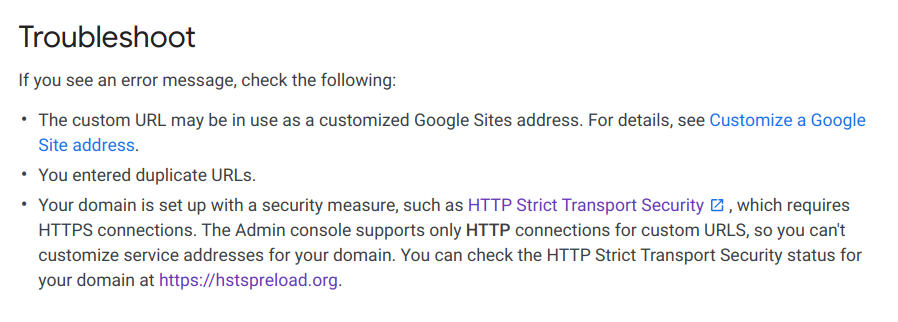
不过这个痕迹并没有带来什么线索。于是我找到了 GSuite 关于自定义域名的帮助页面[1]

看到最后一条 Troubleshoot,官方明确表示不支持 https 跳转,并且指出了 HSTS 可能存在的问题。于是我想起来我之前好像在 Cloudflare 那里配置过 HSTS 相关的内容。

Cloudflare

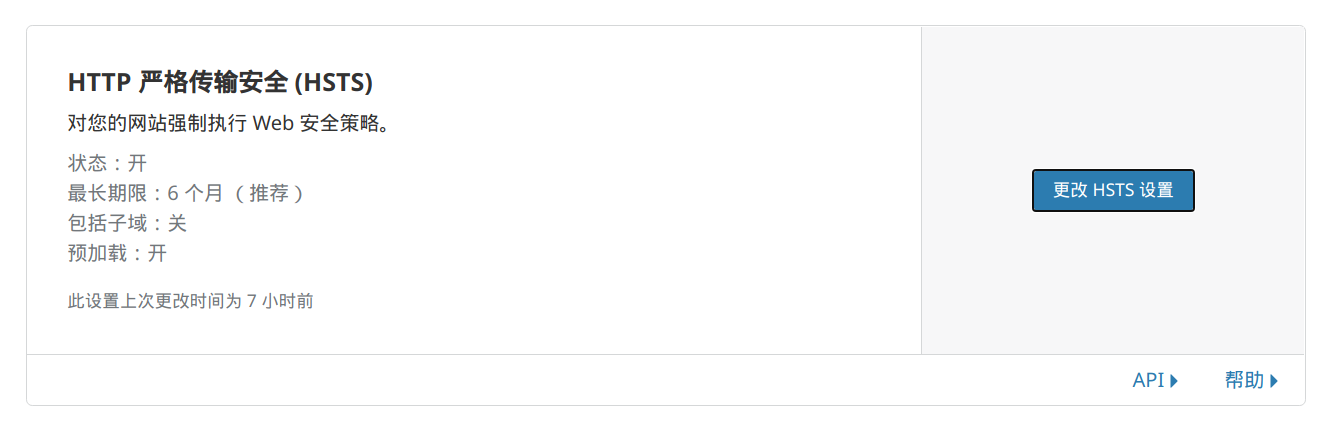
来到 Cloudflare,在 SSL/TLS、边缘证书,找到 HTTP 严格传输安全

可以看到这里有一项名为包括子域,之前是开启的,我选择把它关闭。在关闭之后,无痕模式的浏览恢复了正常,但正常状态下依然无解。于是这时候,我想到了缓存的存在。

清理 HSTS 缓存

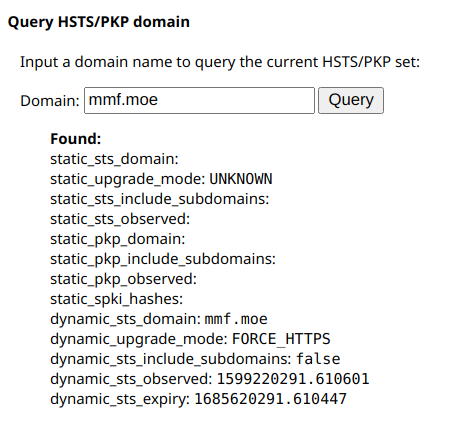
来到 chrome://net-internals/#hsts,拉到最下面,清除 mmf.moe 的内容:

然后再上去查询,可以看到 dynamic_sts_include_subdomainsfalse,这时候就可以正常跳转了。