


惯性聚合 高效追踪和阅读你感兴趣的博客、新闻、科技资讯
阅读原文 在惯性聚合中打开

推荐订阅源

P
Proofpoint News Feed
博客园 - 聂微东
Application and Cybersecurity Blog
MyScale Blog
MyScale Blog
罗磊的独立博客
H
Help Net Security
L
LangChain Blog
T
Threat Research - Cisco Blogs
量子位
S
Securelist
Last Week in AI
Last Week in AI
L
Lohrmann on Cybersecurity
T
The Exploit Database - CXSecurity.com
P
Privacy International News Feed
The Hacker News
The Hacker News
Vercel News
Vercel News
D
Darknet – Hacking Tools, Hacker News & Cyber Security
C
Cybersecurity and Infrastructure Security Agency CISA
T
The Blog of Author Tim Ferriss
T
Threatpost
Security Latest
Security Latest
P
Palo Alto Networks Blog
Microsoft Security Blog
NISL@THU
NISL@THU
F
Full Disclosure
WordPress大学
WordPress大学
cs.AI updates on arXiv.org
Stack Overflow Blog
Stack Overflow Blog
C
Check Point Blog
Hacker News - Newest:
Hacker News - Newest: "LLM"
酷 壳 – CoolShell
酷 壳 – CoolShell
H
Heimdal Security Blog
J
Java Code Geeks
Recorded Future
Recorded Future
Hugging Face - Blog
Hugging Face - Blog
G
GRAHAM CLULEY
Know Your Adversary
Know Your Adversary
K
KPMG report finds enterprise disconnect between AI and its ROI | CIO
阮一峰的网络日志
阮一峰的网络日志
U
Unit 42
B
Blog RSS Feed
月光博客
月光博客
C
Cisco Blogs
V
Visual Studio Blog
D
DataBreaches.Net
H
Hacker News: Front Page
博客园 - 叶小钗
N
News and Events Feed by Topic
爱范儿
爱范儿
A
Arctic Wolf

孙琪峥

端午安康!博客进行了主题升级 - 孙琪峥 群晖NAS MySQL无法外部连接的解决办法 - 孙琪峥 - 比花言巧语更难的是学会闭嘴 群晖NAS MySQL无法外部连接的解决办法 - 孙琪峥 - 比花言巧语更难的是学会闭嘴 “npm warn Unknown project config "electron_mirror". This will stop working in the next major version of npm”的解决方案 - 孙琪峥 “npm warn Unknown project config "electron_mirror". This will stop working in the next major version of npm”的解决方案 - 孙琪峥 鱼贝贝文件信息批量提取神器v1.3.0.250118 免费|绿色免安装|全功能离线版 - 孙琪峥 - 比花言巧语更难的是学会闭嘴 鱼贝贝文件信息批量提取神器v1.3.0.250118 免费|绿色免安装|全功能离线版 - 孙琪峥 - 比花言巧语更难的是学会闭嘴 phpstudy启动报错nginx: [emerg] invalid number of arguments in "include" directive in 的解决方法 - 孙琪峥 phpstudy启动报错nginx: [emerg] invalid number of arguments in "include" directive in 的解决方法 - 孙琪峥 微信小程序《隐私政策》范文参考 - 孙琪峥 - 比花言巧语更难的是学会闭嘴 微信小程序《隐私政策》范文参考 - 孙琪峥 - 比花言巧语更难的是学会闭嘴 electron开发中使用nodemon进行热更新的方法 - 孙琪峥 - 比花言巧语更难的是学会闭嘴 electron开发中使用nodemon进行热更新的方法 - 孙琪峥 - 比花言巧语更难的是学会闭嘴 electron开发,文件无法拖放到渲染窗口的一种奇怪情况,附原因和解决方案 - 孙琪峥 - 比花言巧语更难的是学会闭嘴 moment.js日期时间插件,设置中文语言的方法 - 孙琪峥 - 比花言巧语更难的是学会闭嘴 moment.js日期时间插件,设置中文语言的方法 - 孙琪峥 - 比花言巧语更难的是学会闭嘴 使用npm安装electron失败的可行解决方案 - 孙琪峥 - 比花言巧语更难的是学会闭嘴 使用npm安装electron失败的可行解决方案 - 孙琪峥 - 比花言巧语更难的是学会闭嘴 Windows11系统cmd终端提示“命令提示符已被系统管理员停用”的一种可行解决方案 - 孙琪峥 - 比花言巧语更难的是学会闭嘴 Windows11系统cmd终端提示“命令提示符已被系统管理员停用”的一种可行解决方案 - 孙琪峥 - 比花言巧语更难的是学会闭嘴
electron开发,文件无法拖放到渲染窗口的一种奇怪情况,附原因和解决方案 - 孙琪峥 - 比花言巧语更难的是学会闭嘴
admin · 2024-01-20 · via 孙琪峥

这两天又遇到一个奇怪情况,按理来说,electron应该是能支持几乎所有HTML5页面特性的,但是网页中常见的文件拖拽上传,也就是HTML5中的drop相关事件,封装到electron程序后,无法被触发执行。

下图就是这种奇怪的现象。
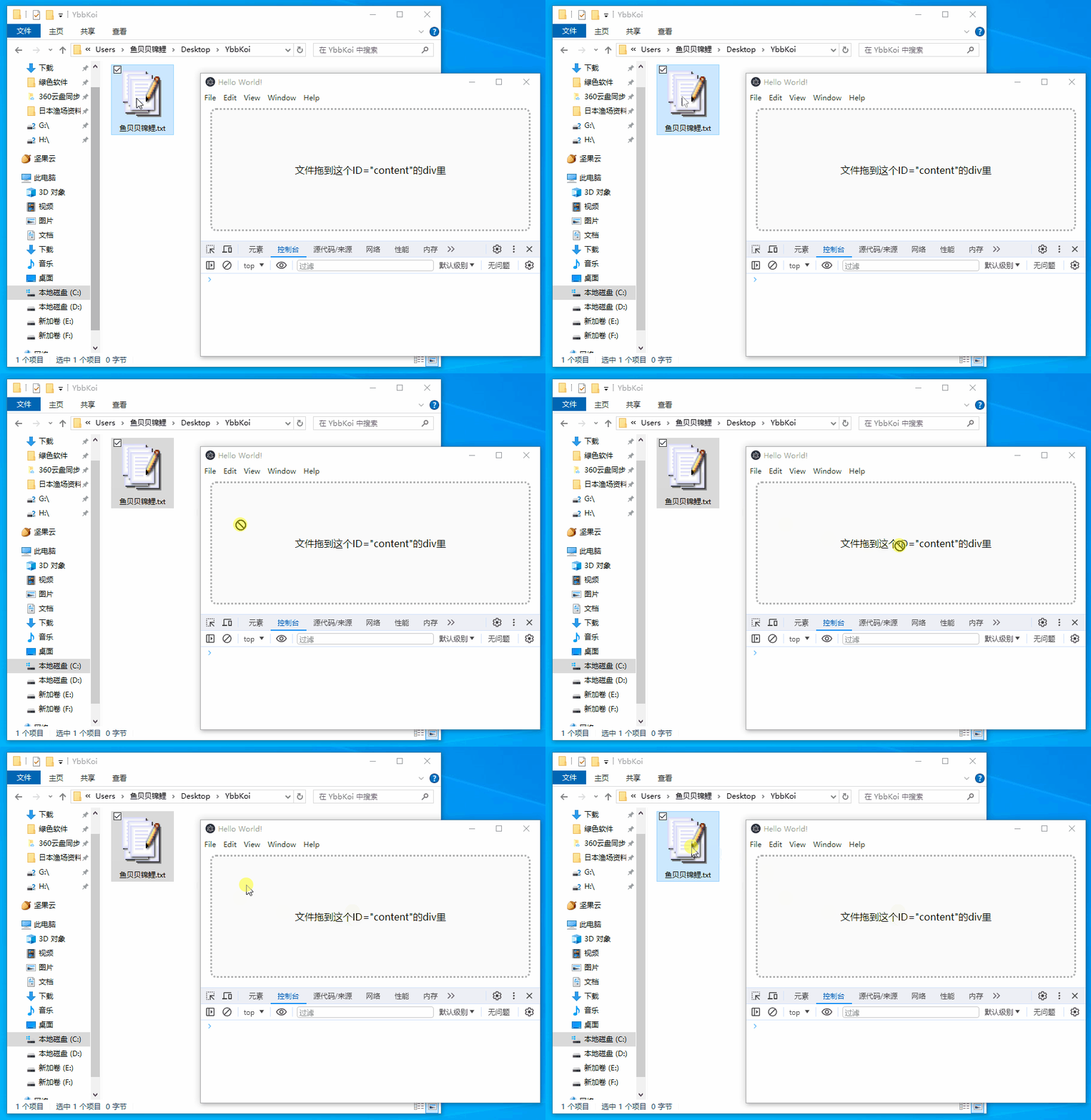
翻阅了大量资料,发现其他开发者可能都没遇到过这种情况,几乎搜不到同类问题。

如果确定html5代码没问题的话,那可能就是electron创建的窗口问题,但是翻阅electron官方文档,也没有看到相关介绍。

既然官方没提到拒绝文件拖拽到窗体,那大概率肯定就是能支持的,毕竟如果和正常HTML5特性冲突的话,一定会有说明,更何况这也算是一种常规需求了。

最后在非常偶然的情况下,发现了问题原因,是Windows系统权限机制导致的,Windows默认不支持从低权限进程到高权限进程拖拽文件的操作,被拖拽的文件实际是来自系统自带的资源管理器,资源管理器默认是普通权限运行的,而如果我们的electron创建的窗体是以管理员权限运行的话,那肯定接收不到拖拽的文件。

那为什么electron窗体进程默认是管理员权限运行的呢?根源就在于,我在执行npm start 命令启动程序的时候,用的是管理员权限的powershell终端,导致创建出来的窗体也是运行在管理员权限!

至此,一切明了,用普通powershell终端再次启动程序,效果就正常了。
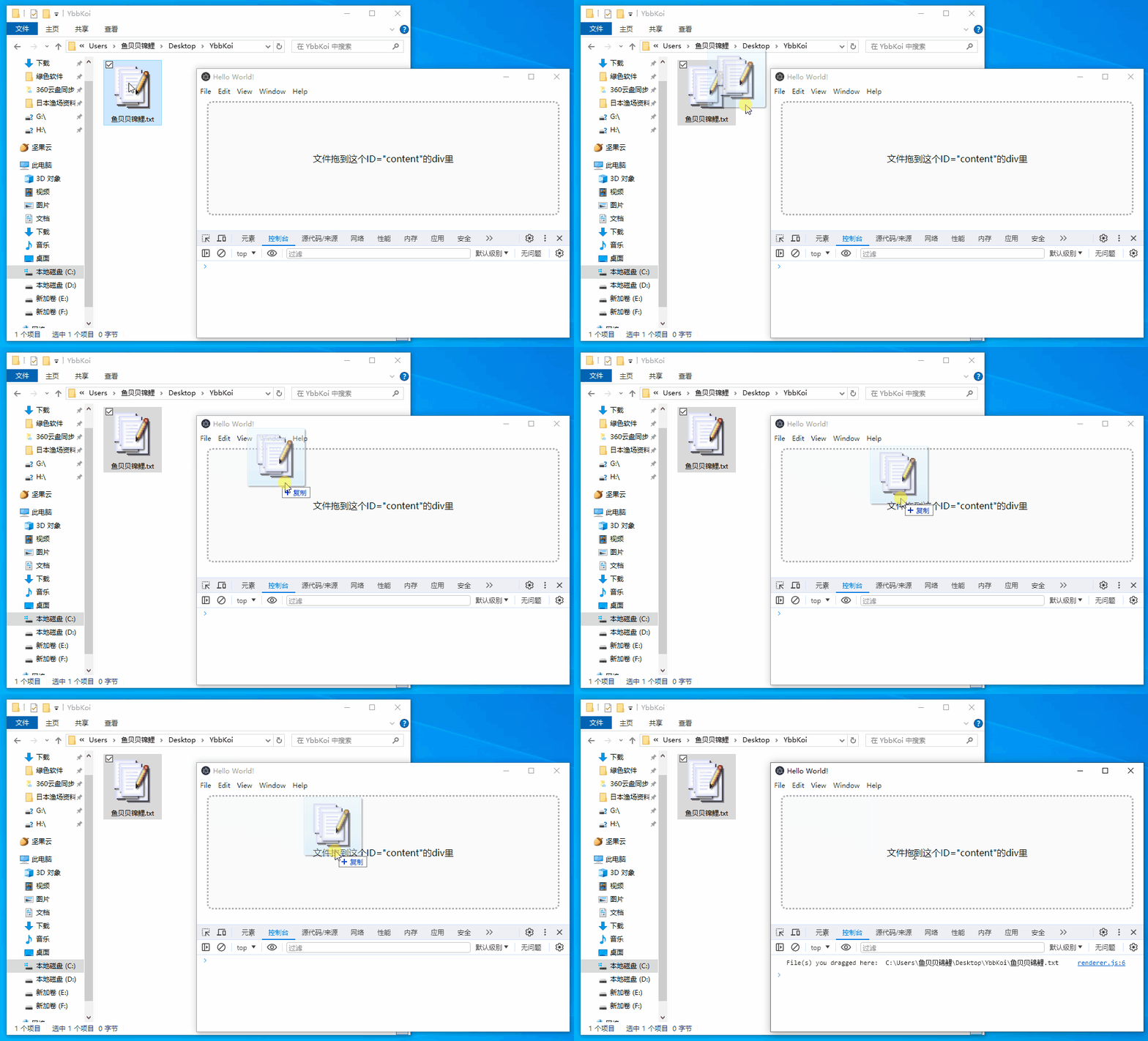
最后,附上核心代码:

<!-- index.html -->
<!DOCTYPE html>
<html>
  <head>
    <meta charset="UTF-8" />
    <title>Hello World!</title>
    <meta
      http-equiv="Content-Security-Policy"
      content="script-src 'self' 'unsafe-inline';"
    />
  </head>
  <body>
    <div class="content" id="content">文件拖到这个ID="content"的div里</div>

    <style>
      #content {
        margin: 0 auto;
        width: 96%;
        height: 200px;
        background-color: rgba(0, 0, 0, 0.02);
        border-radius: 10px;
        border: 3px dotted rgba(0, 0, 0, 0.3);
        display: flex;
        justify-content: center;
        align-items: center;
      }
    </style>

    <script src="renderer.js"></script>
  </body>
</html>
// renderer.js
document.getElementById("content").addEventListener("drop", (e) => {
  e.preventDefault();
  e.stopPropagation();
  for (const f of e.dataTransfer.files) {
    console.log("File(s) you dragged here: ", f.path);
  }
});
document.getElementById("content").addEventListener("dragover", (e) => {
  e.preventDefault();
  e.stopPropagation();
});