








When I read advice about passwords and online accounts, it usually goes something like this:
- Create unique passwords for each account, and store them in a password manager.
- Enable multi-factor authentication (MFA), and use an authenticator app or hardware token as your second factor.
But enabling MFA isn’t everything – what if you lose access to that second factor? For example, I store my MFA codes in an app on my phone. What happens if my phone is broken or stolen?
Most services that support MFA give me a set of recovery codes I can use in an emergency to regain access to my account, but don’t explain what to do with them. I’m advised to “store them securely”, but what does that mean in practice?
I don’t want to store my recovery codes in my password manager, because that compresses multiple authentication factors back into one. Somebody who compromised my password manager would have access to everything. (That’s the same reason I don’t store my MFA codes in there.)
Instead, I have an encrypted disk image on my Mac, which I created using Disk Utility. The password is a long, unique password that I only use for this purpose, and I only keep the disk image mounted when I’m editing or using a recovery code.
This disk image contains two files:
- My 1Password Emergency Kit, a PDF document that contains the details for my 1Password account – including a secret key that I don’t see or type on a day-to-day basis
- An HTML file I write by hand, which has all my MFA recovery codes and notes on when I created them
Here’s what the HTML file looks like (with fake data, obviously):
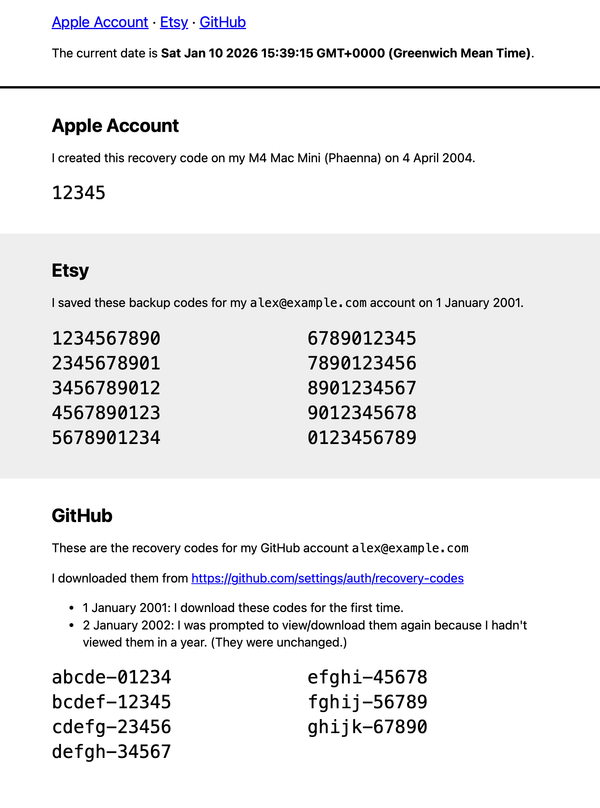
You can download the HTML file I use as a template.
When I need to save some new recovery codes, I mount the disk image, edit the HTML file, then eject the disk image. When I need to use a recovery code, I mount the disk image, copy a code out of the HTML file, make a note that I’ve used it, then eject the disk image. This is a plain text file that’s not dependent on proprietary software or cloud services.
I have a second disk image on my work laptop, with a similar file, where I store recovery codes related to my work accounts.
A malicious program could theoretically read the HTML file while the disk image is mounted, so I try to keep it mounted as little as possible. But if a malicious program had long-running access to arbitrary files on my Mac, it can do more damage than just reading my recovery codes.
This setup assumes I’ll always have access to this disk image, which is why I have offsite backups that include it (in encrypted form, of course). I’ve memorised the password for my offsite backups, which gives me a clear recovery path if I lose my phone and all my home devices:
- Log into my offsite backup
- Download the encrypted disk image
- Mount the disk image
- Retrieve my 1Password Secret Key and MFA recovery codes
From there, I can get access to everything in my digital life.
Later this year, I plan to get a fire safe where I can store important documents, and a paper copy of these codes will definitely be in there. That’s why I include dates in the notes, and the current date at the top of the file – that way, I can see if the printed version is up-to-date.
I’m fortunate that I’ve never had to use this system in a real emergency – and helpful as it could be, let’s hope I never have to.