


之前写过一篇,介绍如何用python实现网络设备配置批量备份,在小规模环境下,确实可以跑起来,但在更大规模环境下,实际使用之后,有很多不完善的,像个玩具。
恰巧现在,有一个大几千网络设备的环境,需要做标准化,所以急需完善,迭代,更改以前的那个玩具程序,让其能真正在生产环境下适用,实用。
包括两个独立的功能,一个用于‘读’配置,一个用于‘写’配置,并包含执行之后的结果及执行过程中的记录。
1 config_get v0.3.py
import os
import xlrd
from netmiko import ConnectHandler
import re
import time
import threading
import encodings.idna
from queue import Queue
import csv,codecs
import logging


BASE_DIR = os.getcwd()
print(BASE_DIR)
BASE_DIR_configuration = os.path.join(BASE_DIR, time.strftime("%Y%m%d%H%M%S", time.localtime()))
os.mkdir(BASE_DIR_configuration)


logging.basicConfig(filename=os.path.join(BASE_DIR_configuration, 'running.log'), level=logging.DEBUG)
logger = logging.getLogger("netmiko")

for file in os.listdir(BASE_DIR):
    if file == 'input_config_get v0.3.xls':
        file_name = file

wb = xlrd.open_workbook(filename=file_name)
sheet1 = wb.sheet_by_index(0)#get the sheet by index and it start with 0
#  sheet2 = wb.sheet_by_name('Devices')#get the sheet by name

device_infor_all = []
title_rows = sheet1.row_values(0)#get row values

for number_rows in range(1, sheet1.nrows):
    value_rows = sheet1.row_values(number_rows)
    device_infor_all.append(dict(zip(title_rows, value_rows)))


WORD_THREAD = 20

IP_QUEUE = Queue()
for i in device_infor_all:
    IP_QUEUE.put(i)

#print(device_infor_all)
results_txt = []
results_csv = []

def devices_conn():
    while not IP_QUEUE.empty():
        device = IP_QUEUE.get()
        cmd_set = wb.sheet_by_name(device['cmd_set']).col_values(0)
        #print(cmd_set)

        cisco1 = {
        "device_type": "cisco_ios" if device['ssh_telnet'] == "ssh" else "cisco_ios_telnet",
        "host": device['IP'],
        "username": device['Username'],
        "password": device['Password'],
        "secret": None if device['Enable'] == '' else device['Enable'],
        "global_delay_factor": 4 if device['Delay'] == '' else int(device['Delay'])
        }

        device_directory = os.path.join(BASE_DIR_configuration, re.sub(r'[\\@#!|/]', '_', device['Hostname']) + '___' + device['IP'])

        os.mkdir(device_directory)
        try:
            with ConnectHandler(**cisco1) as net_connect:
                if device['Enable'] != '':
                    net_connect.enable()
                # print(net_connect.find_prompt())
                r1 = net_connect.find_prompt()
                #th_name = threading.current_thread().getName()
                for command in cmd_set:
                    output = net_connect.send_command(command.strip())
                    with open(os.path.join(device_directory, re.sub(r'[\\@#!|/]', '_', command) + '.txt'), 'wt') as f:
                        f.write(output)
            results_dict = {'Hostname':device['Hostname'], 'IP':device['IP'], 'Result':'Done', 'Prompt':r1 }
            r1 = device['Hostname'] + '___' + device['IP'] + '___' + 'done!!!' + '___' + r1
            results_txt.append(r1)
            results_csv.append(results_dict)
            print(r1)
        except:
            results_dict = {'Hostname':device['Hostname'], 'IP':device['IP'], 'Result':'Fail', 'Prompt':None }
            r1 = device['Hostname'] + '___' + device['IP'] + '___' + 'login Fail!!!'
            results_txt.append(r1)
            results_csv.append(results_dict)
            print(r1)


if __name__ == '__main__':
    threads = []
    start = time.perf_counter()
    for i in range(WORD_THREAD):
        thread = threading.Thread(target=devices_conn)
        thread.start()
        threads.append(thread)

    for thread in threads:
        thread.join()

    with open(os.path.join(BASE_DIR_configuration, 'login_results.txt'), 'wt') as f:
        for i in results_txt:
            f.write(i)
            f.write('\n')


    with codecs.open(os.path.join(BASE_DIR_configuration, 'login_results.csv'), 'w', encoding='utf_8_sig') as csvfile:
        fieldnames = ['Hostname', 'IP', 'Result', 'Prompt']
        writer = csv.DictWriter(csvfile, fieldnames=fieldnames)
        writer.writeheader()
        for item in results_csv:
            writer.writerow({
            'Hostname': item['Hostname'],
            'IP': item['IP'],
            'Result': item['Result'],
            'Prompt': item['Prompt']
            })


    #print(threading.active_count())
    print()
    print("all done: time", time.perf_counter() - start, "\n")
注意事项:
- input excel文件的名字要固定,需要和python文件在相同文件夹下
- WORD_THREAD = 20,这个是线程数,按需修改,超过硬件资源上限,程序会崩溃
- 该程序只适配了Cisco IOS设备
- 该程序用于查看配置
- pyinstaller '.\config_get v0.3.py', 可以打包成exe文件,和input文件一起拷贝到没有python的环境下使用
2 config_set v0.3.py
import os
import xlrd
from netmiko import ConnectHandler
import re
import time
import threading
import encodings.idna
from queue import Queue
import csv,codecs
import logging


BASE_DIR = os.getcwd()
print(BASE_DIR)
BASE_DIR_configuration = os.path.join(BASE_DIR, time.strftime("%Y%m%d%H%M%S", time.localtime()))
os.mkdir(BASE_DIR_configuration)

logging.basicConfig(filename=os.path.join(BASE_DIR_configuration, 'running.log'), level=logging.DEBUG)
logger = logging.getLogger("netmiko")

for file in os.listdir(BASE_DIR):
    if file == 'input_config_set v0.3.xls':
        file_name = file

wb = xlrd.open_workbook(filename=file_name)
sheet1 = wb.sheet_by_index(0)#get the sheet by index and it start with 0
#  sheet2 = wb.sheet_by_name('Devices')#get the sheet by name

device_infor_all = []
title_rows = sheet1.row_values(0)#get row values

for number_rows in range(1, sheet1.nrows):
    value_rows = sheet1.row_values(number_rows)
    device_infor_all.append(dict(zip(title_rows, value_rows)))

WORD_THREAD = 20

IP_QUEUE = Queue()
for i in device_infor_all:
    IP_QUEUE.put(i)

# print(device_infor_all)
results_txt = []
results_csv = []

def devices_conn():
    while not IP_QUEUE.empty():
        device = IP_QUEUE.get()
        cmd_set = wb.sheet_by_name(device['cmd_set']).col_values(0)
        #print(cmd_set)

        cisco1 = {
        "device_type": "cisco_ios" if device['ssh_telnet'] == "ssh" else "cisco_ios_telnet",
        "host": device['IP'],
        "username": device['Username'],
        "password": device['Password'],
        "secret": None if device['Enable'] == '' else device['Enable'],
        "global_delay_factor": 4 if device['Delay'] == '' else int(device['Delay'])
        }

        device_directory = os.path.join(BASE_DIR_configuration, re.sub(r'[\\@#!|/]', '_', device['Hostname']) + '___' + device['IP'])

        os.mkdir(device_directory)
        try:
            with ConnectHandler(**cisco1) as net_connect:
                if device['Enable'] != '':
                    net_connect.enable()
                r1 = net_connect.find_prompt()
                output = net_connect.send_command("config t", expect_string=r"config", strip_prompt=False, strip_command=False)
                for command in cmd_set:
                    output += net_connect.send_command(command.strip(), expect_string=r"config", strip_prompt=False, strip_command=False)
                output += net_connect.send_command("end", expect_string=r"#", strip_prompt=False, strip_command=False)
                output += net_connect.send_command("write", expect_string=r"#", strip_prompt=False, strip_command=False)
                # print(output)
                with open(os.path.join(device_directory, 'session.txt'), 'wt') as f:
                    f.write(output)
            results_dict = {'Hostname':device['Hostname'], 'IP':device['IP'], 'Result':'Done', 'Prompt':r1 }
            r1 = device['Hostname'] + '___' + device['IP'] + '___' + 'done!!!' + '___' + r1
            results_txt.append(r1)
            results_csv.append(results_dict)
            print(r1)
        except:
            results_dict = {'Hostname':device['Hostname'], 'IP':device['IP'], 'Result':'Fail', 'Prompt':None }
            r1 = device['Hostname'] + '___' + device['IP'] + '___' + 'login Fail!!!'
            results_txt.append(r1)
            results_csv.append(results_dict)
            print(r1)


if __name__ == '__main__':
    threads = []
    start = time.perf_counter()
    for i in range(WORD_THREAD):
        thread = threading.Thread(target=devices_conn)
        thread.start()
        threads.append(thread)

    for thread in threads:
        thread.join()

    with open(os.path.join(BASE_DIR_configuration, 'config_results.txt'), 'wt') as f:
        for i in results_txt:
            f.write(i)
            f.write('\n')

    with codecs.open(os.path.join(BASE_DIR_configuration, 'config_results.csv'), 'w', encoding='utf_8_sig') as csvfile:
        fieldnames = ['Hostname', 'IP', 'Result', 'Prompt',]
        writer = csv.DictWriter(csvfile, fieldnames=fieldnames)
        writer.writeheader()
        for item in results_csv:
            writer.writerow({
            'Hostname': item['Hostname'],
            'IP': item['IP'],
            'Result': item['Result'],
            'Prompt': item['Prompt'],

            })


    #print(threading.active_count())
    print()
    print("all done: time", time.perf_counter() - start, "\n")
注意事项:
- input excel文件的名字要固定,需要和python文件在相同文件夹下
- WORD_THREAD = 20,这个是线程数,按需修改,超过硬件资源上限,程序会崩溃
- 该程序只适配了Cisco IOS设备
- 该程序用于修改配置
- pyinstaller '.\config_get v0.3.py', 可以打包成exe文件,和input文件一起拷贝到没有python的环境下使用
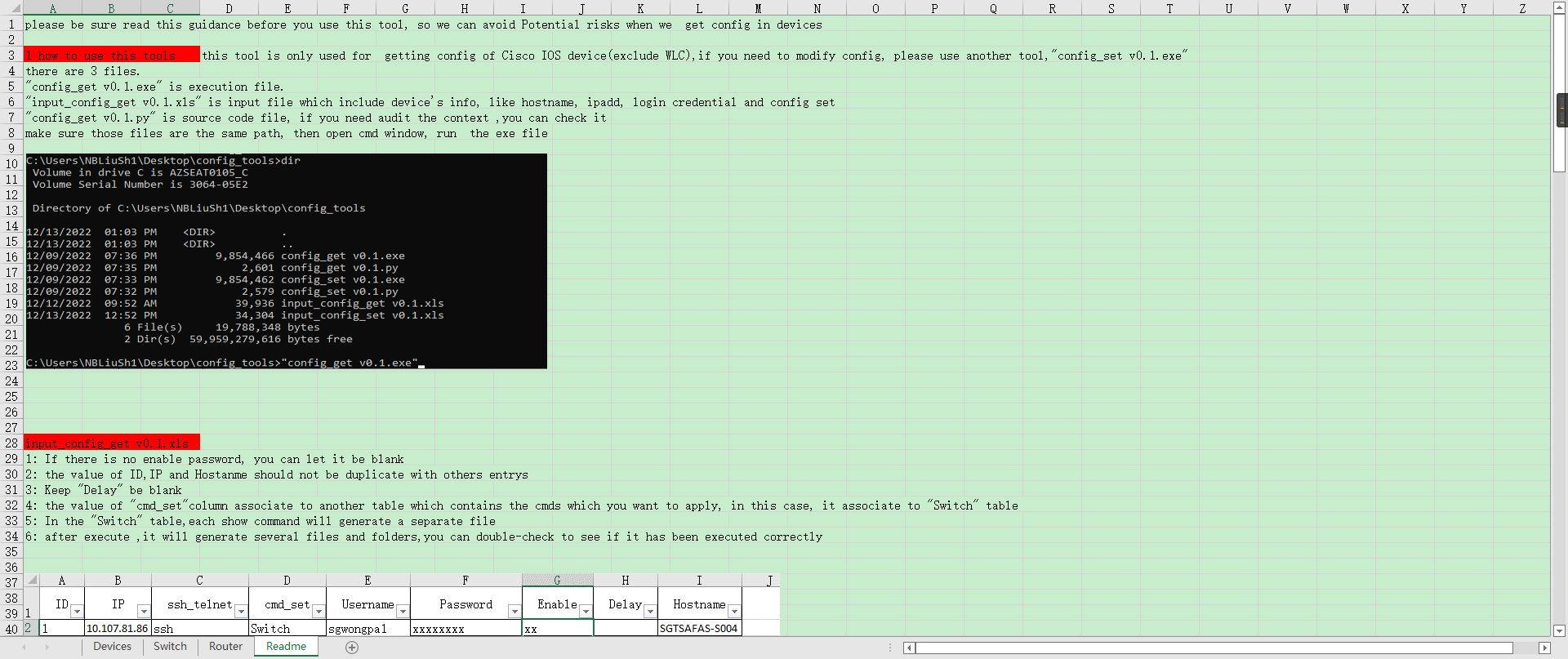
3 input files
input_config_get v0.3.xls 用于config_get v0.3.py程序
input_config_set v0.3.xls 用于config_set v0.3.py程序
4 其他/引用
赞赏作者

如果觉得我的文章对你有用,请随意赞赏