




惯性聚合 高效追踪和阅读你感兴趣的博客、新闻、科技资讯
阅读原文 在惯性聚合中打开

推荐订阅源

C
Cyber Attacks, Cyber Crime and Cyber Security
The Last Watchdog
The Last Watchdog
Forbes - Security
Forbes - Security
S
Security @ Cisco Blogs
TaoSecurity Blog
TaoSecurity Blog
T
Troy Hunt's Blog
cs.AI updates on arXiv.org
H
Hacker News: Front Page
W
WeLiveSecurity
WordPress大学
WordPress大学
freeCodeCamp Programming Tutorials: Python, JavaScript, Git & More
N
News | PayPal Newsroom
D
DataBreaches.Net
博客园_首页
Y
Y Combinator Blog
F
Fortinet All Blogs
罗磊的独立博客
Apple Machine Learning Research
T
Tailwind CSS Blog
Hacker News - Newest:
Hacker News - Newest: "LLM"
Hugging Face - Blog
Hugging Face - Blog
The GitHub Blog
The GitHub Blog
B
Blog RSS Feed
C
CERT Recently Published Vulnerability Notes
P
Privacy & Cybersecurity Law Blog
Help Net Security
Help Net Security
S
SegmentFault 最新的问题
Recorded Future
Recorded Future
K
KPMG report finds enterprise disconnect between AI and its ROI | CIO
N
News and Events Feed by Topic
Schneier on Security
V
Vulnerabilities – Threatpost
A
About on SuperTechFans
CTFtime.org: upcoming CTF events
L
LangChain Blog
酷 壳 – CoolShell
酷 壳 – CoolShell
GbyAI
GbyAI
L
LINUX DO - 热门话题
Simon Willison's Weblog
雷峰网
雷峰网
G
Google Developers Blog
Cyberwarzone
Cyberwarzone
I
Intezer
Google DeepMind News
AWS News Blog
AWS News Blog
C
Check Point Blog
AI
AI
博客园 - 【当耐特】
有赞技术团队
有赞技术团队
博客园 - 司徒正美

思有云 - IOIOX - 梅林固件

梅林固件路由器部署SSL证书支持HTTPS访问 - 思有云 - IOIOX 梅林固件路由器安装配置免费frp内网穿透教程 - 思有云 - IOIOX 梅林固件路由器配置国际域名DDNS动态域名解析教程 - 思有云 - IOIOX
CentOS 7 安装配置frp内网穿透服务器端教程 - 思有云
博主: Stille · 2019-02-28 · via 思有云 - IOIOX - 梅林固件
  • 发布时间:
  • 132710 次浏览
  • 86 条评论
  • 2812字数
  • 分类: 技术教程
  1. 首页
  2. 正文  

前言

本文将详解在CentOS 7 上安装配置frp服务器端的教程.

frp 是一个可用于内网穿透的高性能的反向代理应用,支持 tcp, udp 协议,为 http 和 https 应用协议提供了额外的能力,且尝试性支持了点对点穿透。

本文为 Stille 原创文章.经实践,测试,整理发布.如需转载请联系作者获得授权,并注明转载地址.


服务端frps安装

一键安装卸载脚本

安装脚本

wget https://raw.githubusercontent.com/stilleshan/frps/master/frps_linux_install.sh && chmod +x frps_linux_install.sh && ./frps_linux_install.sh

卸载脚本

wget https://raw.githubusercontent.com/stilleshan/frps/master/frps_linux_uninstall.sh && chmod +x frps_linux_uninstall.sh && ./frps_linux_uninstall.sh

如现有服务器上已存在 frps 服务,请先运行卸载脚本,在运行安装脚本.

安装完成后配置frps.ini并重启服务.

vi /usr/local/frp/frps.ini
# 修改 frps.ini 配置
sudo systemctl restart frps
# 重启 frps 服务即可生效

配置参考

[common]
bind_addr = 0.0.0.0
bind_port = 7000
bind_udp_port = 7001
kcp_bind_port = 7000
vhost_http_port = 80
vhost_https_port = 443
dashboard_addr = 0.0.0.0
dashboard_port = 7500
dashboard_user = admin
dashboard_pwd = admin         # 这里设置为管理面板配置的密码
log_file = ./frps.log
log_level = info
log_max_days = 3
disable_log_color = false
token = 12345678              # 这里设置为客户端配置的token
allow_ports = 2000-3000,3001,3003,4000-50000
max_pool_count = 5
max_ports_per_client = 0
subdomain_host = frps.com
tcp_mux = true

使用systemctl命令来控制frps

sudo systemctl start frps
# 启动frps
sudo systemctl enable frps
# 服务器开机自动启动frps
sudo systemctl status frps
# 查看状态
sudo systemctl restart frps
# 重启frps
sudo systemctl stop frps
# 停止frps

检查服务器端安装情况

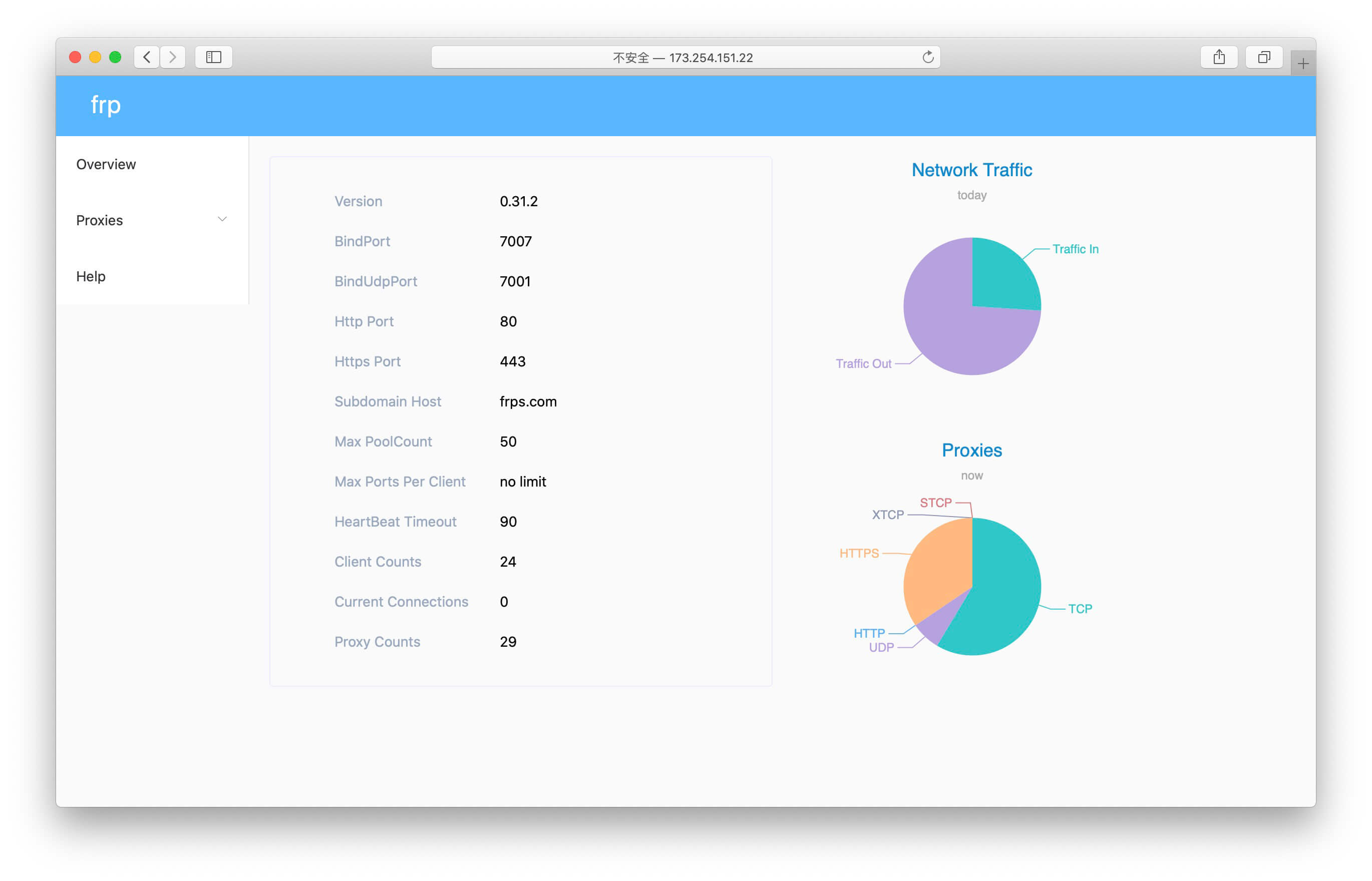
输入http://服务器IP:7500来查看 frps 服务状态
1.jpg

客户端 frpc 安装教程汇总


结语

更多FRP内网穿透相关技巧,教程及信息,请持续关注本站FRP内网穿透专栏:


晚高峰稳定 4K 的 IPLC 机场 解锁各流媒体 支持 ChatGPT. 晚高峰稳定 4K 的 IPLC 机场 解锁各流媒体 支持 ChatGPT. RedteaGO - 最划算的大陆漫游 eSim 流量卡,原生境外 IP,注册就送 3 刀。

RedteaGO - 最划算的大陆漫游 eSim 流量卡,原生境外 IP,注册就送 3 刀。

赞赏作者

如果喜欢我的文章,觉得对你有帮助,请随意赞赏!

CentOS 7 安装配置frp内网穿透服务器端教程

 •