









经过一段时间的使用, drone 的 ci 工作流语法和变量使用基本掌握,也能够替代现在我所使用的 GitHub Action Workflow 的工作流.折腾的过程中也遇到过坑,国内基本上搜索不到有用的文章,只能从国外查找,官方文档有时也写的很简单,博主整理一下常用的信息分享给大家.
本文为 Stille 原创文章.经实践,测试,整理发布.如需转载请联系作者获得授权,并注明转载地址.
配置文件中几个重要的 top level
例如: platform,node,clone,trigger,image_pull_secrets等等.
默认情况下不定义platform,则会使用默认的runner来执行工作流,如果按照以下示例定义了arm64,将会调用 ARM 的runner来执行,前提是必须在 ARM 的服务器上部署drone-ruuner服务.
kind: pipeline
type: docker
name: deploy

platform:
  os: linux
  arch: arm64

steps:
...可以部署多个node在不同的区域的服务器上,这些节点的drone-ruuner需要加上DRONE_RUNNER_LABELS=server:hk变量.
以下示例将会指定server: hk的这个节点来执行.
kind: pipeline
type: docker
name: deploy

steps:
    ...

node:
  server: hk
注意:如果节点配置了 DRONE_RUNNER_LABELS,那么必须在配置文件中指定 node 参数才能使用,并不会作为默认轮询节点.
默认情况下每次触发工作流,都会自动clone当前仓库,如果工作流不需要使用本地仓库可以跳过clone步骤.
kind: pipeline
type: docker
name: deploy

clone:
  disable: true

step:
  - name: build
    image: alpine
    commands:
      - git clone https://github.com/stilleshan/frpc
- cd frpc && ...出发工作流的条件,示例:
kind: pipeline
type: docker
name: deploy

steps:
    ...

trigger:
  branch:
    - master
  event:
    - pull_request
- push用于私有镜像仓库的 pull 使用,下文会有单独的示例讲解.
在工作流中会用到一些机密的参数或者密钥不方便公开,可以在 drone 中创建secrets来传递到工作流中.
例如以下创建腾讯云 COS 的登陆 API 密钥,用于将工作流或者仓库里的文件上传到对象存储.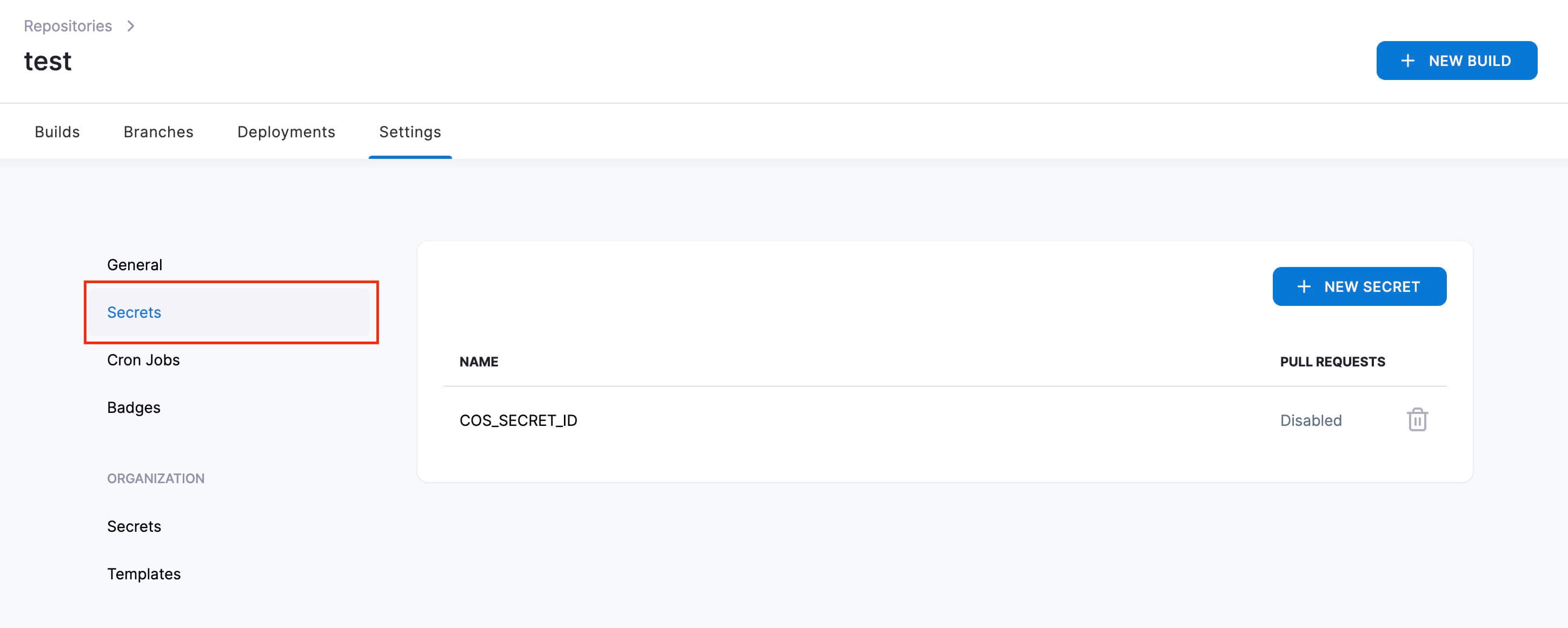
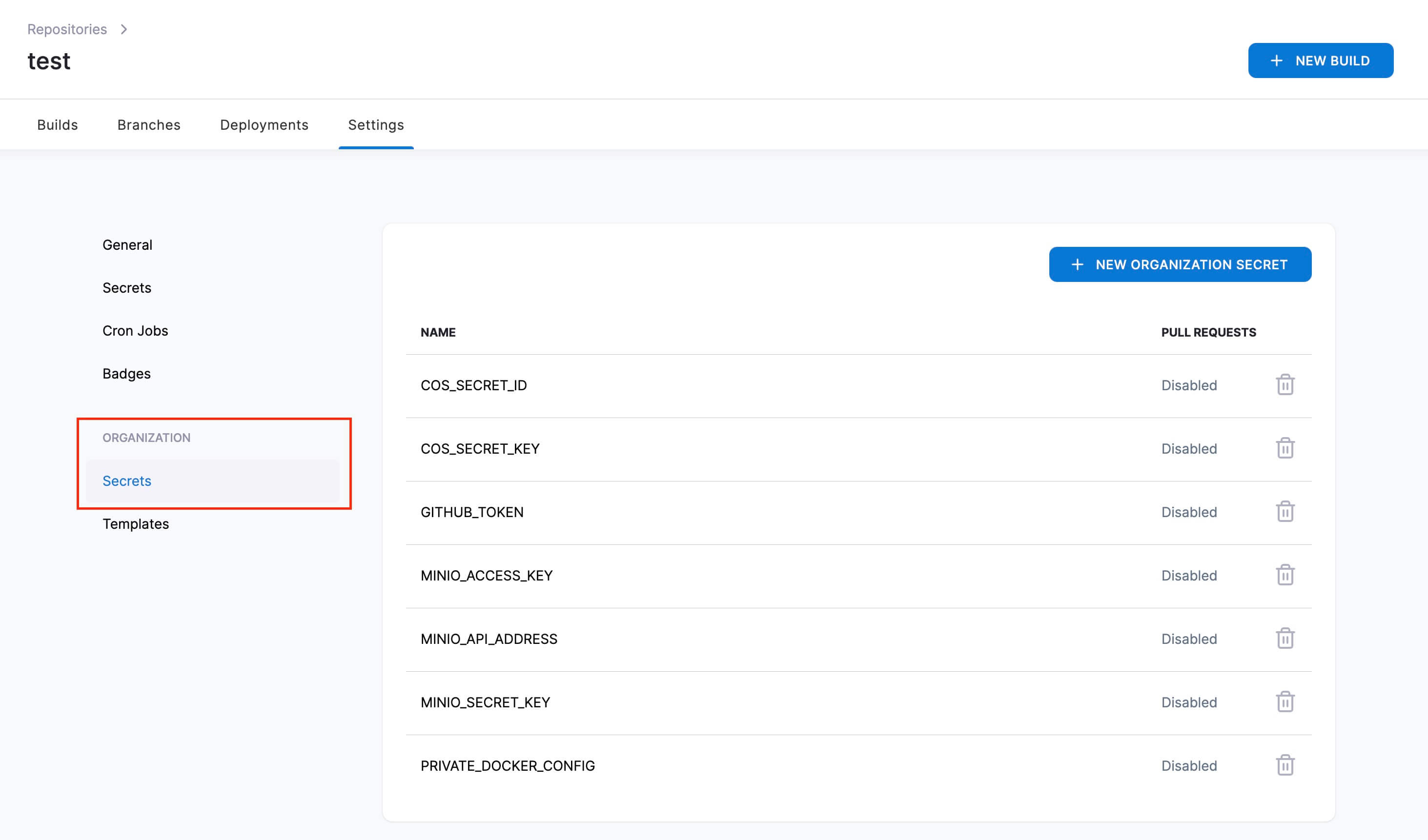
如果是通用的secrets多个仓库都可以使用,可以直接创建组织的secrets,这样同一个组织用户下的所有仓库都可以使用.
值得注意的是,当个人 secrets 和组织 secrets 重复时,工作流会使用个人 secrets.
在工作流中,一些官方的插件可以直接使用secrets,例如使用plugins/docker来构建镜像发布至hub.docke.com.在settings里时可以直接from_secret使用secrets.
kind: pipeline
name: default

steps:
- name: docker
  image: plugins/docker
  settings:
    username:
      from_secret: docker_username
    password:
      from_secret: docker_password
    repo: ioiox/frpc
    context: frpc
    dockerfile: frpc/Dockerfile
    tags:
- latest如果想直接来使用secrets里的值来执行命令,得必须将secrets转为environment变量.
以下示例是添加了environment,将secrets的COS_SECRET_ID等参数转为变量COS_SECRET_ID,在命令里就可以直接$COS_SECRET_ID.
- name: cos
  image: stilleshan/coscmd
  environment:
    COS_SECRET_ID:
      from_secret: COS_SECRET_ID
    COS_SECRET_KEY:
      from_secret: COS_SECRET_KEY
    COS_BUCKET:
      from_secret: COS_BUCKET
    COS_REGION:
      from_secret: COS_REGION
  commands:
    - coscmd config -a $COS_SECRET_ID -s $COS_SECRET_KEY -b $COS_BUCKET -r $COS_REGION
- coscmd upload -rfs --delete public/ /如果需要构建镜像到私有仓库,依旧可以使用plugins/docker插件,则需要添加部分参数.
添加registry为私有仓库地址,注意repo也需要添加私有仓库地址.
kind: pipeline
name: default

steps:
- name: docker
  image: plugins/docker
  settings:
    registry: docker.ioiox.com
    username:
      from_secret: docker_username_private
    password:
      from_secret: docker_password_private
    repo: docker.ioiox.com/stille/alpine
    tags:
    - dev
  when:
    branch:
- main如果需要构建镜像的目录不是根目录,可以添加以下参数来指定文件路径和Dockerfile路径.
step:
    ....
    repo: docker.ioiox.com/stille/alpine
    context: alpine
    dockerfile: alpine/Dockerfile
    tags:
- dev如果需要使用私有仓库的镜像,需要配置image_pull_secrets参数来获取权限.
kind: pipeline
name: default

steps:
- name: build
  image: docker.ioiox.com/stille/alpine
  commands:
    - ...

image_pull_secrets:
  - dockerconfig
需要先 Linux 里登陆私有仓库,获取config.json内容,在secrets中创建dockerconfig填入以下配置内容.
docker login docker.ioiox.com
# 输入账号密码登陆
cat ~/.docker/config.json
# 获取以下内容

{
    "auths": {
        "docker.ioiox.com": {
            "auth": "xxxxxxxxxxxxxxxxxx"
        }
    }
}如果需要同时构建amd64和arm64或者更多架构的镜像,参考示例:
kind: pipeline
type: docker
name: deploy

steps:
- name: latest
  image: thegeeklab/drone-docker-buildx
  privileged: true
  settings:
    registry: docker.ioiox.com
    repo: docker.ioiox.com/stille/alpine
    purge: true
    compress: true
    platforms: linux/amd64,linux/arm64
    username:
      from_secret: docker_username_private
    password:
      from_secret: docker_password_private
    context: alpine
    dockerfile: alpine/Dockerfile
    tags: latest
  when:
    branch:
    - main
- alpine/*可以使用appleboy/drone-scp插件来将构建的文件通过scp发送至服务器.
kind: pipeline
type: docker
name: deploy

- name: deploy
  image: appleboy/drone-scp
  settings:
    host: 103.23.23.23
    user: root
    password: xxxx
    port: 33333
    source: public/*
    strip_components: 1
    target: /home/wwwroot/blog
  when:
    branch:
- master搭配secrets传递password.
    user: root
    password:
        from_secret: ssh-password
    port: 33333
也可以使用ssh-key来登陆服务器,至需要将私钥 id_rsa内容创建ssh-key的secrets即可.
    user: root
    key:
      from_secret: ssh-key
port: 33333工作流修改了仓库文件需要commit和push,可以参考以下示例使用:
- name: push commit
  image: appleboy/drone-git-push:0.2.0-linux-amd64
  settings:
    branch: main
    remote: git@github.com:stille/frpc.git
    ssh_key:
      from_secret: git_key
    force: false
    commit: true
commit_message: push by drone以上就是一些常用的 drone 配置文件使用语法,更多插件或语法可以参考 官方文档
此内容由惯性聚合(RSS阅读器)自动聚合整理,仅供阅读参考。 原文来自 — 版权归原作者所有。