惯性聚合 高效追踪和阅读你感兴趣的博客、新闻、科技资讯
阅读原文 在惯性聚合中打开

推荐订阅源

S
Secure Thoughts
Security Latest
Security Latest
Simon Willison's Weblog
O
OpenAI News
GbyAI
GbyAI
L
LINUX DO - 最新话题
A
Arctic Wolf
T
Tor Project blog
G
GRAHAM CLULEY
I
InfoQ
博客园_首页
IT之家
IT之家
The Register - Security
Exploit-DB.com RSS Feed
P
Proofpoint News Feed
The GitHub Blog
The GitHub Blog
Blog — PlanetScale
Blog — PlanetScale
N
Netflix TechBlog - Medium
K
Kaspersky official blog
博客园 - 三生石上(FineUI控件)
S
SegmentFault 最新的问题
U
Unit 42
PCI Perspectives
PCI Perspectives
量子位
P
Palo Alto Networks Blog
S
Securelist
T
Troy Hunt's Blog
博客园 - 【当耐特】
Recorded Future
Recorded Future
K
KPMG report finds enterprise disconnect between AI and its ROI | CIO
S
Security Affairs
Engineering at Meta
Engineering at Meta
T
The Blog of Author Tim Ferriss
博客园 - 聂微东
罗磊的独立博客
N
News and Events Feed by Topic
人人都是产品经理
人人都是产品经理
B
Blog RSS Feed
NISL@THU
NISL@THU
C
Cisco Blogs
T
Threatpost
有赞技术团队
有赞技术团队
Forbes - Security
Forbes - Security
Hugging Face - Blog
Hugging Face - Blog
Last Week in AI
Last Week in AI
T
The Exploit Database - CXSecurity.com
Cloudbric
Cloudbric
Cyberwarzone
Cyberwarzone
Google DeepMind News
C
Cyber Attacks, Cyber Crime and Cyber Security

SunPma'Blog

宝塔面板错误及BUG解决方法集合(持续更新) - SunPma'Blog Adobe Photoshop 2025 v26.2.0 绿色便携版 My Music 一款音乐文件网页HTML播放器源码 - SunPma'Blog ShareFile 一款目录程序源码 - SunPma'Blog 360星图绿色离线版,网站日志分析工具 - SunPma'Blog AMD R7 8845HS 虚拟机安装苹果系统 MacOS 15.2 Sequoia Telegram多平台主题Windows/Android/iOS - SunPma'Blog Telegram 桌面便携版修复应用程序弹出链接URL协议 - SunPma'Blog Lsky 兰空图床程序基于宝塔面板部署教程 - SunPma'Blog
Chrome谷歌浏览器手动安装IDM(Internet Download Manager)扩展插件 - SunPma'Blog
博主: sunpma · 2025-02-05 · via SunPma'Blog

Chrome谷歌浏览器手动安装IDM(Internet Download Manager)扩展插件

 • 

前言

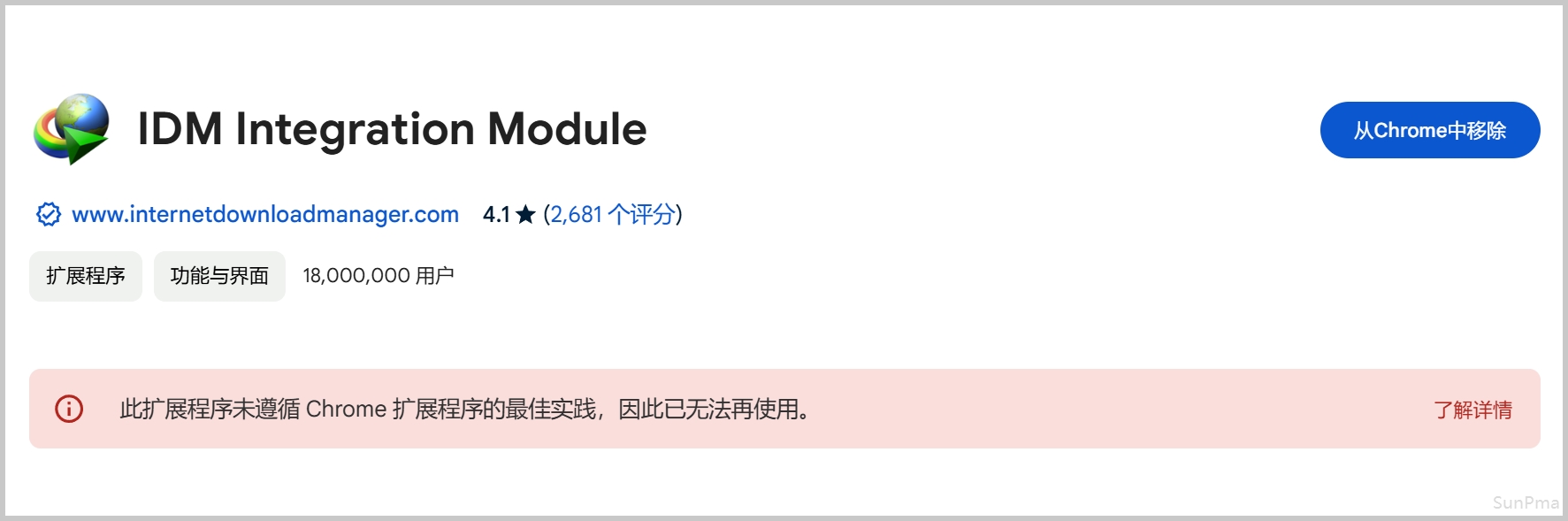
最近Chrome谷歌浏览器更新了隐私和安全策略,许多常用的扩展插件都被停用了
包括IDM Integration ModuleProxy SwitchyOmega等插件
Chrome应用商店中无法安装,可以手动安装来解决
image

链接

Internet Download Manager 官网
https://www.internetdownloadmanager.com

Internet Download Manager 浏览器集成
https://www.internetdownloadmanager.com/register/new_faq/Chrome-browser-integration.html

Chrome 应用商店安装页面(以后如果恢复安装后可直接在此页面安装扩展)
https://chromewebstore.google.com/detail/idm-integration-module/ngpampappnmepgilojfohadhhmbhlaek

安装

先将IDM更新到最新版本
然后在IDM的的安装目录中找到名为IDMGCExt.crx的文件,如果是Edge浏览器则是IDMEdgeExt.crx文件;
IDM的默认安装目录在C:\Program Files (x86)\Internet Download Manager
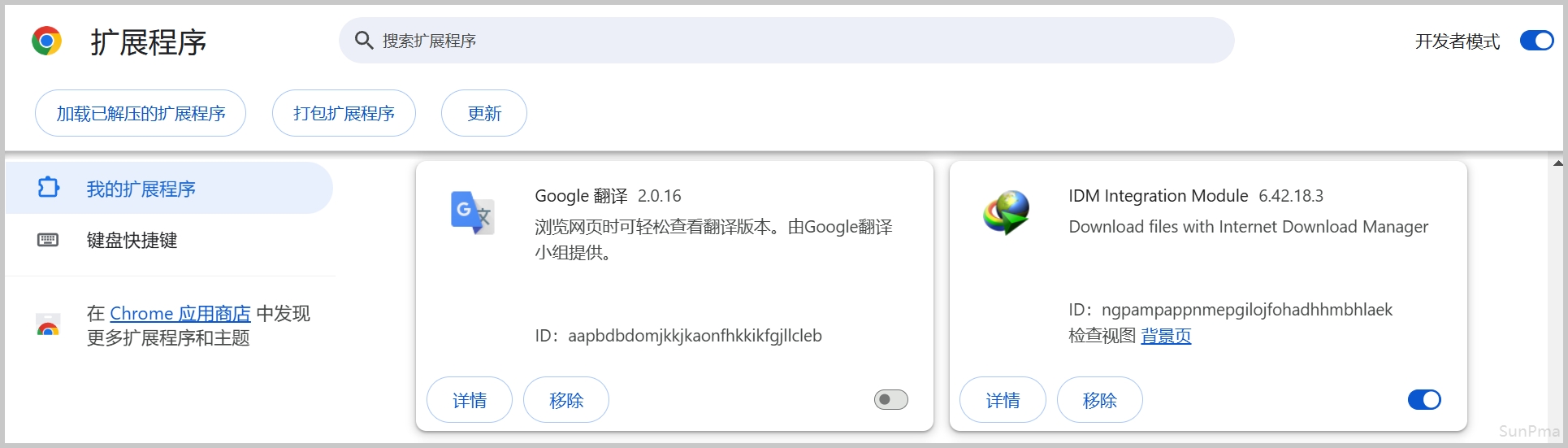
然后将其拖动到Chrome浏览器的扩展程序页面chrome://extensions
如果拖动进行显示错误,可将IDMGCExt.crx文件的后缀名改为.zip再拖动进去进行安装即可
注意需要先开启开发者模式
示例:
image
安装完成后即可正常使用;
示例:
image


版权声明:本文为原创文章,版权归 suntl.com 所有,转载请注明出处!

本文链接:https://suntl.com/1291.html

友情提示:如果博客出现404或链接失效,请留言或者联系博主修复!