

惯性聚合 高效追踪和阅读你感兴趣的博客、新闻、科技资讯
阅读原文 在惯性聚合中打开

推荐订阅源

Simon Willison's Weblog
P
Privacy International News Feed
www.infosecurity-magazine.com
T
Troy Hunt's Blog
Hacker News - Newest:
Hacker News - Newest: "LLM"
Attack and Defense Labs
S
Secure Thoughts
V2EX - 技术
V2EX - 技术
cs.AI updates on arXiv.org
O
OpenAI News
Cloudbric
Cloudbric
Google Online Security Blog
Schneier on Security
cs.CV updates on arXiv.org
Help Net Security
Help Net Security
Cyberwarzone
Cyberwarzone
G
GRAHAM CLULEY
L
Lohrmann on Cybersecurity
Threat Intelligence Blog | Flashpoint
Spread Privacy
Spread Privacy
NISL@THU
NISL@THU
N
News and Events Feed by Topic
T
Tenable Blog
S
Security @ Cisco Blogs
N
News and Events Feed by Topic
The Hacker News
The Hacker News
C
CXSECURITY Database RSS Feed - CXSecurity.com
宝玉的分享
宝玉的分享
月光博客
月光博客
酷 壳 – CoolShell
酷 壳 – CoolShell
美团技术团队
奇客Solidot–传递最新科技情报
奇客Solidot–传递最新科技情报
Google DeepMind News
钛媒体:引领未来商业与生活新知
钛媒体:引领未来商业与生活新知
T
Tailwind CSS Blog
V
Visual Studio Blog
P
Proofpoint News Feed
Webroot Blog
Webroot Blog
让小产品的独立变现更简单 - ezindie.com
博客园 - 三生石上(FineUI控件)
cs.CL updates on arXiv.org
Jina AI
Jina AI
雷峰网
雷峰网
T
The Blog of Author Tim Ferriss
Hugging Face - Blog
Hugging Face - Blog
腾讯CDC
L
LangChain Blog
The Register - Security
OSCHINA 社区最新新闻
OSCHINA 社区最新新闻
博客园 - 聂微东

SunPma'Blog

Adobe Photoshop 2025 v26.2.0 绿色便携版 My Music 一款音乐文件网页HTML播放器源码 - SunPma'Blog ShareFile 一款目录程序源码 - SunPma'Blog 360星图绿色离线版,网站日志分析工具 - SunPma'Blog AMD R7 8845HS 虚拟机安装苹果系统 MacOS 15.2 Sequoia Telegram多平台主题Windows/Android/iOS - SunPma'Blog Telegram 桌面便携版修复应用程序弹出链接URL协议 - SunPma'Blog Chrome谷歌浏览器手动安装IDM(Internet Download Manager)扩展插件 - SunPma'Blog Lsky 兰空图床程序基于宝塔面板部署教程 - SunPma'Blog
宝塔面板错误及BUG解决方法集合(持续更新) - SunPma'Blog
博主: sunpma · 2025-11-12 · via SunPma'Blog
  •  发布时间:
  •  3056 次浏览
  •   5 条评论
  • 分类: Linux
  1.  首页
  2. 正文  

前言

博主目前使用的是宝塔面板7.7.0版本,旧版经常会出现一些错误和BUG
在这里统一记录下,方便以后查找处理

下载错误

在宝塔面板下载文件时出现如下错误页面

出错了,面板运行时发生错误!
TypeError: send_file() got an unexpected keyword argument 'add_etags'

image
解决方法:
在服务器SSH端运行以下命令:

/www/server/panel/pyenv/bin/pip install -U Flask==2.1.2

运行完成后重启宝塔面板服务即可;

证书错误

错误(一)
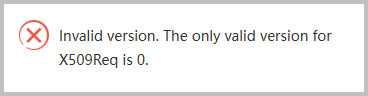
宝塔面板申请Let's Encrypt证书时报错
Invalid version. The only valid version forX509Req is 0.
image
解决方法:
找到/www/server/panel/class目录下acme_v2.py文件
查找到:X509Req.set_version(2)
修改为:X509Req.set_version(0)
修改完成后清理宝塔面板缓存再重启面板服务;

错误(二)
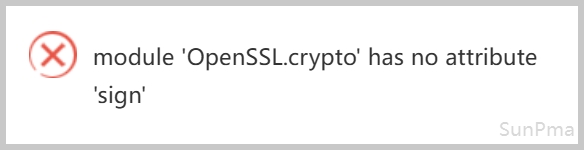
宝塔面板申请Let's Encrypt证书时报错
module 'OpenSSL.crypto' has no attribute 'sign'
image
解决方法:
SSH端运行以下命令,然后重启宝塔面板

btpip install pyOpenSSL==24.2.1 -U

证书续签Shell脚本

/www/server/panel/pyenv/bin/python -u /www/server/panel/class/acme_v2.py --renew=1

软件商店

如果软件商店打不开可以修改hosts连接宝塔面板的香港机房
SSH端输入以下两条命令修改hosts

sed -i "/bt.cn/d" /etc/hosts

echo "103.179.243.14 www.bt.cn download.bt.cn api.bt.cn dg1.bt.cn dg2.bt.cn" >> /etc/hosts

恢复hosts

sed -i "/bt.cn/d" /etc/hosts

规则拦截

Typecho程序在发布或编辑文章时容易被宝塔防火墙POST规则拦截
解决方法:
防火墙设置白名单URL
Nginx防火墙->全局配置->URL白名单->标准模式-URL白名单
文章编辑:

^/action/contents-post-edit?

主题设置:

^/action/themes-edit

旧版直装

直接安装宝塔7.7.0版本
安装命令:( Centos / Ubuntu / Debian )

curl -sSO https://raw.githubusercontent.com/sunpma/bt-v7.7.0/main/install/install_panel.sh && bash install_panel.sh

优化脚本

一键脚本:(注意:仅适用于宝塔面板7.7.0版本)

wget -O SunBT.sh https://suntl.com/other/bt/SunBT.sh && bash SunBT.sh

优化内容说明:

  • 去除强制绑定账号
  • 去除建站默认文件
  • 去除删除操作验证
  • 关闭版本升级通道
  • 关闭推荐客服功能
  • 解锁付费插件使用

版权声明:本文为原创文章,版权归 suntl.com 所有,转载请注明出处!

本文链接:https://suntl.com/1297.html

友情提示:如果博客出现404或链接失效,请留言或者联系博主修复!

宝塔面板错误及BUG解决方法集合(持续更新)

 • 

前言

博主目前使用的是宝塔面板7.7.0版本,旧版经常会出现一些错误和BUG
在这里统一记录下,方便以后查找处理

下载错误

在宝塔面板下载文件时出现如下错误页面

出错了,面板运行时发生错误!
TypeError: send_file() got an unexpected keyword argument 'add_etags'

image
解决方法:
在服务器SSH端运行以下命令:

/www/server/panel/pyenv/bin/pip install -U Flask==2.1.2

运行完成后重启宝塔面板服务即可;

证书错误

错误(一)
宝塔面板申请Let's Encrypt证书时报错
Invalid version. The only valid version forX509Req is 0.
image
解决方法:
找到/www/server/panel/class目录下acme_v2.py文件
查找到:X509Req.set_version(2)
修改为:X509Req.set_version(0)
修改完成后清理宝塔面板缓存再重启面板服务;

错误(二)
宝塔面板申请Let's Encrypt证书时报错
module 'OpenSSL.crypto' has no attribute 'sign'
image
解决方法:
SSH端运行以下命令,然后重启宝塔面板

btpip install pyOpenSSL==24.2.1 -U

证书续签Shell脚本

/www/server/panel/pyenv/bin/python -u /www/server/panel/class/acme_v2.py --renew=1

软件商店

如果软件商店打不开可以修改hosts连接宝塔面板的香港机房
SSH端输入以下两条命令修改hosts

sed -i "/bt.cn/d" /etc/hosts

echo "103.179.243.14 www.bt.cn download.bt.cn api.bt.cn dg1.bt.cn dg2.bt.cn" >> /etc/hosts

恢复hosts

sed -i "/bt.cn/d" /etc/hosts

规则拦截

Typecho程序在发布或编辑文章时容易被宝塔防火墙POST规则拦截
解决方法:
防火墙设置白名单URL
Nginx防火墙->全局配置->URL白名单->标准模式-URL白名单
文章编辑:

^/action/contents-post-edit?

主题设置:

^/action/themes-edit

旧版直装

直接安装宝塔7.7.0版本
安装命令:( Centos / Ubuntu / Debian )

curl -sSO https://raw.githubusercontent.com/sunpma/bt-v7.7.0/main/install/install_panel.sh && bash install_panel.sh

优化脚本

一键脚本:(注意:仅适用于宝塔面板7.7.0版本)

wget -O SunBT.sh https://suntl.com/other/bt/SunBT.sh && bash SunBT.sh

优化内容说明:

  • 去除强制绑定账号
  • 去除建站默认文件
  • 去除删除操作验证
  • 关闭版本升级通道
  • 关闭推荐客服功能
  • 解锁付费插件使用

版权声明:本文为原创文章,版权归 suntl.com 所有,转载请注明出处!

本文链接:https://suntl.com/1297.html

友情提示:如果博客出现404或链接失效,请留言或者联系博主修复!