



惯性聚合 高效追踪和阅读你感兴趣的博客、新闻、科技资讯
阅读原文 在惯性聚合中打开

推荐订阅源

D
Darknet – Hacking Tools, Hacker News & Cyber Security
V
Vulnerabilities – Threatpost
Cloudbric
Cloudbric
G
GRAHAM CLULEY
S
Securelist
Schneier on Security
Help Net Security
Help Net Security
Exploit-DB.com RSS Feed
Project Zero
Project Zero
Spread Privacy
Spread Privacy
P
Privacy International News Feed
C
Cyber Attacks, Cyber Crime and Cyber Security
Cisco Talos Blog
Cisco Talos Blog
T
Tailwind CSS Blog
博客园_首页
有赞技术团队
有赞技术团队
Simon Willison's Weblog
Stack Overflow Blog
Stack Overflow Blog
K
KPMG report finds enterprise disconnect between AI and its ROI | CIO
Latest news
Latest news
T
Tor Project blog
钛媒体:引领未来商业与生活新知
钛媒体:引领未来商业与生活新知
Attack and Defense Labs
www.infosecurity-magazine.com
O
OpenAI News
J
Java Code Geeks
T
Tenable Blog
K
Kaspersky official blog
AWS News Blog
AWS News Blog
S
Security @ Cisco Blogs
The GitHub Blog
The GitHub Blog
T
Threatpost
月光博客
月光博客
H
Heimdal Security Blog
Security Latest
Security Latest
The Hacker News
The Hacker News
Y
Y Combinator Blog
A
Arctic Wolf
Apple Machine Learning Research
C
Cisco Blogs
美团技术团队
Microsoft Security Blog
Hugging Face - Blog
Hugging Face - Blog
T
The Blog of Author Tim Ferriss
C
CERT Recently Published Vulnerability Notes
D
Docker
Google Online Security Blog
D
DataBreaches.Net
V
Visual Studio Blog
H
Help Net Security

TJUGERKFER's Blog

Chromebook Duet乱七八糟小技巧 [东方同人][STG游戏]东方槐夏寒晶 [magisk模块]Noactive Helper 用备用机实现电脑性能监视 远离神舟电脑 [Magisk模块]10W慢充 使用ventoy给米板2装win11教程 4399、17yy和7k7kflash小游戏防沉迷及广告移除脚本 对广西省青少年科技创新大赛组织水准的吐槽
跨端文本传输工具
2023-12-23 · via TJUGERKFER's Blog

为了把文本从chromebook上方便的传输到别的设备,用go写了这玩意放在服务器上(

还是看看远处从仓库里复制出来的readme.md吧
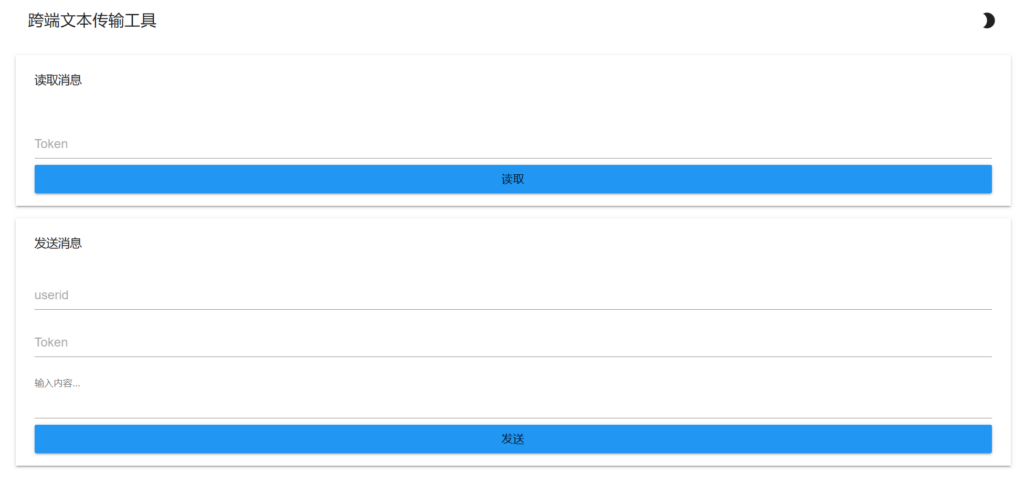
https://www.tjsite.cn/wp-content/uploads/2023/12/install-1-1024x483.png

跨端文本传输工具

本工具适用于个人或小团体跨设备传输并分享文本,使用GO编写,最初设计用于将个人ChromeBook上的文本快速传送到别的设备上,需要拥有自己的服务器。

特点

  • 部署简单,可通过docker直接编译并部署。
  • 无额外依赖,文本和配置全部直接使用文件存储,无需数据库。
  • 使用简单,访问网页,输入消息token即可快速读取文本,无需进行登录等额外操作。

部署方式

项目默认监听80端口,推荐使用docker compose模板编排,以下是一个示例:

  gotextsharer:
    command: ./main
    build:
      context: ./goshare/build # 将项目文件放于此处以进行编译
    restart: unless-stopped
    volumes:
      - ./goshare/message:/app/message
      - ./goshare/config:/app/config
    ports:
      - 80:80 # 也可通过nginx等进行反代

然后使用

docker compose up gotextsharer --build -d

进行构建。

也可以直接编译使用:

go build .

使用方式

  1. 访问部署地址/setup进行初始用户和管理员密码设置。
  2. 在主页发送消息面板输入userid,任意消息token以及文本进行发送。
  3. 在主页读取消息面板输入token进行读取或访问部署地址/s/消息token读取文本

TODO

  • [x] 简易日志系统和多用户系统
  • [ ] 消息索引
  • [ ] 更完善的消息读取机制
  • [ ] 完善的PWA应用

致谢

  • @bbaa 技术支持/功能建议
  • MDUI 前端框架
  • xxhash 用go实现的xxhash库