





AI简历开发 - 如何实现纯前端切换简历多模板
近期在做一个纯前端的简历项目,遇到一个问题难点。
背景:
纯前端(无后端),页面左侧是简历编辑区域,右侧是可以实时切换简历模板的,左侧编辑后,右侧简历预览可以实时随着数据更改而更新数据。最重要的是简历模板的热插拔实时切换更新,纯前端实现方案。
实现思路整体流程
- 获取简历模板列表
- 用户选择简历模板,存入pinia(需持久化,pinia-plugin-persistedstate插件)
- 简历预览页面,通过组件形式导入简历。
- 预览页面需要监听用户切换模板的操作,实时热更新简历模板(切换组件)。
解决
首先在public/template.json中定义模板列表
为什么放在public文件夹?因为public文件夹不会被vite打包压缩,并且无论是打包还是开发状态运行,都可以直接通过/template.json访问到对应的json文件获取到模板。
[
  {
    "id": "template111111",
    "name": "简洁模板1",
    "description": "简约而不简单的简历模板。",
    "folderPath": "templateA",
    "thumbnail": "preview.jpg"
  },
  {
    "id": "template222222",
    "name": "简洁模板2",
    "description": "简约而不简单的简历模板。",
    "folderPath": "templateB",
    "thumbnail": "preview.jpg"
  },
  {
    "id": "template33333",
    "name": "开发版本",
    "description": "供开发者参考开发的模板。",
    "folderPath": "templateC",
    "thumbnail": "preview.jpg"
  }
]
获取简历模板列表的工具类
import type { Template } from '../types/template';

export const getTemplates = async (): Promise<Template[]> => {
  try {
    const response = await fetch('/templates.json'); // 使用绝对路径
    if (!response.ok) {
      throw new Error('无法获取模板列表');
    }
    return await response.json();
  } catch (error) {
    console.error('获取模板列表失败:', error);
    return [];
  }
};
使用pinia持久化存储用户切换模板的数据,这样用户下次在浏览器进入的时候看到的还是选择的模板
这里使用下面这个插件,开启pinia数据自动持久化
npm install pinia-plugin-persistedstateuseTemplateStore.ts中设置了用户选择的主题模板(另外还有主题色,不在本文章中介绍)
persist: true 开启pinia数据自动持久化 不需要自己另外再自己去写localStorage的更新插入等操作,十分方便!
import { defineStore } from 'pinia'
import { ref } from 'vue'
import type { Template } from "../types/template";

export const useTemplateStore = defineStore('templateStore', () => {
  const currentTemplate = ref<Template | null>(null)
  const themeColor = ref<string>('#203CCB')
  function setThemeColor(color: string) {
    themeColor.value = color
  }
  function setTemplate(template: Template) {
    currentTemplate.value = template
  }
  return { currentTemplate, setTemplate, themeColor, setThemeColor }
}, {
  persist: true // 开启持久化存储
})
上面主要讲述的是模板切换、持久化、模板列表的获取,下面正式讲讲怎么实现简历模板的热插拔动态切换(纯前端)
首先看看项目结构,我设计了所有简历模板都存放在src/template中,这样就可以根据模板所在的文件夹名字 ,直接匹配到对应的vue文件来引入组件。
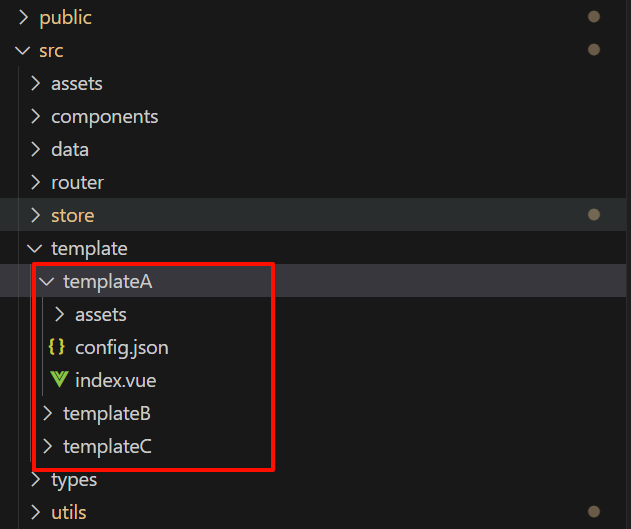
为了实现动态切换,需要在预览页面中一次性,把template目录中所有的简历都加载进来
// 动态导入所有模板组件
const templateModules = import.meta.glob('../../../template/**/index.vue');
解释
import.meta.glob 是 Vite 提供的一个特殊的导入功能,主要用于实现模块的动态导入。
主要功能:
1. 批量导入 :
    - 使用 glob 模式匹配多个文件
    = **/ 表示匹配任意深度的子目录
    = 这里会匹配 template 目录下所有的 index.vue 文件
2. 生成导入函数映射 :
    // templateModules 实际上是这样的结构
    {
      '../../../template/templateA/index.vue': () => import('../../../template/templateA/index.vue'),
      '../../../template/templateB/index.vue': () => import('../../../template/templateB/index.vue'),
      // ... 更多模板
    }
3. 按需加载 :
    - 每个匹配的文件会生成一个动态导入函数
    - 这些函数只有在被调用时才会真正加载对应的模块
    - 有助于提高应用的初始加载性能
4. 优势:
    - 实现代码分割
    - 减小主包体积
    - 支持动态加载
    - 提高首屏加载速度
页面初始化的时候,先加载用户的默认模板要是有,就加载,没有则默认第一个模板
// 获取并初始化模板列表
onMounted(async () => {
  try {
    templates.value = await getTemplates();
    // 如果 Pinia 中有已选中的模板,则恢复
    if (templateStore.currentTemplate) {
      selectedTemplateId.value = templateStore.currentTemplate.id;
    } else if (templates.value.length > 0) {
      // 否则默认选中第一个模板
      selectedTemplateId.value = templates.value[0].id;
      templateStore.setTemplate(templates.value[0]);
    }
    loadCurrentTemplate();
  } catch (error) {
    console.error('获取模板列表失败:', error);
  }
});loadCurrentTemplate()函数,就是整个切换模板的核心代码,用于实时把对应的组件渲染到页面上。
// 加载当前选中的模板组件
const loadCurrentTemplate = () => {
    //  首先定义获取到当前选择的模板
  const selectedTemplate = templateStore.currentTemplate;
    // 在判断的时候,使用可选链操作符 ?. 确保 folderPath 存在
    // 防止 selectedTemplate 为 null 或 undefined 时报错。
  if (selectedTemplate?.folderPath) {
    const folderName = selectedTemplate.folderPath;
    if (!folderName) {
      console.error('模板路径错误:', selectedTemplate.folderPath);
      return;
    }
    const importPath = `../../../template/${folderName}/index.vue`;
      // templateModules 是通过 import.meta.glob 生成的导入函数映射
      // 根据路径获取对应的动态导入函数
    const importFunc = templateModules[importPath];
    if (importFunc) {
        // 异步加载组件
      currentComponent.value = defineAsyncComponent(() => importFunc() as Promise<typeof import('*.vue')['default']>);
    } else {
      console.error(`未找到路径为 ${importPath} 的组件`);
    }
  }
};另外,页面中需要使用component挂载组件
<component :is="currentComponent" :colorShades="colorShades" />补充:defineAsyncComponent()
defineAsyncComponent() 是 Vue 3 提供的异步组件加载函数,用于按需动态加载组件,可以优化性能、减少初始加载时间。
基本用法:
import { defineAsyncComponent } from 'vue';

const AsyncComponent = defineAsyncComponent(() => import('./MyComponent.vue'));
作用:
- 只有在 组件需要渲染时,才会执行
import(),从而按需加载。 import()返回的是Promise,Vue 会等待组件加载完成后再渲染。
最后完成了整个模板的动态切换。
总结就是通过import.meta.glob批量导入文件夹下的.vue,当用户切换模板的时候,从templateModules中按需加载对应的模块。