惯性聚合 高效追踪和阅读你感兴趣的博客、新闻、科技资讯
阅读原文 在惯性聚合中打开

推荐订阅源

P
Palo Alto Networks Blog
N
Netflix TechBlog - Medium
freeCodeCamp Programming Tutorials: Python, JavaScript, Git & More
小众软件
小众软件
WordPress大学
WordPress大学
宝玉的分享
宝玉的分享
B
Blog
MyScale Blog
MyScale Blog
Microsoft Security Blog
aimingoo的专栏
aimingoo的专栏
Cyber Security Advisories - MS-ISAC
Hugging Face - Blog
Hugging Face - Blog
S
Schneier on Security
Project Zero
Project Zero
T
Tenable Blog
T
Tor Project blog
U
Unit 42
G
GRAHAM CLULEY
N
News and Events Feed by Topic
P
Proofpoint News Feed
奇客Solidot–传递最新科技情报
奇客Solidot–传递最新科技情报
Y
Y Combinator Blog
C
Cybersecurity and Infrastructure Security Agency CISA
腾讯CDC
博客园 - 叶小钗
M
MIT News - Artificial intelligence
Vercel News
Vercel News
T
Threat Research - Cisco Blogs
D
Darknet – Hacking Tools, Hacker News & Cyber Security
T
The Exploit Database - CXSecurity.com
P
Privacy & Cybersecurity Law Blog
I
Intezer
博客园 - 聂微东
SecWiki News
SecWiki News
Scott Helme
Scott Helme
C
Cyber Attacks, Cyber Crime and Cyber Security
IT之家
IT之家
量子位
S
Secure Thoughts
The Cloudflare Blog
博客园 - 司徒正美
Know Your Adversary
Know Your Adversary
Hacker News: Ask HN
Hacker News: Ask HN
V
Vulnerabilities – Threatpost
Simon Willison's Weblog
N
News | PayPal Newsroom
C
Check Point Blog
Spread Privacy
Spread Privacy
C
CXSECURITY Database RSS Feed - CXSecurity.com
Cyberwarzone
Cyberwarzone

ImCaO's Blog

なんでもないや 7 Years JustLaws 法律文库贡献指南 Love Story 阻止文明倒塌:Jonathan Blow 在莫斯科 DevGAMM 上的演讲 我做了一个法律文库,这可能是最简洁、便捷查询法律条文的地方 基本计算器问题的双栈通用解法 Spring Data Neo4j 开发记录 岛屿类问题的通用解法、DFS 遍历框架 When You're Gone 近况 很久以后 Spring Boot 自动配置原理 我怀念的 Webpack 核心概念 制造设备实时数据传输架构方案 暑假摸的鱼 夏至已至 CSS 选择器
VuePress 2.0 中使用 Algolia DocSearch 文档搜索功能的配置
ImCaO · 2022-06-24 · via ImCaO's Blog

已经一个多月没有更新博客了,这段时间在学习 Spring Cloud 微服务开发,也有几周没更新 JustLaws 网站了,想起来还有一个搜索功能要增强,这次就来试试 Algolia DocSearch 吧!

主要流程

流程简单来说分为两步:

1. 创建 Algolia 索引
2. 在 VuePress 中配置 Algolia DocSearch

官方提供了多种方式来创建 Algolia 索引,最简单的方式是提交网站的 URL 给 DocSearch 官方,DocSearch 团队会帮你创建索引,并将 apiKey 和 indexName 发送到你的邮箱。但是这一方式有一些限制,其中一条是你的网站必须是开源项目的技术文档或者技术博客,我们的法律文库显然不满足这个条件,所以我们需要自己手动创建索引。

环境配置

首先需要注册一个 Algolia 的账号,注册完成后来到控制台,系统会自动帮你创建好一个应用,可以将应用的地区改成香港,这样在搜索查询的时候延迟会低一些。接着需要手动创建一个索引,我们之后运行爬虫的结果会全部存储在这个索引中。
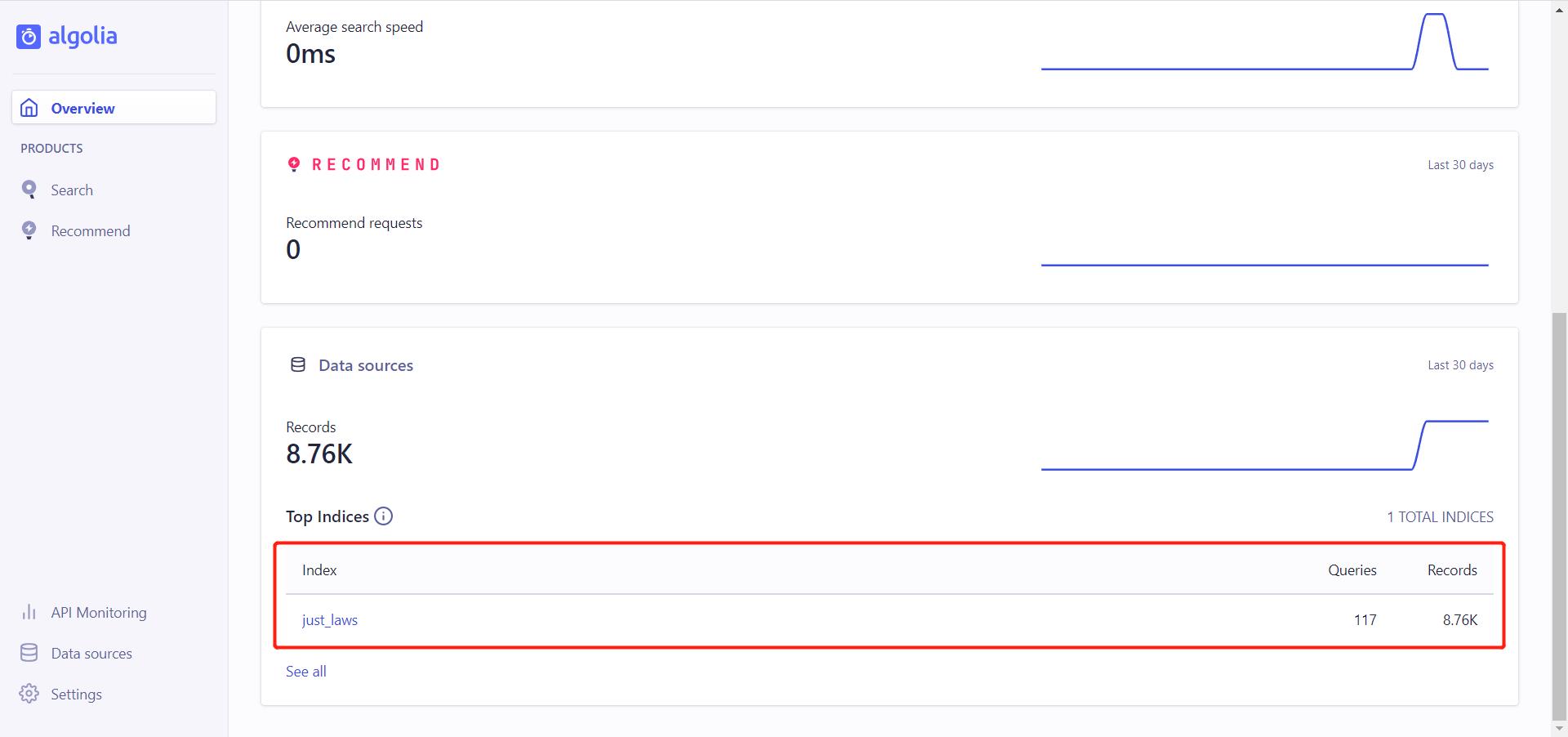
创建索引

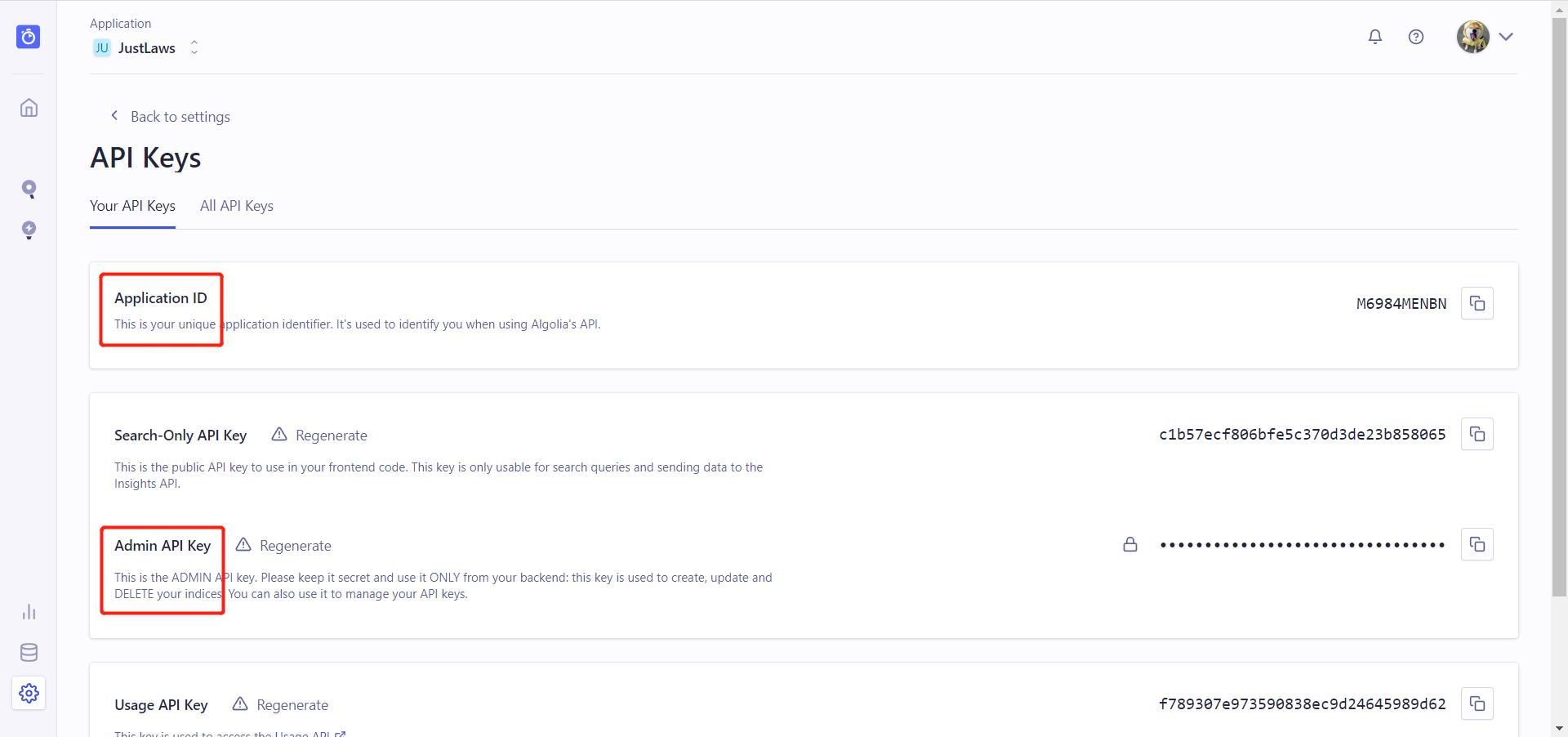
创建完索引后,来到设置——API Keys 获取 Application IDAdmin API Key。创建 .env 文件,将两个参数填入。

获取 API

1
2
APPLICATION_ID=M6984MENBN
API_KEY=••••••••••••••••••••••••••••••••

配置完 API,接下去需要配置爬虫的选项。创建 config.json 文件,对于 VuePress 可以用以下配置,修改 index_name 为之前创建的索引名称,start_urls 为网站的首页地址,其余选项可保持默认。

1
2
3
4
5
6
7
8
9
10
11
12
13
14
15
16
17
18
19
20
21
22
23
24
25
26
27
28
29
30
31
32
33
34
35
36
37
38
39
40
41
42
43
44
45
46
47
48
49
50
51
52
{
"index_name": "just_laws",
"start_urls": [{ "url": "https://www.justlaws.cn/", "variables": { "lang": ["zh-CN"] } }],
"selectors": {
"lvl0": ".sidebar-heading.active",
"lvl1": ".theme-default-content h1",
"lvl2": ".theme-default-content h2",
"lvl3": ".theme-default-content h3",
"lvl4": ".theme-default-content h4",
"lvl5": ".theme-default-content h5",
"lvl6": ".theme-default-content h6",
"text": ".theme-default-content p, .theme-default-content li"
},
"initialIndexSettings": {
"attributesForFaceting": ["type", "lang"],
"attributesToRetrieve": ["hierarchy", "content", "anchor", "url"],
"attributesToHighlight": ["hierarchy", "hierarchy_camel", "content"],
"attributesToSnippet": ["content:10"],
"camelCaseAttributes": ["hierarchy", "hierarchy_radio", "content"],
"searchableAttributes": [
"unordered(hierarchy_radio_camel.lvl0)",
"unordered(hierarchy_radio.lvl0)",
"unordered(hierarchy_radio_camel.lvl1)",
"unordered(hierarchy_radio.lvl1)",
"unordered(hierarchy_radio_camel.lvl2)",
"unordered(hierarchy_radio.lvl2)",
"unordered(hierarchy_radio_camel.lvl3)",
"unordered(hierarchy_radio.lvl3)",
"unordered(hierarchy_radio_camel.lvl4)",
"unordered(hierarchy_radio.lvl4)",
"unordered(hierarchy_radio_camel.lvl5)",
"unordered(hierarchy_radio.lvl5)",
"unordered(hierarchy_radio_camel.lvl6)",
"unordered(hierarchy_radio.lvl6)",
"unordered(hierarchy_camel.lvl0)",
"unordered(hierarchy.lvl0)",
"unordered(hierarchy_camel.lvl1)",
"unordered(hierarchy.lvl1)",
"unordered(hierarchy_camel.lvl2)",
"unordered(hierarchy.lvl2)",
"unordered(hierarchy_camel.lvl3)",
"unordered(hierarchy.lvl3)",
"unordered(hierarchy_camel.lvl4)",
"unordered(hierarchy.lvl4)",
"unordered(hierarchy_camel.lvl5)",
"unordered(hierarchy.lvl5)",
"unordered(hierarchy_camel.lvl6)",
"unordered(hierarchy.lvl6)",
"content"
]
}
}

运行爬虫

我们在服务器上运行爬虫,系统为 CentOS 7.6。首先需要安装 jq,一个简单而又强大的 json 解析工具,一行命令就搞定。

1
yum install jq

接着拉取 Docker 镜像,并运行爬虫,注意修改配置文件的路径。

1
docker run -it --env-file=.env -e "CONFIG=$(cat /root/docsearch/config.json | jq -r tostring)" algolia/docsearch-scraper

等待爬虫运行结束,就可以在控制台看到结果了,免费版的索引存储上限是 10000 条。

在 VuePress 中配置 Algolia DocSearch

按照官方文档进行配置即可。

其中,searchParameters 参数可以参考 algolia 文档进行配置。

1
npm i -D @vuepress/plugin-docsearch@next
1
2
3
4
5
6
7
8
9
10
11
12
13
14
15
16
17
18
19
20
21
22
23
24
25
26
27
28
29
30
31
32
33
34
35
36
37
38
39
40
41
42
43
44
45
46
47
48
49
50
51
52
53
54
55
56
57
const { docsearchPlugin } = require("@vuepress/plugin-docsearch");

module.exports = {
plugins: [
docsearchPlugin({
apiKey: "c1b57ecf806bfe5c370d3de23b858065",
appId: "M6984MENBN",
indexName: "just_laws",
searchParameters: {
attributesToSnippet: ["lvl1:30", "content:25"],
},
locales: {
"/": {
placeholder: "搜索文档",
translations: {
button: {
buttonText: "搜索文档",
buttonAriaLabel: "搜索文档",
},
modal: {
searchBox: {
resetButtonTitle: "清除查询条件",
resetButtonAriaLabel: "清除查询条件",
cancelButtonText: "取消",
cancelButtonAriaLabel: "取消",
},
startScreen: {
recentSearchesTitle: "搜索历史",
noRecentSearchesText: "没有搜索历史",
saveRecentSearchButtonTitle: "保存至搜索历史",
removeRecentSearchButtonTitle: "从搜索历史中移除",
favoriteSearchesTitle: "收藏",
removeFavoriteSearchButtonTitle: "从收藏中移除",
},
errorScreen: {
titleText: "无法获取结果",
helpText: "你可能需要检查你的网络连接",
},
footer: {
selectText: "选择",
navigateText: "切换",
closeText: "关闭",
searchByText: "搜索提供者",
},
noResultsScreen: {
noResultsText: "无法找到相关结果",
suggestedQueryText: "你可以尝试查询",
reportMissingResultsText: "你认为该查询应该有结果?",
reportMissingResultsLinkText: "点击反馈",
},
},
},
},
},
}),
],
};