



惯性聚合 高效追踪和阅读你感兴趣的博客、新闻、科技资讯
阅读原文 在惯性聚合中打开

推荐订阅源

WordPress大学
WordPress大学
博客园 - 司徒正美
小众软件
小众软件
H
Help Net Security
博客园 - 聂微东
宝玉的分享
宝玉的分享
Jina AI
Jina AI
酷 壳 – CoolShell
酷 壳 – CoolShell
阮一峰的网络日志
阮一峰的网络日志
M
MIT News - Artificial intelligence
博客园 - 【当耐特】
U
Unit 42
大猫的无限游戏
大猫的无限游戏
Apple Machine Learning Research
S
SegmentFault 最新的问题
腾讯CDC
MongoDB | Blog
MongoDB | Blog
云风的 BLOG
云风的 BLOG
J
Java Code Geeks
I
InfoQ
钛媒体:引领未来商业与生活新知
钛媒体:引领未来商业与生活新知
Martin Fowler
Martin Fowler
博客园 - 三生石上(FineUI控件)
Vercel News
Vercel News

Lei Mao's Log Book

2026 FIFA World Cup 备受嘲讽的会徽 Python Debugging Via VS Code In Docker Container Vargas Plateau Regional Park 徒步 Vargas Plateau Regional Park Apex 2026 FIFA World Cup 小组赛赛程 San Francisquito Creek Joint Powers Authority 2025 Calendar Photo 麦当劳 The FIFA World Cup 套餐 Ardenwood Historic Farm 徒步 Ardenwood Historic Farm Synchronizations With TorchRec KeyedJaggedTensor Pacific Commons Linear Park 徒步 Pacific Commons Linear Park 2026 San Jose Half Marathon 竞赛 目标 Mountain View Shoreline Park 徒步 Mountain View Shoreline Park PyTorch AOTInductor Hybrid Lowering Carquinez Strait Regional Shoreline 徒步 Carquinez Strait Regional Shoreline PyTorch Triton Kernel Transparent Tracing and Compilation 脸庞 PyTorch Fake Export 2026 BRAIN Foundation 10K 竞赛 2026 Wild and Scenic Film Festival 参观 2026 Wild and Scenic Film Festival 系统工程程序员修 Bug FIFA 官方网站的语言 PyTorch Custom Operation 汉堡王 The Mandalorian and Grogu 套餐
Retaining EXIF Metadata In GIMP
Lei Mao · 2026-06-08 · via Lei Mao's Log Book

Introduction

I switched to Ubuntu 26.04 LTS a few days ago and I realized that the EXIF metadata of my photos were lost if I have edited the photos with GIMP. This problem did not exist when I was using GIMP on Ubuntu 24.04 LTS.

In this blog post, I would like to quickly document how to retain EXIF metadata when editing photos with GIMP on Ubuntu 26.04 LTS.

The first thing I checked was the GIMP Preferences. I found that there is an option called “Export Exif metadata by default when available” under the “Export Policies” of “Image Import & Export”. However, this option was already enabled, but the EXIF metadata was still lost after I edited and exported the photos with GIMP.
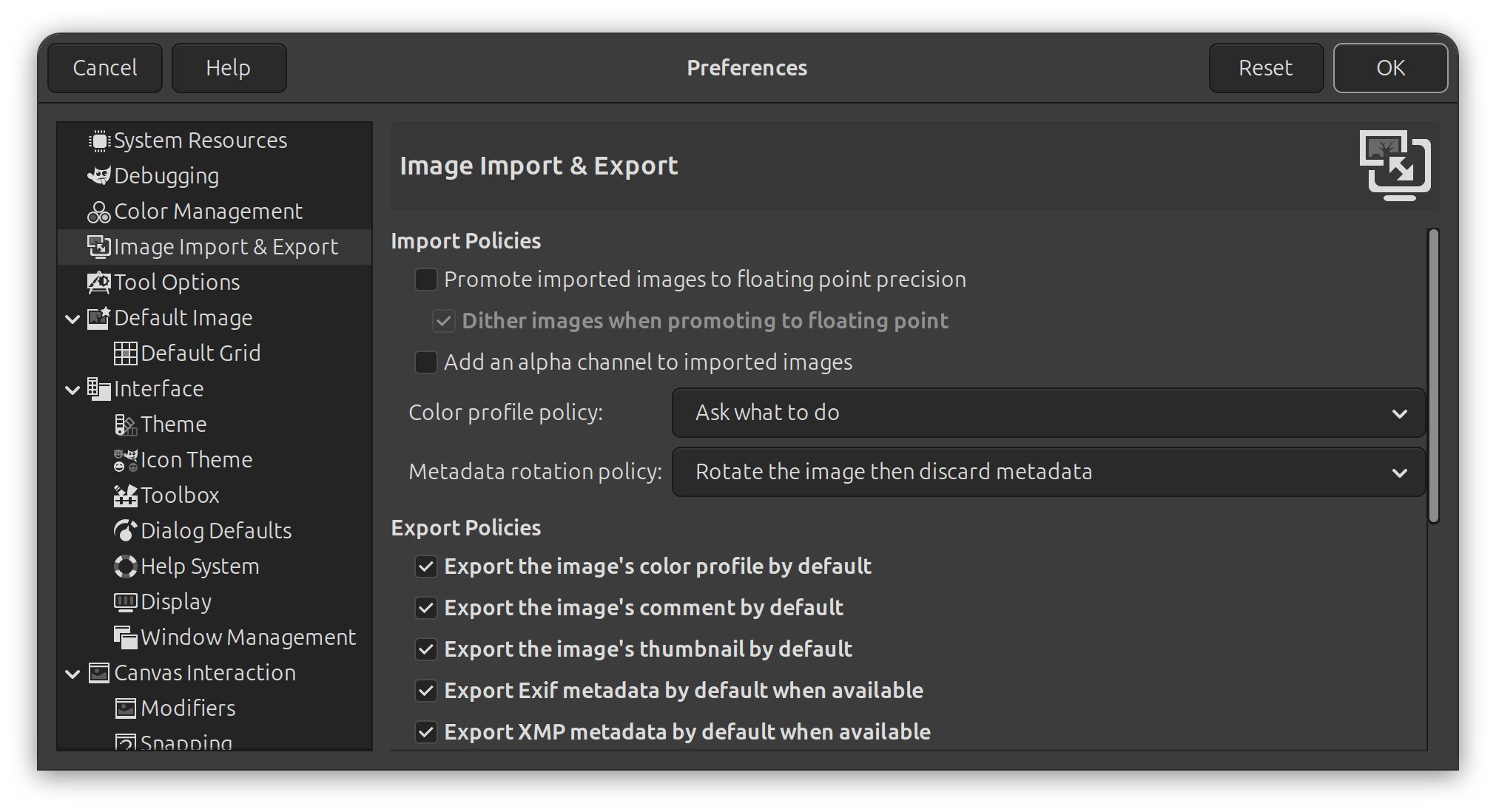
GIMP Preferences

It turns out that if I do “File -> Export As” to export the edited photo, there will be options for metadata as well. However, by default, the “Save Exif” option is not enabled.
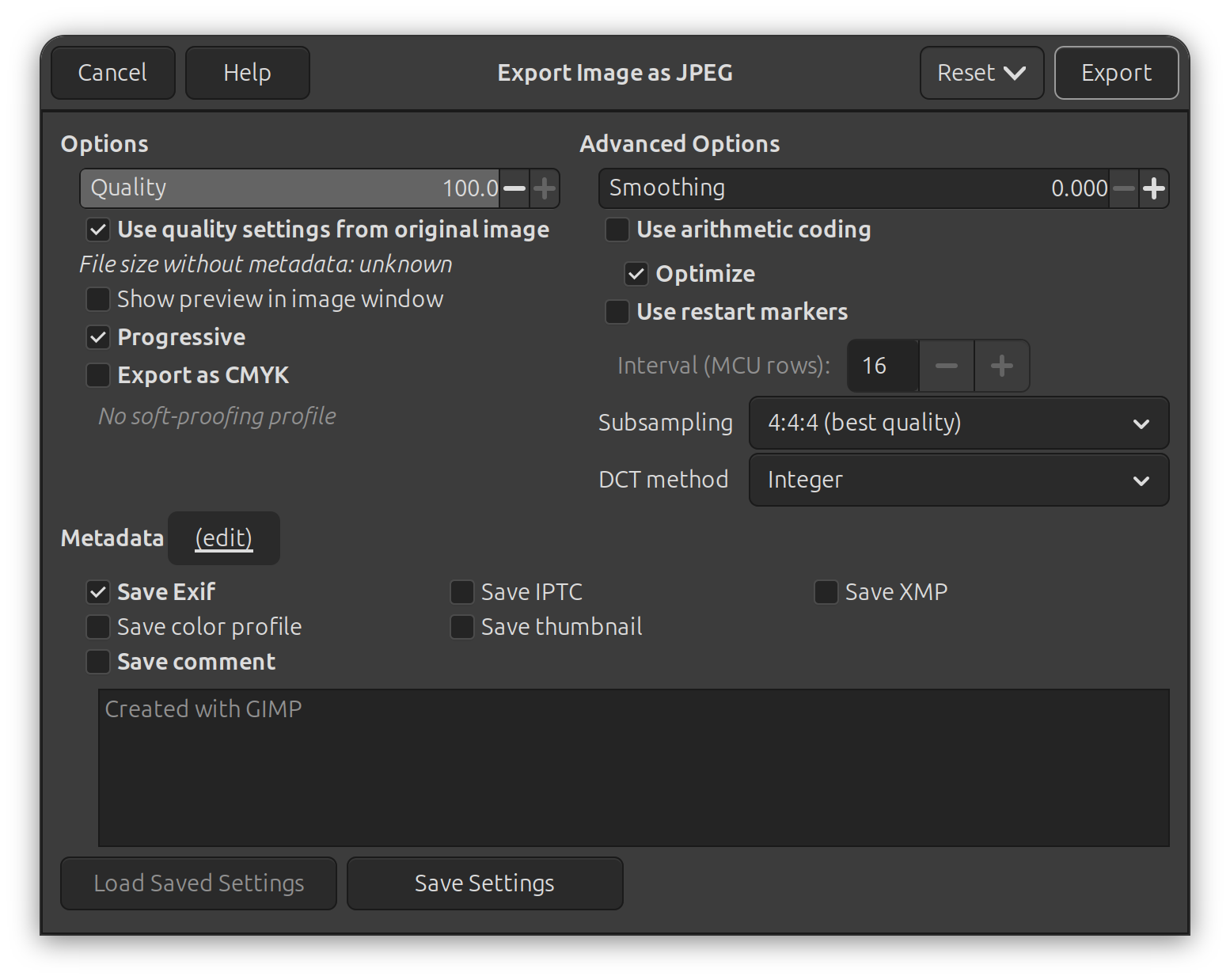
GIMP Export Settings

My preferrence was to export the edited photo by overwritting the existing one using “File -> Overwrite”, so I could never notice this option before. After I enabled the “Save Exif” in the “File -> Export As” options, this enablement is permanent and is also applied to “File -> Overwrite” automatically.