










用 NumPy 向量化操作快速模拟并洞察 100×20 电影评分矩阵,揭示平均分、最受欢迎、争议最大及用户打分倾向。

如果你经常在豆瓣、IMDb 上冲浪,你会发现有的人动不动就打 10 分,
也有的人连《阿凡达》都只给个 6 分。
那问题来了:
如果我们用 NumPy 来分析一群用户的打分,会发现怎样的规律?
今天,我们就做一个小实验,用 NumPy 还原一个「影评网站」的世界。
我们要模拟一份影评数据表,里面包含:
目标:用 NumPy 模拟一个 100 个用户、20 部电影的评分矩阵,
并完成平均分、最受欢迎电影、两极分化电影等分析。
pip install numpy matplotlib别忘了导入:
import numpy as np
import matplotlib.pyplot as plt
import numpy as np
import matplotlib.pyplot as plt
np.random.seed(42)
num_users = 100
num_movies = 20
# 用户打分偏好:有人偏高、有人偏低
user_bias = np.random.normal(0, 1, num_users)
# 电影总体质量
movie_quality = np.random.normal(0, 1, num_movies)
# 评分生成公式 = 用户偏好 + 电影质量 + 一点随机噪声
ratings = np.add.outer(user_bias, movie_quality) + np.random.normal(0, 0.8, (num_users, num_movies))
# 归一化到 1~10 之间
ratings = 1 + 9 * (ratings - ratings.min()) / (ratings.max() - ratings.min())
ratings = np.round(ratings, 1)输出:
[[4.9 4.6 6.3 ... 4.4 7.2 5.4]
 [4.  5.6 3.6 ... 4.4 5.2 6.2]
 [3.8 6.  6.3 ... 5.8 6.6 8.3]
 ...
 [4.8 5.  5.4 ... 5.2 6.3 5.8]
 [4.  5.3 3.9 ... 3.4 5.1 6.4]
 [4.  4.  4.1 ... 3.3 4.2 5.5]]
运行后你会得到一个 100×20 的评分矩阵,
每个数字都像是某个网友的「一己之见」。
movie_avg = ratings.mean(axis=0)
print(movie_avg)

# [3.955 4.783 4.802 4.381 4.964 5.408 6.674 5.334 5.324 5.192 3.392 5.06
 5.159 7.327 5.096 5.369 5.079 4.13  6.187 5.861]
这行代码,直接把 100 个用户的打分在“电影维度”上取平均。
不需要任何循环,性能炸裂。
axis=0 → 对列求平均(即每部电影)axis=1 → 对行求平均(即每个用户)
best_movie_idx = np.argmax(movie_avg)
print(f"最受欢迎电影编号:{best_movie_idx},平均分:{movie_avg[best_movie_idx]:.2f}")

# 最受欢迎电影编号:13,平均分:7.33movie_std = ratings.std(axis=0)
most_divided_idx = np.argmax(movie_std)
print(f"最两极分化电影编号:{most_divided_idx},标准差:{movie_std[most_divided_idx]:.2f}")
# 最两极分化电影编号:11,标准差:1.17user_avg = ratings.mean(axis=1)
strict_user = np.argmin(user_avg)
easy_user = np.argmax(user_avg)
print(f"最严格用户:{strict_user},平均打分:{user_avg[strict_user]:.2f}")
print(f"最佛系用户:{easy_user},平均打分:{user_avg[easy_user]:.2f}")
# 最严格用户:74,平均打分:3.01
# 最佛系用户:6,平均打分:6.71plt.figure(figsize=(10,5))
plt.bar(range(num_movies), movie_avg, color='skyblue')
plt.xlabel('电影编号')
plt.ylabel('平均评分')
plt.title('各电影平均评分')
plt.show()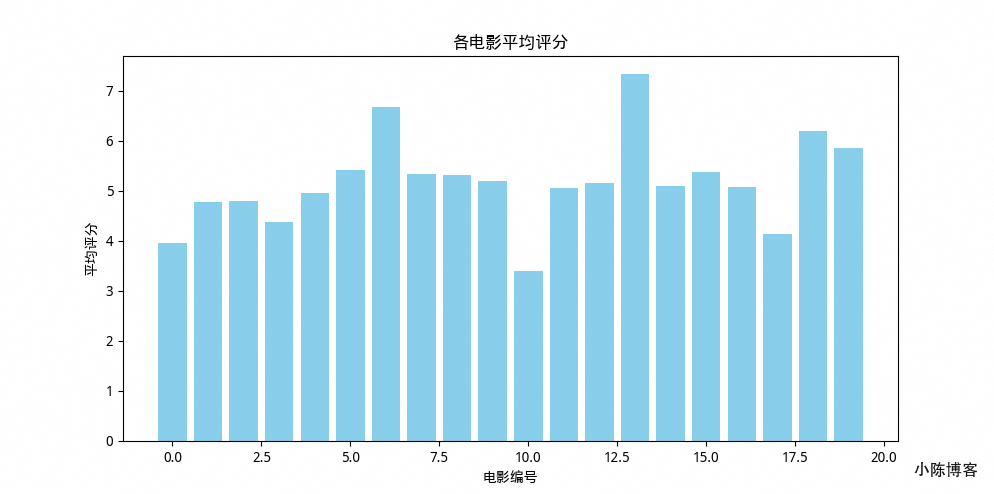
plt.figure(figsize=(10,6))
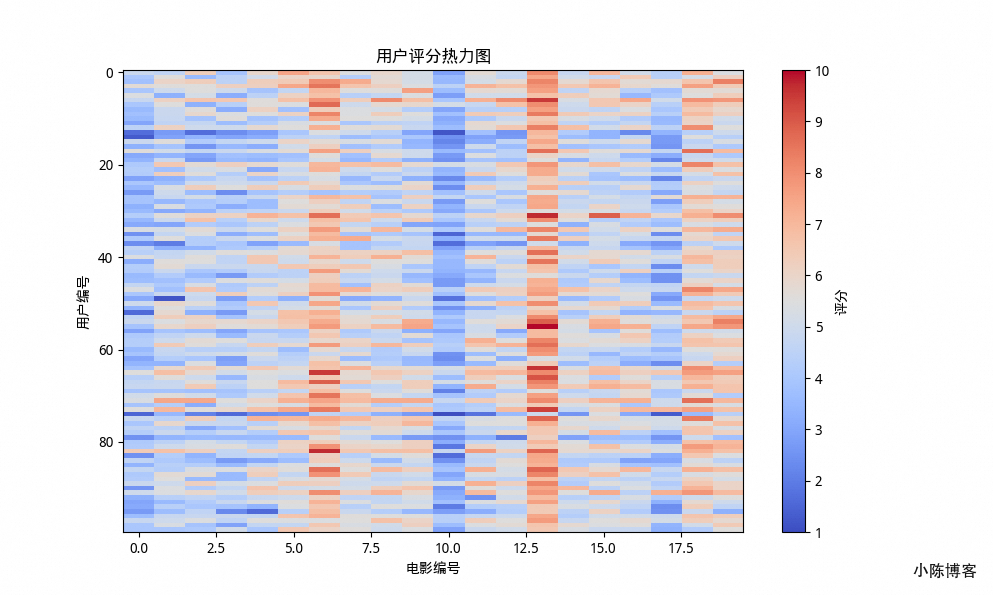
plt.imshow(ratings, cmap='coolwarm', aspect='auto')
plt.colorbar(label='评分')
plt.xlabel('电影编号')
plt.ylabel('用户编号')
plt.title('用户评分热力图')
plt.show()
热力图可以直观看出“哪部电影评分高”以及“谁在疯狂打高分”。
import time

start = time.time()
avg_scores = []
for i in range(num_movies):
    avg_scores.append(sum(ratings[:, i]) / num_users)
print("循环耗时:", time.time() - start)

# 循环耗时: 7.82012939453125e-05
start = time.time()
movie_avg = ratings.mean(axis=0)
print("向量化耗时:", time.time() - start)
# 向量化耗时: 1.5020370483398438e-05💡 实测差距可达 30~100 倍。
循环是跑步,NumPy 是坐高铁。
| 模块 | 技术点 |
|---|---|
| 数据生成 | np.random.randint() |
| 聚合分析 | mean()、std()、argmax() |
| 性能优化 | 向量化计算 |
| 可视化 | matplotlib 热力图与柱状图 |
恭喜!到这里,你已经能独立用 NumPy 处理一份真实数据集,
从生成、分析、到可视化,闭环打通。
作者: 文章链接: https://reinness.com/posts/302 版权声明: 本博客所有文章除特别声明外,均采用 CC BY-NC-SA 4.0 许可协议。转载请注明来自小陈同学 !
此内容由惯性聚合(RSS阅读器)自动聚合整理,仅供阅读参考。 原文来自 — 版权归原作者所有。