
TL;DR:
We’re sharing two new ways for you to use Stable Audio 3.0. We now have a DAW plugin and a more advanced generation experience on StableAudio.com.
The new plugin brings generation to your DAW, so you can work where you need to work. Arrange, edit, and mix what you make with Stable Audio 3.0 like any other audio.
In the web app, go beyond the initial generation to give iterative direction, try variations, mix and edit, work with multiple tracks, and extend the length.
Both are powered by our commercially-safe models. You own your outputs, and can distribute outputs freely.
This is an early beta, so some features are experimental. Try it here and tell us what would be useful in your process.
Getting to the right soundscape, score, or song is a deeply personal process. Every artist works differently, and you don’t know where an idea will take you when you start.
Which means you don’t get there in one shot.
That’s something we’ve been thinking about a lot as we build what’s next with Stable Audio. Our goal is simple: give you the tools to shape a sound, not just generate one.
So today we wanted to share two new tools that give you different ways to work with Stable Audio 3.0.
There’s a new Stable Audio plugin that brings generation directly into your favorite DAW. And we also enhanced the web experience on StableAudio.com, with more ways to edit and work with what you generate. Both are powered by our commercially-safe models, which means you own your outputs, and can distribute outputs freely.
These are both in beta, so some features are experimental. We will continue to iterate on the experience in real time.
Work with Stable Audio where you make music
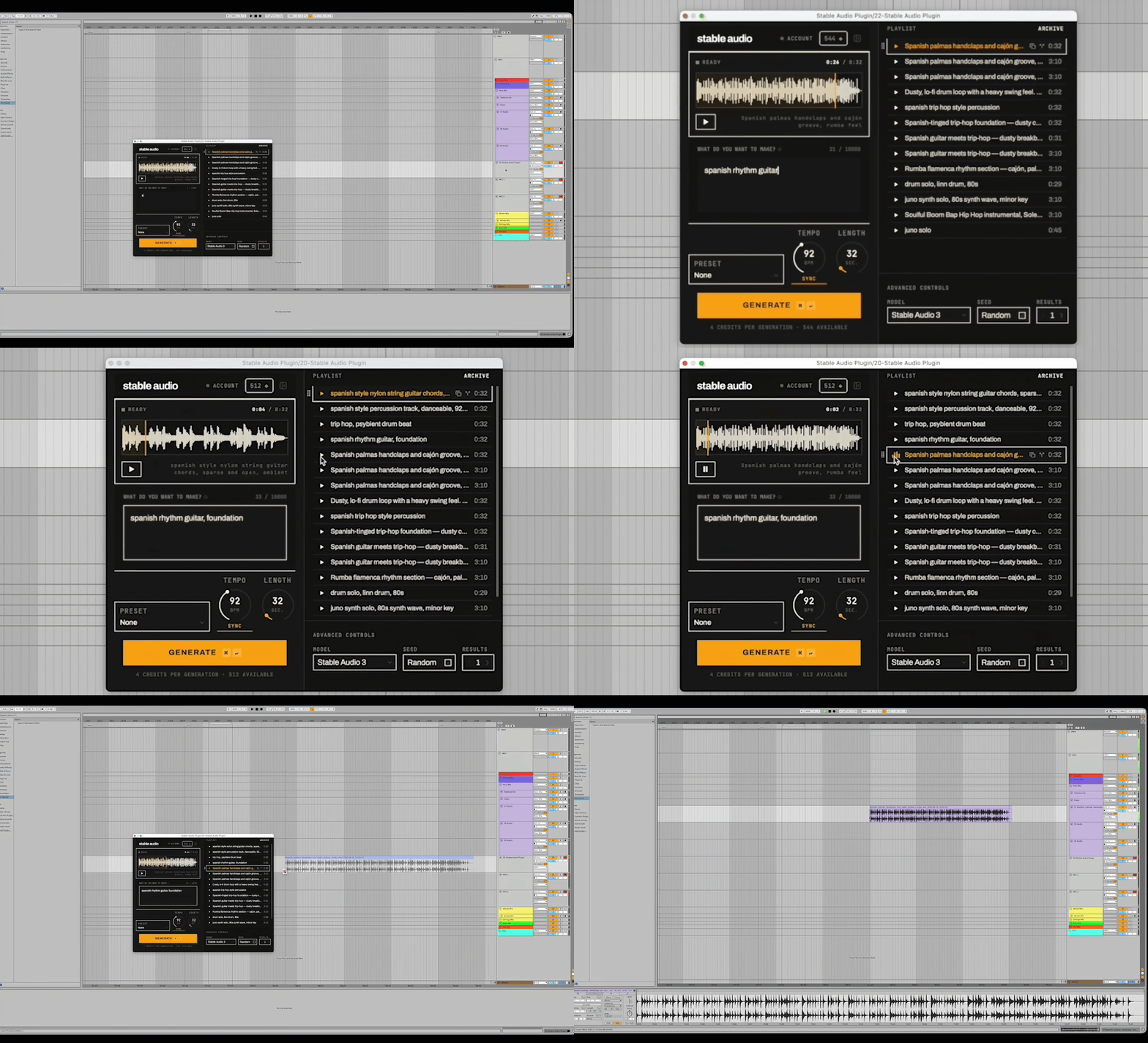
We’re introducing the Stable Audio plugin. Generate audio directly on a track in your DAW, where you can arrange it, edit it, process it, and build on it alongside the rest of your session.
The plugin works as an instrument. For example, in Ableton, it’s under PlugIns on an Instrument track, and in Logic it’s the Instrument slot. Working inside the session, you can:
Work at your tempo. Sync Stable Audio to your session BPM so your generations fit the project you’re already working on.
Choose the length. Generate exactly what you need, from a short section to a full six-minute song.
Keep your options open. Save multiple takes in a playlist so you can compare generations and decide what stays.
The plugin is available as a macOS AU and VST3, with support for both Apple Silicon and Intel Macs. It is compatible with major DAWs including Logic Pro and Ableton Live.
Start with a track, then keep working on it in your browser
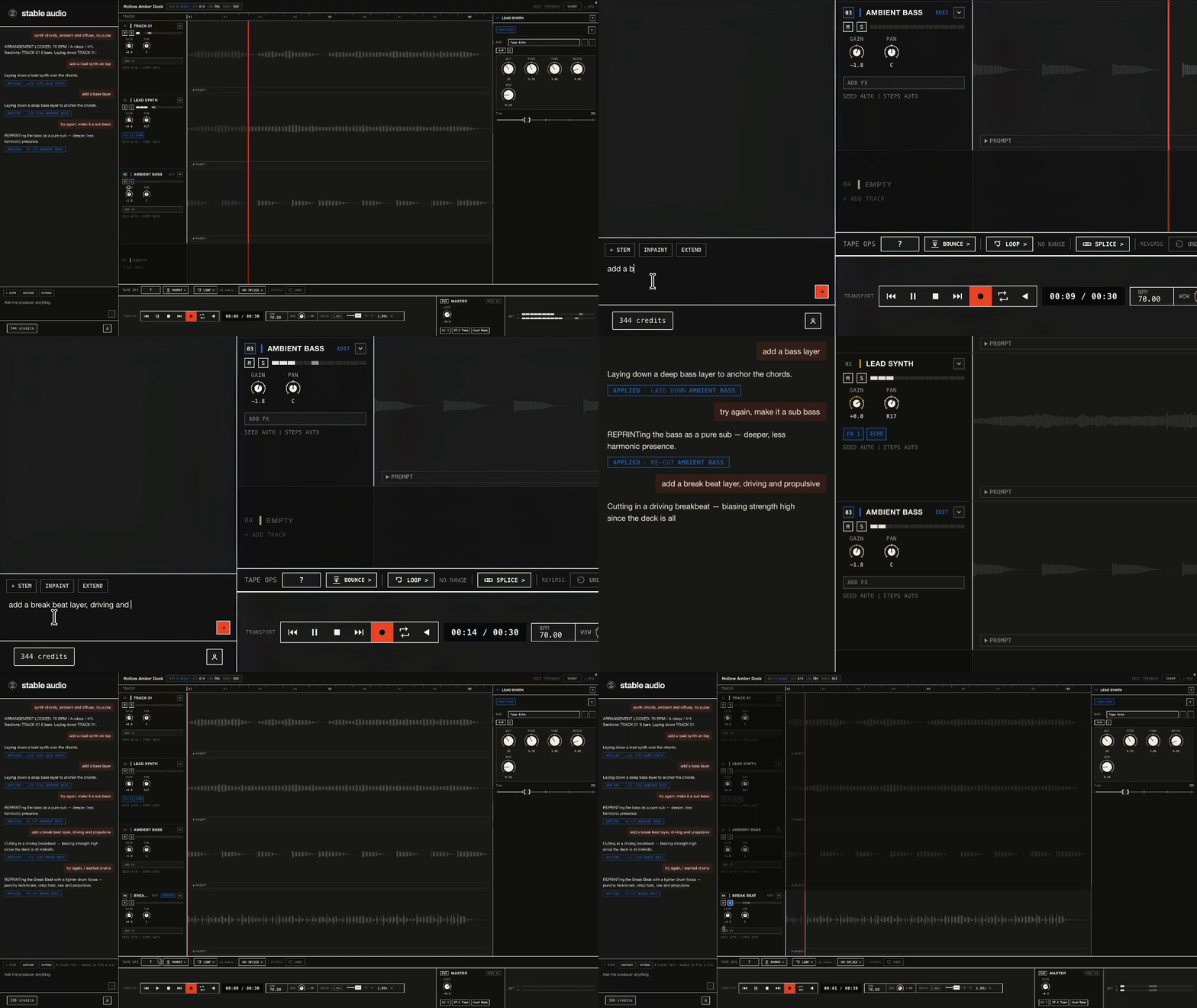
The enhanced web app is built for how musicians work: get an idea down, react to it, make changes, and keep iterating.
You can get your first take down by prompting for it. From there, iterate further:
Give direction in your own words. Ask for less low end, a later build, different instrumentation, or whatever else you want to try.
Use audio-to-audio to explore new genres, moods, and variations from something you already have.
Work with the individual parts. Mix and edit your tracks with controls like level, pan, mute, and solo, plus per-track and master effects.
Take it with you. Bounce the parts you want, then export the mix when you’re ready to keep working somewhere else.
Instead of asking you to begin again whenever a take is close but not quite there, Stable Audio gives you a session you can keep working in. Read our guide for tips on making your first mix.
Be part of what we’re building next
This beta is an early step toward a larger vision for our audio tools: Supporting your iterative creative process.
We will keep testing, learning, and improving with the people who use these tools every day. Whether you’re a musician, producer, composer, sound designer, or developer working with audio, we want to hear what helps, what gets in the way, and what you want to build next.
Give it a try and tell us what you think.
Rock on 🤘
The Stable Audio team