




在window下安装最新Go语言开发包自定义单元格单击或右键时,给单元格添加不一样的样式而苦苦搜寻,可找了好久却好像都没有呢?巧了,笔者已经实现了这一看似很简单地功能!
先来看下最终实现效果:
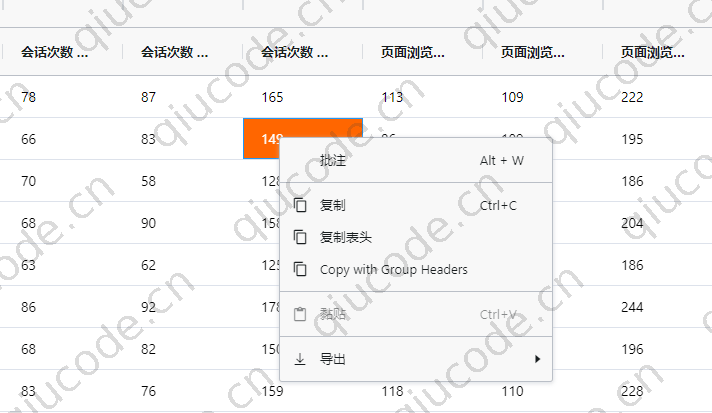
你在看这篇文章的时候,那就说明你项目中已经引入了ag-grid表格库,本文是基于 vue 实现的。
<ag-grid-vue :style="{height: tableHeight,width: '100%'}" class="flex-grow-1 flex-shrink-1 ag-theme-alpine"
                                 :gridOptions="gridOptions"
                                 :columnDefs="columnDefs"
                                 :rowData="rowData"
                                 :sideBar="sideBar"
                                 :animateRows="true"
                                 :autoGroupColumnDef="autoGroupColumnDef"

                                 :defaultColDef="{
                                    sortable: true,
                                    resizable: true,
                                    filter: true,
                                    minWidth: 100,
                                 }"


                                 :groupHeaders="true"
                                 :suppressRowClickSelection="true"
                                 rowSelection="multiple"

                                 :allowContextMenuWithControlKey="true"
                                 :getContextMenuItems="getContextMenuItems"

                                 @grid-ready="onReady"
                                 @cell-clicked="onCellClicked"
                                 @cell-context-menu="onCellContextMenu"
                                 @cell-focused="onCellFocused"
                    >
                    </ag-grid-vue>
首先定义两个全局变量,注意放在 export default语句外边
let selectRow = null,selectColumn = null

export default {
    data(){
        return {
            gridOptions: null,
            gridapi: null,
            columnDefs: null,
            rowData: null,
            showGrid: false,
            sideBar: false,
            rowCount: null,
            autoGroupColumnDef: null,

        }
    },
    methods: {
        //数据是模拟   不必太在意于
         createRowData() {
                const rowData = [];

                for (let i = 0; i < 200; i++) {

                    rowData.push({
                        name: '张三'+i,
                        skills: {
                            android: Math.random() < 0.4,
                            html5: Math.random() < 0.4,
                            mac: Math.random() < 0.4,
                            windows: Math.random() < 0.4,
                            css: Math.random() < 0.4
                        },
                        dob: '张三'+i,
                        address: '张三'+i,
                        years: '2020',
                        proficiency: Math.round(Math.random() * 100),
                        country: '张三'+i,
                        continent: '张三'+i,
                        language: 'zh',
                        mobile: 134884552+'i',
                        landline: '张三'+i
                    });
                }

                this.rowData = rowData;
            },
            createColumnDefs() {
                this.columnDefs = [
                    {
                        headerName: '#', minWidth: 60, width: 60, checkboxSelection: true, sortable: false,
                        suppressMenu: true, pinned: true
                    },
                    {
                        headerName: 'Employee',
                        children: [
                            {
                                headerName: "Name", field: "name", editable: true,
                                width: 150, pinned: true,
                            },
                            {
                                headerName: "Country", field: "country", width: 150,
                            },
                            {
                                headerName: "DOB",
                                field: "dob",
                                width: 120,
                                pinned: true,

                                filter: 'agDateColumnFilter',
                                columnGroupShow: 'open'
                            }
                        ]
                    },
                    {
                        headerName: 'IT Skills',
                        children: [
                            {
                                headerName: "Skills",
                                width: 125,
                                sortable: false,
                            },
                            {
                                headerName: "Proficiency",
                                field: "proficiency",
                                width: 120,
                            },
                        ]
                    },
                    {
                        headerName: 'Contact',
                        children: [
                            {
                                headerName: "Mobile",
                                field: "mobile",
                                width: 150,
                                filter: 'text'
                            },
                            {
                                headerName: "Land-line",
                                field: "landline",
                                width: 150,
                                filter: 'text'
                            },
                            {headerName: "Address", field: "address", width: 500, filter: 'text'}
                        ]
                    }
                ];
            },
        onReady(params) {
            console.log('onReady');

            this.gridapi = params.api;
            this.calculateRowCount();

            this.gridapi.sizeColumnsToFit();
        },

        //单元格点击事件
        onCellClicked(event) {
            //selectRow = event.data
            //selectColumn = event.colDef

        },

        /**
        * 右键弹出菜单
        */
        onCellContextMenu(event) {

            let headerDom = document.querySelectorAll('.ag-cell')
            for (const n of headerDom) {
                n.style.backgroundColor = '#fff'
                n.style.color = '#000'
            }

            var column = event.colDef.field;


            if (event.data === selectRow && event.colDef === selectColumn) {
                //return 'col-orange'
                event.colDef.cellStyle = { 'background-color': '#f60', 'color': '#fff' };
            }

            this.gridapi.refreshCells({
                force: true,
                columns: [column],
                rowNodes: [event.node]
            });


    },
        //单元获得焦点
        onCellFocused(event) {
            let rowData = this.gridapi.getRowNode(event.rowIndex)
            selectRow = rowData.data
            selectColumn = event.column.colDef
        },
   },
    beforeMount() {
        this.gridOptions = {};
        this.gridOptions.components = {agDateInput: DateComponent};
        this.createRowData();
        this.createColumnDefs();
        this.showGrid = true;
    },
}