


惯性聚合 高效追踪和阅读你感兴趣的博客、新闻、科技资讯
阅读原文 在惯性聚合中打开

推荐订阅源

博客园_首页
N
News and Events Feed by Topic
P
Privacy International News Feed
The Hacker News
The Hacker News
Schneier on Security
C
Cybersecurity and Infrastructure Security Agency CISA
Security Latest
Security Latest
L
LINUX DO - 最新话题
阮一峰的网络日志
阮一峰的网络日志
Cisco Talos Blog
Cisco Talos Blog
cs.AI updates on arXiv.org
Simon Willison's Weblog
The Cloudflare Blog
博客园 - 【当耐特】
博客园 - Franky
P
Privacy & Cybersecurity Law Blog
Attack and Defense Labs
云风的 BLOG
云风的 BLOG
月光博客
月光博客
D
Docker
Webroot Blog
Webroot Blog
The GitHub Blog
The GitHub Blog
cs.CL updates on arXiv.org
W
WeLiveSecurity
S
Security Affairs
Martin Fowler
Martin Fowler
K
KPMG report finds enterprise disconnect between AI and its ROI | CIO
Security Archives - TechRepublic
Microsoft Azure Blog
C
CERT Recently Published Vulnerability Notes
B
Blog
L
Lohrmann on Cybersecurity
T
Threatpost
量子位
S
Schneier on Security
V
Visual Studio Blog
S
Securelist
T
The Exploit Database - CXSecurity.com
Scott Helme
Scott Helme
V
Vulnerabilities – Threatpost
aimingoo的专栏
aimingoo的专栏
The Register - Security
I
Intezer
Stack Overflow Blog
Stack Overflow Blog
Exploit-DB.com RSS Feed
博客园 - 聂微东
小众软件
小众软件
罗磊的独立博客
雷峰网
雷峰网
Recorded Future
Recorded Future

Easton Man's Blog

龙芯3A6000:国产CPU中的一颗明星 | Easton Man's Blog HotChips 2023: Ventana 不寻常的 Veyron V1 | Easton Man's Blog 现代分支预测:从学术界到工业界 | Easton Man's Blog NSCSCC2022 龙芯杯参赛总结 | Easton Man's Blog 2021年终总结:你所热爱的,就是你的生活 | Easton Man's Blog 最优停止理论与导师选择 | Easton Man's Blog 全球大内网与Zerotier | Easton Man's Blog 论大学之义 | Easton Man's Blog 现代处理器结构 | Easton Man's Blog
Bash History的使用技巧 | Easton Man's Blog
Easton Man · 2021-06-10 · via Easton Man's Blog

浏览量: 380

预计阅读时间: 3 分钟

Bash是常见的shell环境,大多数Linux发行版也都带有Bash,因此高效地利用history可以节省手动输入重复命令的时间。本文分享一下几个我自己使用的技巧和配置。

搜索

这个技巧大家应该多少都知道,就是在输入界面按Ctrl-R就可以进行搜索了,返回的结果是最近一个匹配的命令,然后按回车就可以执行。
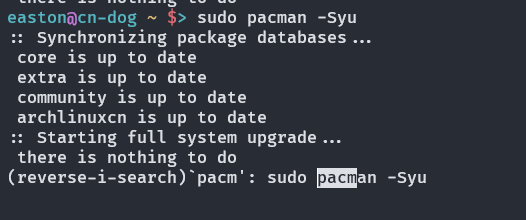
Ctrl-R

但是有的时候搜索结果只是与我想要的很相近,但又不完全一样,我希望能够在执行之前对命令做小的修改,那怎么办?其实此时按Esc就可以退出并且编辑。

还有一个方式是利用:p:p在Bash中表示打印但不执行,因此如果我们想要查看某个前缀的命令,就可以使用!prefix:p来打印。

HISTIGNORE

HISTIGNORE是一个环境变量,它指示Bash什么样的命令不要加入history中,例如这样的一个变量。

export HISTIGNORE='pwd:exit:fg:bg:top:clear:history:ls:uptime:df'

就可以把无意义的交互命令从history中去除了。如果你经常使用ll或者la这样的简写,那么把他们加入HISTIGNORE中或许是一个不错的选择。

HISTCONTROL

HISTCONTROL也是一个环境变量,它有几个选择

  • ignorespace:以空格开头的所有命令都不会加入history中
  • ignoredups:重复的命令不会加入history中
  • ignoreboth:打开以上的两个特性

通常一些发行版已经带有ignoredups的选项,如果你想要避免某些特定的命令计入history中,那么可以打开ignorespace选项。

并行的窗口之间的history问题

这个问题相信很多同学也会有,在远程管理服务器的时候,通常为了某些监视任务或者耗时长的任务不阻塞人的操作,会使用各种窗口复用工具,比如tmux或者screen,那么由于Bash在关闭的时候才会将history写入.bash_history文件,那么大多数时候当我们关闭这些窗口以后就只有最后一个关闭的窗口的History被记录了下来。

我们可以使用

shopt -s histappend

来指示Bash讲history附加到原本的history上而不是覆盖。

使用!来执行history中的命令

!可以用来执行命令,比如!10就是执行history中的第10条命令。当然也可以执行最近的第几条命令,比如!-3就是倒数第三条命令。

这里还可以结合:p使用,以避免直接执行带来的风险。

如果你一定要避免所有的风险,每次都希望检查命令再执行,而又不想输入:p,那么Bash还有一个选项可以做到这一点:shopt -s histverify。这个选项会使得所有用!执行的命令都需要按Enter键确认才会执行。

使用上一个命令的参数

!$和!*分别会将上一个命令的最后一个参数和所有参数填补到这个位置,例如

$ mv list.txt items.txt
$ vim !$
vim items.txt
$ cp !$ shopping.txt
cp items.txt shopping.txt