








warning: 这篇文章距离上次修改已过1609天,其中的内容可能已经有所变动。
docker-compose.yml (path is: /docker/docker-compose/chevereto/docker-compose.yml)
参考安装教程:使用 Docker 安装 Chevereto https://juejin.cn/post/6857029114718355463
version: '3'

services:
  db:
    image: mariadb
    container_name: chevereto-mysql
    # 挂载容器中的mysql数据卷到本地database文件夹
    volumes:
      - ./database:/var/lib/mysql:rw
    restart: always
    networks:
      - chevereto-net
    # 设置容器中的mysql的root用户密码以及其他用户
    environment:
      MYSQL_ROOT_PASSWORD: 123456
      MYSQL_DATABASE: chevereto
      MYSQL_USER: chevereto
      MYSQL_PASSWORD: chevereto
    ports:
     - 3306:3306

  chevereto:
    depends_on:
      - db
    image: nmtan/chevereto
    container_name: chevereto
    restart: always
    networks:
      - chevereto-net
    # 设置CHEVERETO_DB的一些参数
    environment:
      CHEVERETO_DB_HOST: db
      CHEVERETO_DB_USERNAME: chevereto
      CHEVERETO_DB_PASSWORD: chevereto
      CHEVERETO_DB_NAME: chevereto
      CHEVERETO_DB_PREFIX: chv_
    # 挂载容器中的images文件夹到本地的chevereto_images文件夹
    volumes:
      - ./chevereto_images:/var/www/html/images:rw
    # 端口映射,本机:容器,需要配置安全组
    ports:
      - 8082:80
networks:
  chevereto-net:
volumes:
  database:
chevereto_images:默认的是上传单个文件最大大小是 2MB,游客 0.5MB,最大的执行大小 8MB。下面是解决方法
在容器中该目录下 /usr/local/etc/php new 一个文件,名字叫 php.ini,写上以下文本。在该目录下还有文件 php.ini-development、php.ini-production、和conf.d 这个文件夹
[PHP]
max_execution_time = 60;
memory_limit = 256M;
upload_max_filesize = 256M;
post_max_size = 256M;
然后重启 chevereto 容器
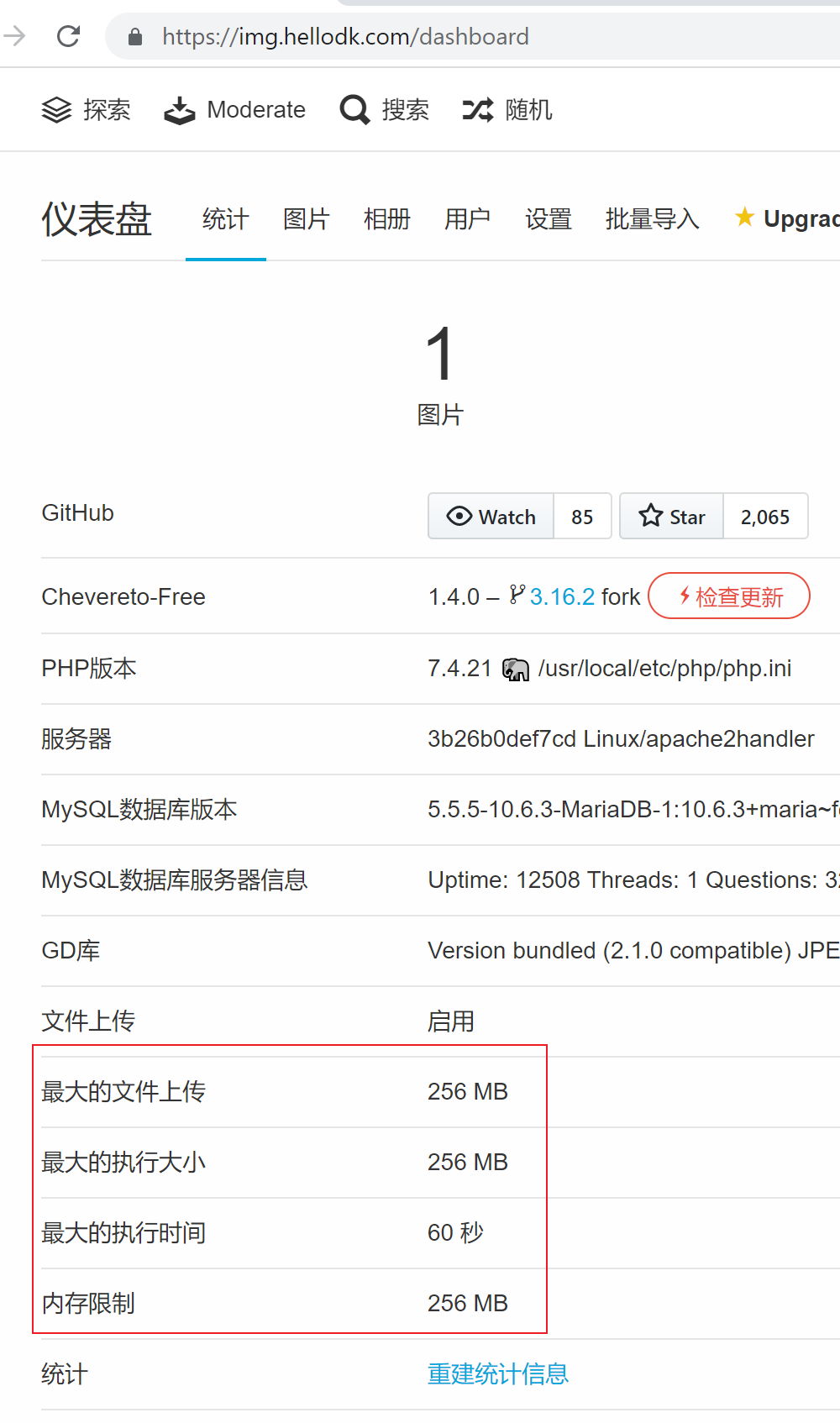
问题解决了
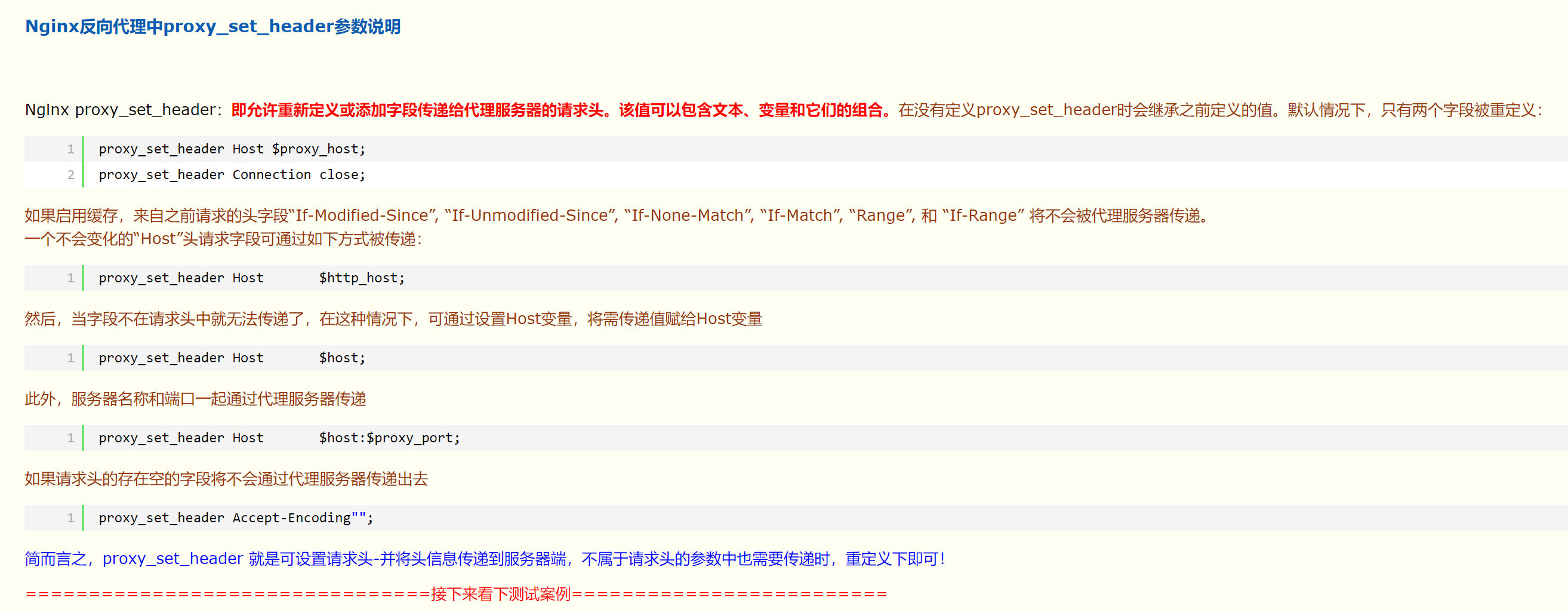

另外之前通过 frp 做的家里 t400 上的 chevereto 图床服务每次生成的链接 url 里都带上了端口 :443 这个问题,今天终于解决了。
justhost.ru 机器上通过 docker 安装了 chevereto 也遇到了这个问题。通过 nginx 反代。
产生这个问题的原因:由于 location / 块里设置反代的 header 主机带上了端口导致的此问题。
proxy_set_header Host $host:$server_port;上面这一行改成下面这样就 OK 了
proxy_set_header Host $host;贴一个完整配置
server {
        listen       80;
        server_name  img.hellodk.com;
        server_tokens off;
        return 301 https://$host$request_uri;

        error_page 404 /404.html;
            location = /40x.html {
        }

        error_page 500 502 503 504 /50x.html;
            location = /50x.html {
        }
}

server
{
    listen 443 ssl http2;
    port_in_redirect off;
    server_name img.hellodk.com;
    proxy_set_header X-Forwarded-For $remote_addr;
    proxy_ssl_server_name on;
    server_tokens off;
    ssl_certificate    /etc/letsencrypt/live/hellodk.com/fullchain.pem;
    ssl_certificate_key    /etc/letsencrypt/live/hellodk.com/privkey.pem;
    ssl_protocols TLSv1 TLSv1.1 TLSv1.2;
    ssl_ciphers ECDHE-RSA-AES128-GCM-SHA256:HIGH:!aNULL:!MD5:!RC4:!DHE;
    ssl_prefer_server_ciphers on;
    ssl_session_timeout 10m;

    add_header Strict-Transport-Security "max-age=31536000; includeSubDomains";

    error_page 404 /404.html;
    error_page 502 /502.html;

    #PHP-INFO-START  PHP引用配置,可以注释或修改
    #SECURITY-START 防盗链配置
    #SECURITY-END
    #include enable-php-71.conf;
    #PHP-INFO-END

    #REWRITE-START URL重写规则引用,修改后将导致面板设置的伪静态规则失效
    #include /www/server/panel/vhost/rewrite/hellodk.cn.conf;
    #REWRITE-END

    location / {
         proxy_pass         http://127.0.0.1:8082;
         proxy_set_header   Host $host;
         proxy_set_header   X-Real-IP $remote_addr;
         proxy_set_header   X-Forwarded-For $proxy_add_x_forwarded_for;
         proxy_set_header   X-Forwarded-Host $server_name;
         proxy_read_timeout  1200s;
         proxy_ssl_server_name on;
         proxy_set_header X-Forwarded-Proto $scheme;

         # used for view/edit office file via Office Online Server
         client_max_body_size 64m;
    }

    access_log      /var/log/nginx/chevereto-current-host.access.log;
    error_log       /var/log/nginx/chevereto-current-host.error.log;
}
end.
此内容由惯性聚合(RSS阅读器)自动聚合整理,仅供阅读参考。 原文来自 — 版权归原作者所有。