惯性聚合 高效追踪和阅读你感兴趣的博客、新闻、科技资讯
阅读原文 在惯性聚合中打开

推荐订阅源

云风的 BLOG
云风的 BLOG
Hacker News: Ask HN
Hacker News: Ask HN
C
CXSECURITY Database RSS Feed - CXSecurity.com
T
The Exploit Database - CXSecurity.com
The Hacker News
The Hacker News
Security Latest
Security Latest
Attack and Defense Labs
Application and Cybersecurity Blog
Scott Helme
Scott Helme
H
Heimdal Security Blog
K
KPMG report finds enterprise disconnect between AI and its ROI | CIO
WordPress大学
WordPress大学
雷峰网
雷峰网
L
LangChain Blog
Y
Y Combinator Blog
I
Intezer
V
Vulnerabilities – Threatpost
Apple Machine Learning Research
The Last Watchdog
The Last Watchdog
Simon Willison's Weblog
W
WeLiveSecurity
P
Privacy International News Feed
V
Visual Studio Blog
T
The Blog of Author Tim Ferriss
A
About on SuperTechFans
AI
AI
博客园 - Franky
Hacker News - Newest:
Hacker News - Newest: "LLM"
Martin Fowler
Martin Fowler
K
Kaspersky official blog
U
Unit 42
S
Schneier on Security
Webroot Blog
Webroot Blog
Know Your Adversary
Know Your Adversary
T
Tor Project blog
aimingoo的专栏
aimingoo的专栏
Engineering at Meta
Engineering at Meta
G
GRAHAM CLULEY
美团技术团队
TaoSecurity Blog
TaoSecurity Blog
C
Cybersecurity and Infrastructure Security Agency CISA
Google DeepMind News
让小产品的独立变现更简单 - ezindie.com
Jina AI
Jina AI
钛媒体:引领未来商业与生活新知
钛媒体:引领未来商业与生活新知
人人都是产品经理
人人都是产品经理
P
Proofpoint News Feed
爱范儿
爱范儿
F
Fortinet All Blogs
有赞技术团队
有赞技术团队

czp's blog

Ubuntu 下使用 zsh · HonKit 使用 VNC 来远程管理服务器 · HonKit Linux 下无限试用 JetBrains · HonKit 使用 KMS 激活 Windows · HonKit 在 Spring Boot 中处理 MissingKotlinParameterException · HonKit 用 Spring Native 拯救微服务 · HonKit 正确调试 PHP · HonKit Ubuntu 增加最大文件打开数量限制 · HonKit 将 Minecraft 服务端编译到 native · HonKit 用凝聚力购买 P 社游戏 DLC · HonKit 模拟超星网课 Android 客户端 · HonKit 模拟 Bilibili Android 客户端 · HonKit 模拟哔咔 Android 客户端 · HonKit 异步是什么 · HonKit GCP Pub/Sub push 至 IAP 保护的 Endpoint · HonKit 部署 Spring Native 到 GCP App Engine · HonKit 多个 Gradle SubProject 同时编译导致 CI/CD 内存耗尽 · HonKit Google Cloud Build 运行 DIND · HonKit 在 Google Storage 中部署 SPA · HonKit Terraform 不自动更新 CloudRun service · HonKit Telegram Bot 收不到普通群聊消息的问题 · HonKit 加密货币交易 · HonKit 挖掘以太坊 · HonKit 挖掘门罗币 · HonKit 小明学英语 · HonKit 卖程序的小女孩 · HonKit 一个测试工程师走进一家酒吧 · HonKit 我给你们讲个 TCP 笑话吧! · HonKit 我给你们讲个 UDP 笑话吧! · HonKit 格局打开 · HonKit c 语言常见未定义行为 · HonKit 在 Kotlin 使用 SpaceEngineers Remote API · HonKit Kotlin 协程 · HonKit 在 Spring Boot 中正确注册 Jackson Module · HonKit Spring Boot Jpa 使用 Google Cloud SQL · HonKit Spring Boot 中配置单页应用 · HonKit Spring Boot 无法加载 ClasspathResource 问题 · HonKit 正确打包 Spring Boot 到 war · HonKit czp's blog · HonKit 鸣谢列表 · HonKit 友链 · HonKit
为 KVM 中的 Windows 虚拟机启用 VirtIO · HonKit
2026-04-11 · via czp's blog

众所周知, KVM 全称 Kernel-based Virtual Machine, 很显然这是为 Linux 设计的, 那么 Windows 客户机在其上的表现果不其然非常稀烂, 尤其是硬盘 IO 性能低至不可忍受(当使用 qcow2 时). 这时候就必须要用 VirtIO, 它是一套为半虚拟化设计的通过一组标准化的 API 来实现在多种不同的虚拟化方案中复用专用的客户机驱动代码的解决方案.

如果客户机是 Linux 系统, 那么只要内核版本高于 2.6, 而且内核编译时开启了 libvirt 支持, 那么直接就支持 VirtIO, 几乎所有发行版都是如此. 在 virt-manager 创建新的虚拟机时, 将为 Linux 系统的客户机直接启用 VirtIO. 但是 Windows 并不自带对 VirtIO 的支持, 所以我们必须想办法为 Windows 系统安装对应的驱动.

首先我们要先下载 VirtIO 驱动文件 https://www.linux-kvm.org/page/WindowsGuestDrivers/Download_Drivers

直接可用的二进制文件见此 https://docs.fedoraproject.org/en-US/quick-docs/creating-windows-virtual-machines-using-virtio-drivers/index.html#virtio-win-direct-downloads

通常来说只需要下载 ISO 格式的光盘镜像文件. 较老的 Windows 可能无法正常读取 qemu 虚拟的光驱设备, 此时需要下载 VFD 格式的软盘镜像文件.

光盘镜像中的各个文件夹都对应某种驱动, 在下载页面有详细描述, 我在此复制黏贴一遍

NetKVM/ - Virtio network driver

viostor/ - Virtio block driver

vioscsi/ - Virtio Small Computer System Interface (SCSI) driver

viorng/ - Virtio RNG driver

vioser/ - Virtio serial driver

Balloon/ - Virtio memory balloon driver

qxl/ - QXL graphics driver for Windows 7 and earlier. (build virtio-win-0.1.103-1 and later)

qxldod/ - QXL graphics driver for Windows 8 and later. (build virtio-win-0.1.103-2 and later)

pvpanic/ - QEMU pvpanic device driver (build virtio-win-0.1.103-2 and later)

guest-agent/ - QEMU Guest Agent 32bit and 64bit MSI installers

qemupciserial/ - QEMU PCI serial device driver

*.vfd VFD floppy images for using during install of Windows XP

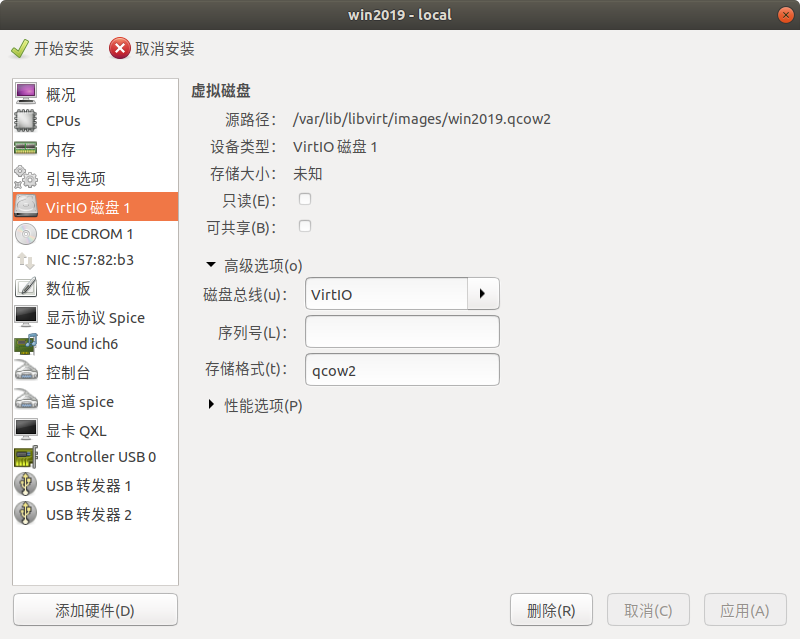
然后我们开始安装虚拟机, 在安装前自定义配置.

注意此时就要将磁盘和网络都调为 VirtIO
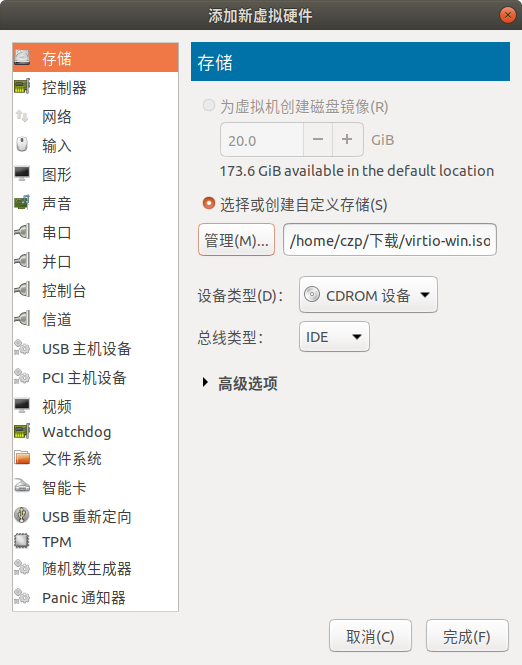
另外再添加一个光驱, 指向刚才下载的驱动镜像.
然后开始安装.

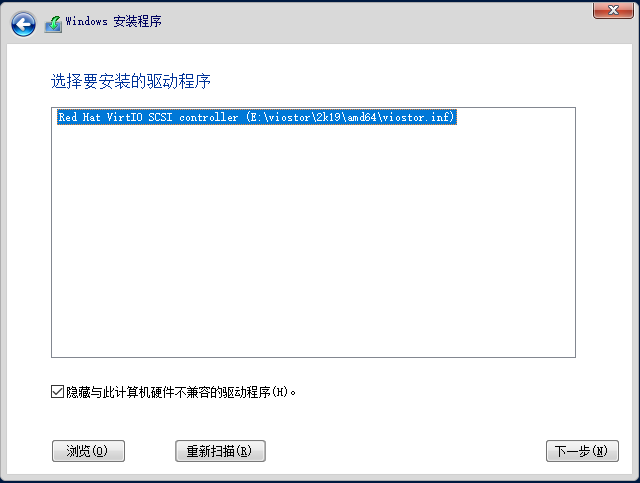
安装的时候会无法识别磁盘

点击 加载驱动程序 , 然后点击 浏览 , 根据你的操作系统版本选择对应的文件夹
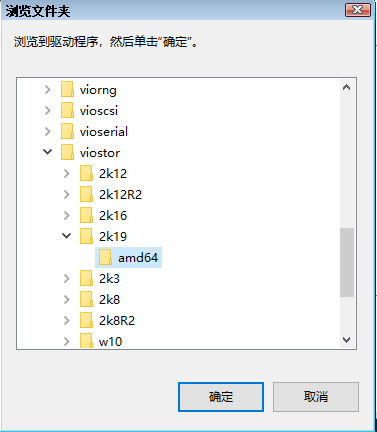
安装完毕之后, 我们现在可以看到磁盘了
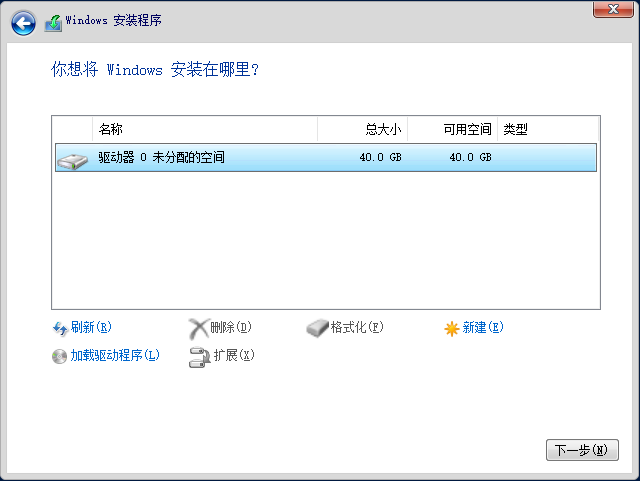
对于网络驱动也是一样的操作. 除了硬盘和网络驱动之外都是可选的, 根据实际需要来安装. 这里提供阿里云预装的 VirtIO 驱动清单: viostor netkvm balloon pvpanic vioser . 至于每个驱动都有什么用, 在驱动下载页有描述.

安装完所需的驱动之后就可以开心的安装系统啦.
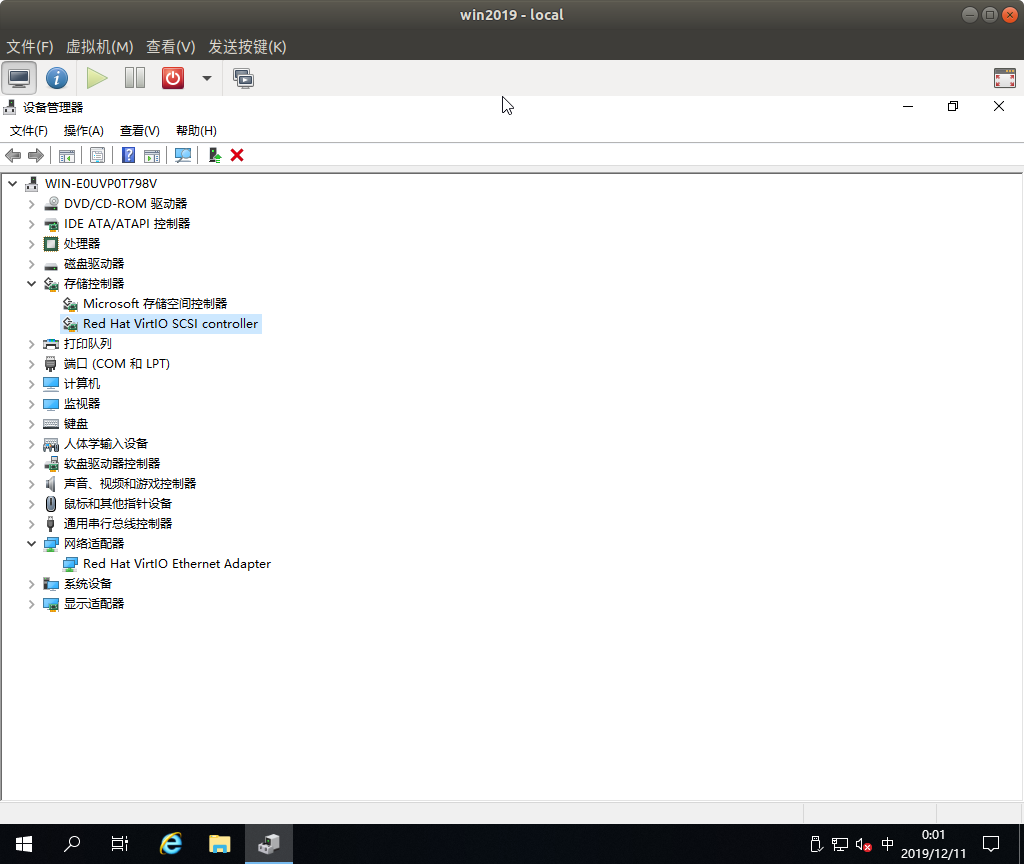
如果系统已经装好, 才想到要安装 VirtIO, 此时可以先关闭虚拟机, 挂载一个 VirtIO 磁盘总线的额外的虚拟磁盘, 然后开机. 到设备管理器中找到这个设备, 为他安装驱动(在所挂载的光盘镜像中选择). 驱动安装完毕后关闭虚拟机, 删除临时磁盘, 将原有的磁盘设置为 VirtIO 再重新启动虚拟机. 如果虚拟机已经可以正常上网, 也可以直接将 virtio-win.iso 下载到虚拟机里双击打开.

现在, Windows 客户机的磁盘性能应该达到能用的程度了.