









WeRead Plugin for Halo
一个功能强大的 Halo 博客插件,将您的微信读书(WeRead)数据集成到个人博客中。通过深度同步书架、阅读进度及书籍元数据。
核心特性
- 全自动数据同步: 依托于强大的后台逻辑,插件可自动从微信读书拉取最新的书架信息、阅读时长及详细进度。
- CookieCloud 深度集成: 彻底解决手动更新 Cookie 的烦恼。支持配置 CookieCloud 服务端,实现凭证的自动化更新与端到端维护。
- 高性能同步策略: 采用全量书架预加载技术,有效减少 API 请求频次,提升同步效率并降低封禁风险。
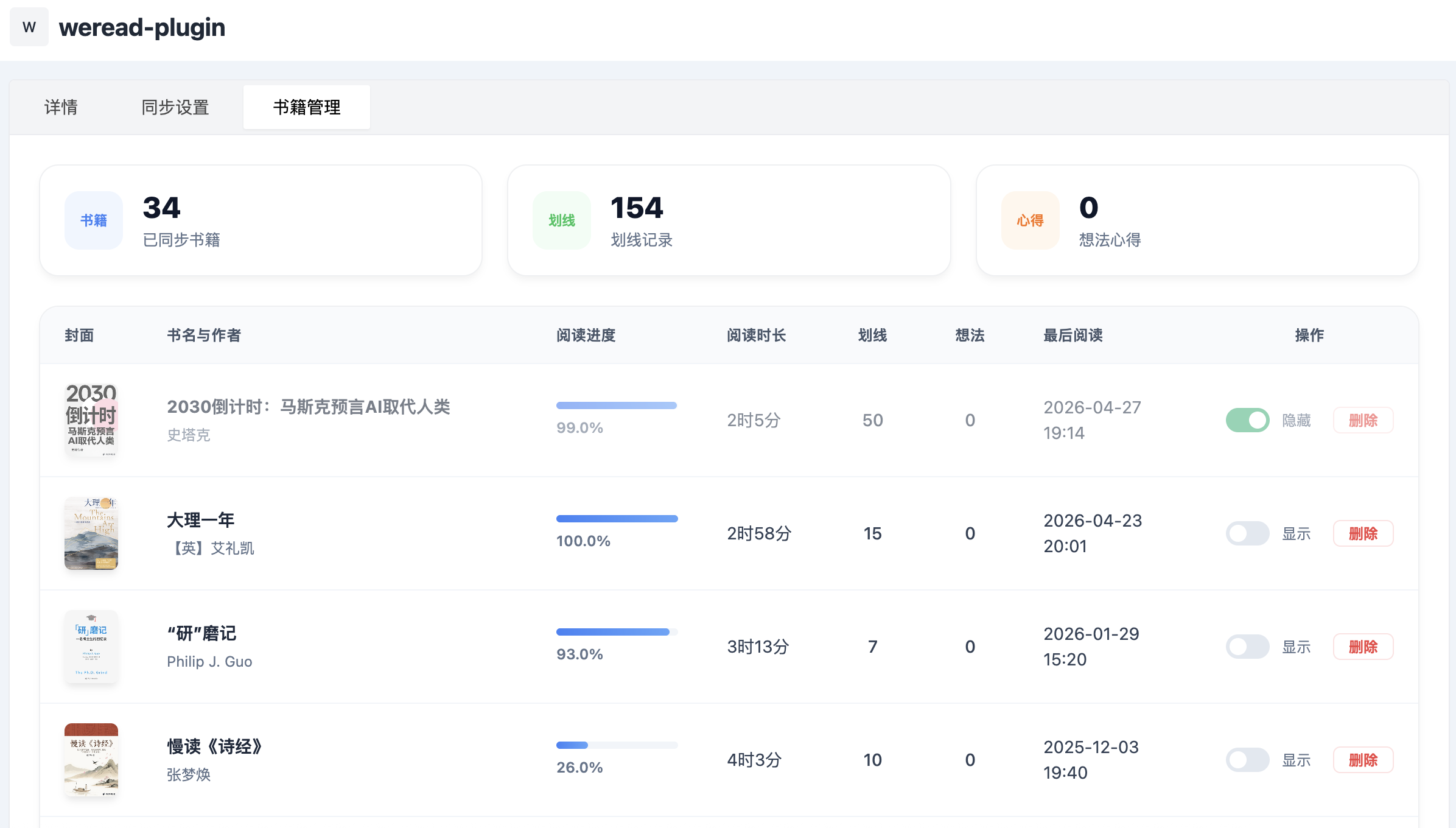
- 多维度元数据: 同步包含作者、出版信息、ISBN、总字数、笔记数、评论数及分类在内的完整数据。
预览
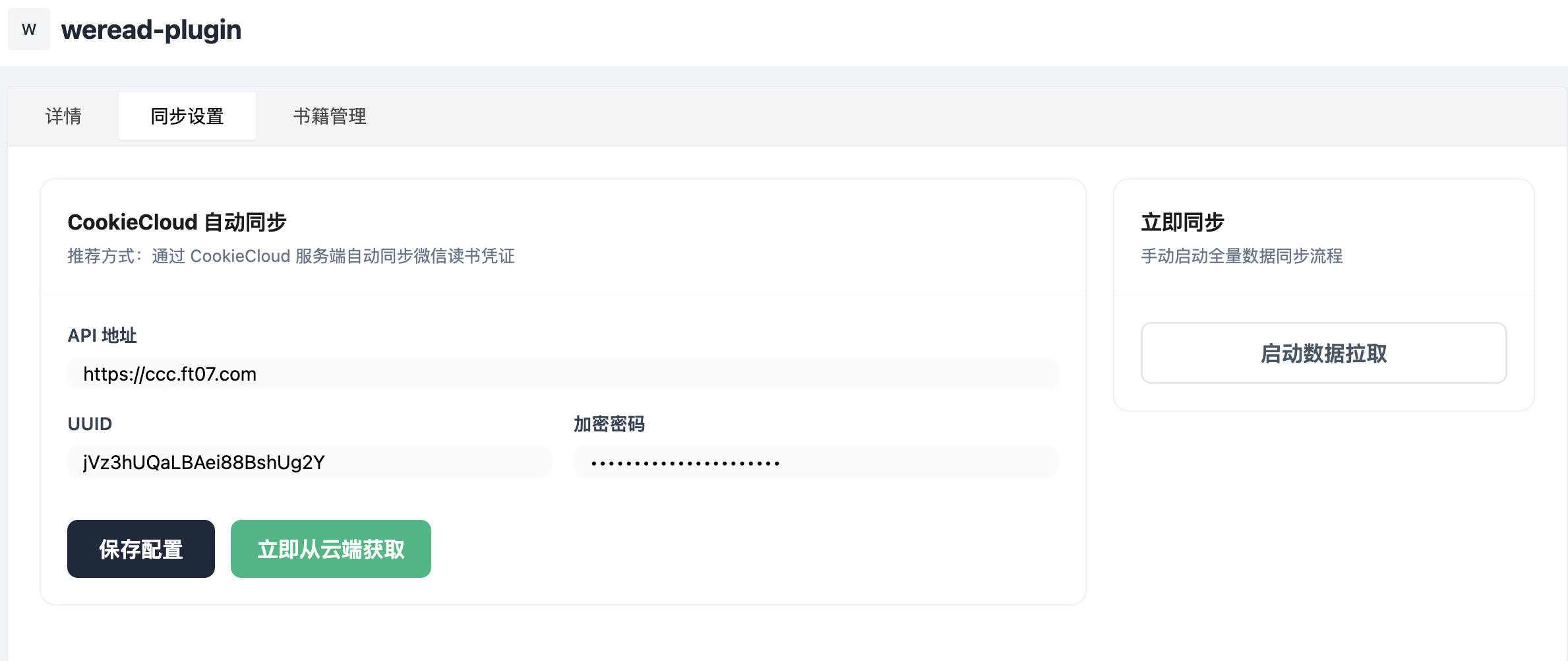
设置界面
书籍管理界面
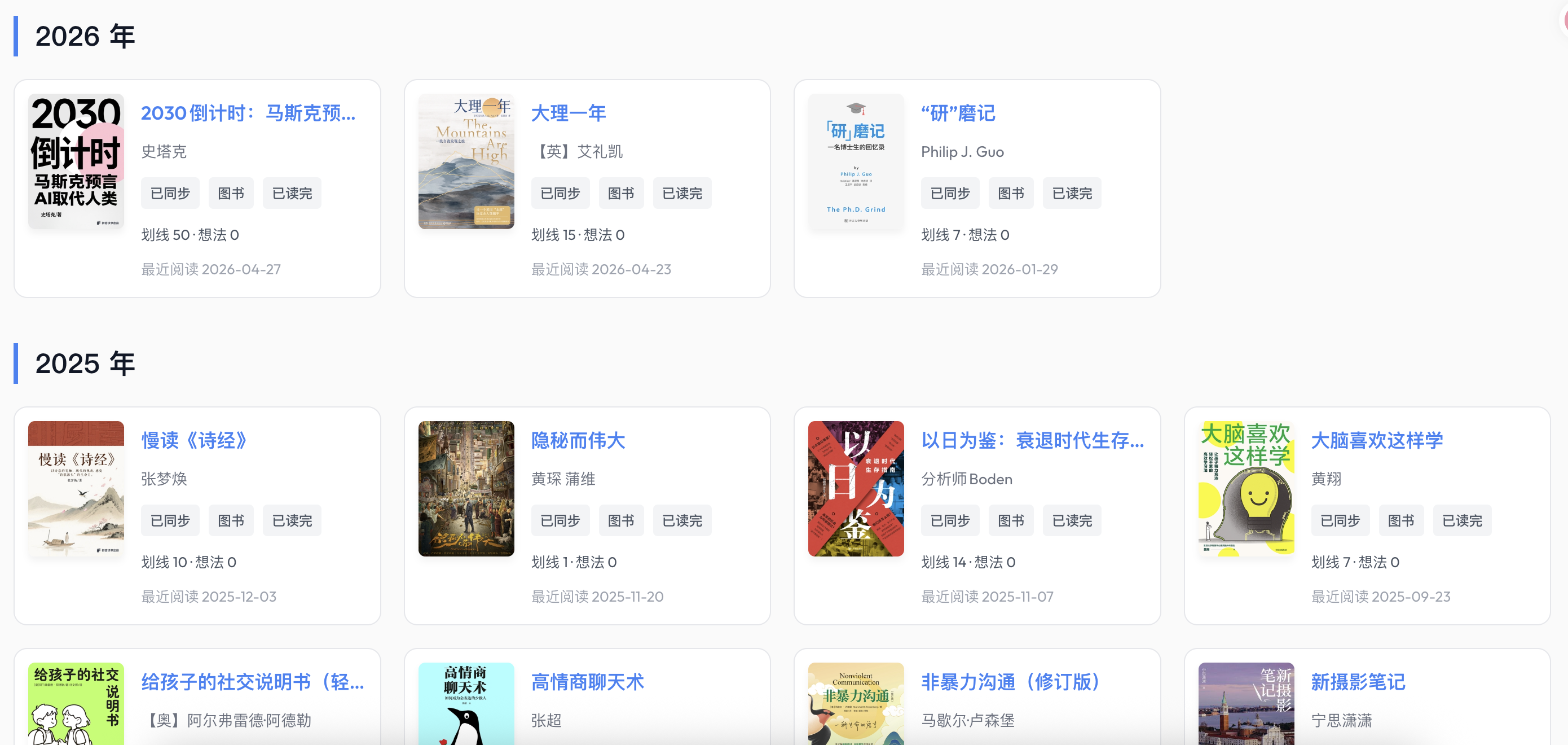
前端展示
[!NOTE]
前端展示效果建议配合适配的主题或自定义页面使用,以获得最佳视觉体验。
安装指南
环境要求
- Halo 版本: >= 2.23.0
手动安装
- 下载插件的 JAR 包(例如
halo-weread-plugin-x.y.z.jar)。 - 进入 Halo 控制台 -> 插件 -> 安装。
- 选择下载好的 JAR 文件上传并启用。
配置说明
启用插件后,请前往“插件配置”页面完成初始化:
凭证配置
本插件推荐使用 CookieCloud 实现凭证的自动获取与长期维护:
- 自动获取: 配置 CookieCloud 相关信息(API 地址、UUID、加密密码),插件将自动同步并维护您的微信读书凭证。
2. 数据同步
- 配置完成后,点击“启动数据拉取”即可立即触发同步。
- 插件会自动管理后续的数据更新。
技术亮点
- 异步响应式架构: 基于 Project Reactor 栈开发,确保在高并发数据同步时系统依然保持轻量且响应迅速。
- 鲁棒的容错机制: 内置 Cookie 自动刷新逻辑,当遇到 401 错误时自动尝试补全凭证,增强同步稳定性。
- 精细化数据映射: 针对不同类型的书籍 ID 实现了复杂的 URL 哈希映射算法。
前端集成
您可以将以下代码片段添加到您的主题模板或自定义页面中,以实现访客免登录查看书架:
<!-- 微信读书书架容器 -->
<div id="weread-shelf-wrapper">加载中...</div>
<script>
fetch('/apis/run.halo.plugin.wereadplugin/v1beta1/wereadbooks?size=1000')
.then(res => res.json())
.then(data => {
const books = data.items || [];
if (books.length === 0) {
document.getElementById('weread-shelf-wrapper').innerHTML = '暂无书籍';
return;
}
// 排序:按阅读时间倒序
books.sort((a, b) => (b.spec.lastReadTime || 0) - (a.spec.lastReadTime || 0));
// 分组:按年份
const yearGroups = {};
books.forEach(book => {
const time = book.spec.lastReadTime;
const year = time ? new Date(time).getFullYear() : "其他";
if (!yearGroups[year]) yearGroups[year] = [];
yearGroups[year].push(book);
});
const formatDate = (ts) => {
if (!ts) return "未知";
const d = new Date(ts);
return `${d.getFullYear()}-${String(d.getMonth() + 1).padStart(2, '0')}-${String(d.getDate()).padStart(2, '0')}`;
};
// 注入样式
let html = `
<style>
@import url('https://fonts.googleapis.com/css2?family=Outfit:wght@400;500;600&display=swap');
.wr-container { font-family: 'Outfit', system-ui, sans-serif; --wr-accent: #3b82f6; color: #111827; }
.wr-year-group { margin-bottom: 40px; }
.wr-year-title { font-size: 1.5rem; font-weight: 600; margin-bottom: 20px; border-left: 4px solid var(--wr-accent); padding-left: 15px; }
.wr-grid { display: grid; grid-template-columns: repeat(auto-fill, minmax(280px, 1fr)); gap: 20px; }
.wr-card { display: flex; background: #fff; border: 1px solid #e5e7eb; border-radius: 12px; padding: 12px; transition: all 0.3s; cursor: pointer; }
.wr-card:hover { border-color: var(--wr-accent); box-shadow: 0 10px 15px -3px rgba(0, 0, 0, 0.05); transform: translateY(-2px); }
.wr-card-cover { width: 85px; height: 120px; object-fit: cover; border-radius: 6px; box-shadow: 0 4px 6px rgba(0,0,0,0.05); flex-shrink: 0; }
.wr-card-content { margin-left: 15px; flex-grow: 1; display: flex; flex-direction: column; justify-content: space-between; overflow: hidden; }
.wr-card-title { font-weight: 600; font-size: 1.05rem; white-space: nowrap; overflow: hidden; text-overflow: ellipsis; color: var(--wr-accent); }
.wr-card-author { font-size: 0.85rem; color: #6b7280; margin: 4px 0; white-space: nowrap; overflow: hidden; text-overflow: ellipsis; }
.wr-tag-row { display: flex; gap: 8px; margin-top: 5px; }
.wr-tag { background: #f3f4f6; color: #4b5563; font-size: 0.75rem; padding: 2px 8px; border-radius: 4px; font-weight: 500; }
.wr-stats-row { font-size: 0.8rem; color: #4b5563; margin-top: 10px; }
.wr-time-row { font-size: 0.8rem; color: #9ca3af; margin-top: 5px; }
.wr-modal { display:none; position:fixed; z-index:1000; left:0; top:0; width:100%; height:100%; background: rgba(0,0,0,0.5); backdrop-filter: blur(4px); align-items:center; justify-content:center; }
.wr-modal-content { background:white; width:90%; max-width:600px; max-height:80vh; border-radius:16px; position:relative; overflow-y:auto; padding:30px; box-shadow: 0 25px 50px -12px rgba(0,0,0,0.25); }
.wr-close { position:absolute; right:20px; top:15px; font-size:24px; cursor:pointer; color:#9ca3af; }
</style>
<div class="wr-container">
`;
// 渲染分组内容
Object.keys(yearGroups).sort((a,b)=>b-a).forEach(year => {
html += `
<div class="wr-year-group">
<h2 class="wr-year-title">${year} 年</h2>
<div class="wr-grid">
${yearGroups[year].map(book => `
<div class="wr-card" onclick="window.showBookDetail('${book.metadata.name}')">
<img class="wr-card-cover" src="https://raw.githubusercontent.com/uuaki/halo-weread-plugin/main/${book.spec.cover}">
<div class="wr-card-content">
<div class="wr-card-title">${book.spec.title}</div>
<div class="wr-card-author">${book.spec.author}</div>
<div class="wr-tag-row">
<span class="wr-tag">已同步</span><span class="wr-tag">图书</span>
<span class="wr-tag">${book.spec.readInfo === 3 ? '已读完' : '在读'}</span>
</div>
<div class="wr-stats-row">划线 ${book.spec.noteCount || 0} · 想法 ${book.spec.reviewCount || 0}</div>
<div class="wr-time-row">最近阅读 ${formatDate(book.spec.lastReadTime)}</div>
</div>
</div>
`).join('')}
</div>
</div>
`;
});
html += `
</div>
<!-- 详情弹窗 -->
<div id="wrModal" class="wr-modal" onclick="if(event.target==this)this.style.display='none'">
<div class="wr-modal-content">
<span class="wr-close" onclick="document.getElementById('wrModal').style.display='none'">×</span>
<div id="wrModalBody">加载中...</div>
</div>
</div>
`;
document.getElementById('weread-shelf-wrapper').innerHTML = html;
// 弹窗控制函数
window.showBookDetail = function(id) {
document.getElementById('wrModal').style.display = 'flex';
document.getElementById('wrModalBody').innerHTML = '<div style="text-align:center;padding:50px;">已加载该书籍元数据,划线与评论同步功能持续开发中...</div>';
};
})
.catch(err => {
document.getElementById('weread-shelf-wrapper').innerHTML = '书架加载失败';
});
</script>
常见问题 (FAQ)
Q: 什么是 CookieCloud?
A: CookieCloud 是一个简单易用的端到端加密 Cookie 同步工具。它可以配合浏览器插件,在您的浏览器登录状态更新时自动将最新凭证同步到 Halo 插件中,彻底解决微信读书凭证易失效的问题。
许可证
本项目基于 MIT 协议开源。详情请参阅 LICENSE 文件。