惯性聚合 高效追踪和阅读你感兴趣的博客、新闻、科技资讯
阅读原文 在惯性聚合中打开

推荐订阅源

L
LINUX DO - 最新话题
小众软件
小众软件
C
Check Point Blog
酷 壳 – CoolShell
酷 壳 – CoolShell
V
Visual Studio Blog
Last Week in AI
Last Week in AI
P
Proofpoint News Feed
奇客Solidot–传递最新科技情报
奇客Solidot–传递最新科技情报
The GitHub Blog
The GitHub Blog
T
Tailwind CSS Blog
Recorded Future
Recorded Future
雷峰网
雷峰网
WordPress大学
WordPress大学
A
Arctic Wolf
Threat Intelligence Blog | Flashpoint
Project Zero
Project Zero
T
Tor Project blog
T
Threat Research - Cisco Blogs
Scott Helme
Scott Helme
Spread Privacy
Spread Privacy
G
Google Developers Blog
Security Latest
Security Latest
MongoDB | Blog
MongoDB | Blog
T
Threatpost
I
InfoQ
T
Tenable Blog
T
The Exploit Database - CXSecurity.com
S
Security Affairs
H
Hackread – Cybersecurity News, Data Breaches, AI and More
人人都是产品经理
人人都是产品经理
C
Cisco Blogs
博客园 - 三生石上(FineUI控件)
cs.CL updates on arXiv.org
aimingoo的专栏
aimingoo的专栏
C
CXSECURITY Database RSS Feed - CXSecurity.com
美团技术团队
Google DeepMind News
The Hacker News
The Hacker News
D
Docker
博客园 - 【当耐特】
大猫的无限游戏
大猫的无限游戏
让小产品的独立变现更简单 - ezindie.com
Vercel News
Vercel News
PCI Perspectives
PCI Perspectives
Microsoft Azure Blog
C
CERT Recently Published Vulnerability Notes
月光博客
月光博客
Cloudbric
Cloudbric
A
About on SuperTechFans
F
Fortinet All Blogs

任峻宏的小站

Debugging Memory Leaks in a Next.js Application Troubleshooting: Resolving Devise Issue in an API-only Application How to Customize a Right-Click Menu in React Using ActionCable and React to Create a Simple Chat App 纪念左耳朵耗子 - 任峻宏的小站 Using SSE to Implement ChatGPT in Rails Refresh Myself - 任峻宏的小站 战痘 - 任峻宏的小站 逆向的能量——生活需要批评者 - 任峻宏的小站 人活着必须要有目标 - 任峻宏的小站 《第一人称单数》读书笔记 - 任峻宏的小站 卸载英雄联盟 - 任峻宏的小站 我的 2021 年总结 - 任峻宏的小站 记我的爷爷 - 任峻宏的小站 Migrate from Webpacker to Vite 从入门到放弃 《人生算法》读书笔记 - 任峻宏的小站 《不拘一格》读书笔记 - 任峻宏的小站 我为什么很少写博客 - 任峻宏的小站 我的2020年总结 - 任峻宏的小站 如何避免冲动消费? - 任峻宏的小站 《不能不去爱的两件事》读书笔记 - 任峻宏的小站 记一次搬家 - 任峻宏的小站 My blog V3.0 has been published! 解决服务器上运行 bundle install 时 killed 的问题 解决生产环境不能发送邮件的问题 - 任峻宏的小站 解决内存泄漏记录 - 任峻宏的小站 勿忘初心 - 任峻宏的小站 关于 RSpec 的一点方法总结 - 任峻宏的小站 使用 AJAX 重载部分页面 - 任峻宏的小站 Nginx 添加 SSL 支持 - 任峻宏的小站 Nginx 中进行重定向配置 - 任峻宏的小站 记我的第二次部署 - 任峻宏的小站 写在“毕业”之际 - 任峻宏的小站 速递易工作总结及感想 - 任峻宏的小站 在 Aliyun ECS 上用 Nginx + Passenger 部署 Rails 应用时安装 Passenger 的问题 [译] Common Rails Idioms that Kill Database Performance Git 常用操作总结 - 任峻宏的小站 [译] Terminal 功夫——方便开发者的实用技巧 - 任峻宏的小站 实例方法与类方法 - 任峻宏的小站 各种报错解决集合 - 任峻宏的小站
JS 简单实现弹出层效果 - 任峻宏的小站
任峻宏 · 2017-03-16 · via 任峻宏的小站

起源

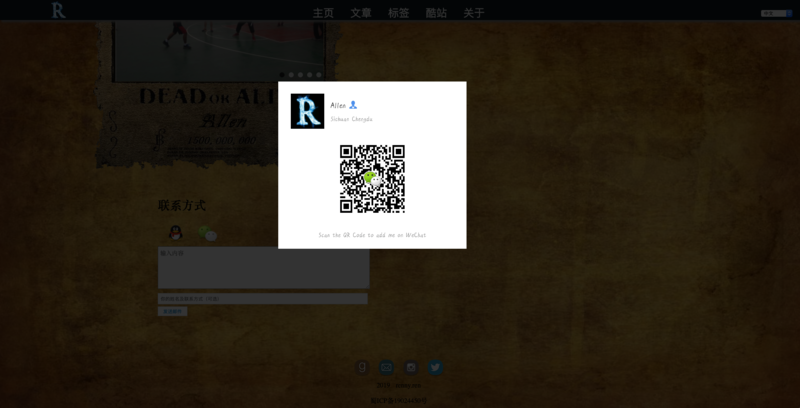
今天在添加微信联系方式的时候有了这个需求:需要点击按钮后弹出一个显示图片的对话框。

很简单的一个功能,我一开始想的是直接用alert()来弹出对话框然后显示图片,然后发现似乎这样并不能插入图片。 而且为了实现更酷炫的效果,最后我采用了以下方法:

思路

1.在页面中央直接摆放好图片,初始状态设为不显示;

2.放置一个覆盖整个页面的div,堆叠到图片下层,用于实现背景效果,初始状态也是不显示;

3.按钮的onclick事件来触发openWindow(),控制1、2的显示;

4.点击背景div触发closewindow事件,将显示状态还原。

页面代码

<img src="/wechat.png" alt="点击弹出二维码" onclick="openWindow()" />  # 这个当按钮

<div id="black_overlay" onclick="closeWindow()"></div>  # 这是遮罩层背景

<%= image_tag 'wechat_add.png', id: "wechat" %>  # 这是要弹出显示的图片

JS

function openWindow(){
  document.getElementById('wechat').style.display = 'block';
  document.getElementById('black_overlay').style.display='block';
}

function closeWindow(){
  document.getElementById('wechat').style.display = 'none';
  document.getElementById('black_overlay').style.display='none';
}

CSS

 #wechat{
   height: 400px;
   width: 450px;
   display: none;
   position: abosluted;
   top: 20%;
   left: 35%;
   z-index: 1002;
 }

 #black_overlay{
   display: none;
   position: absoluted;
   background-color: black;
   z-index: 1001;
   left: 0%;
   top: 0%;
   width: 100%;
   height: 100%;
   opacity: 0.8;
   -moz-opacity: 0.8;
   filter: alpha(opacity=80); 
 }

效果

最后实现的效果如下: