惯性聚合 高效追踪和阅读你感兴趣的博客、新闻、科技资讯
阅读原文 在惯性聚合中打开

推荐订阅源

T
The Blog of Author Tim Ferriss
TaoSecurity Blog
TaoSecurity Blog
Apple Machine Learning Research
Hugging Face - Blog
Hugging Face - Blog
IT之家
IT之家
freeCodeCamp Programming Tutorials: Python, JavaScript, Git & More
小众软件
小众软件
让小产品的独立变现更简单 - ezindie.com
S
SegmentFault 最新的问题
T
Troy Hunt's Blog
N
News and Events Feed by Topic
雷峰网
雷峰网
K
KPMG report finds enterprise disconnect between AI and its ROI | CIO
PCI Perspectives
PCI Perspectives
cs.AI updates on arXiv.org
www.infosecurity-magazine.com
博客园 - 三生石上(FineUI控件)
Schneier on Security
T
The Exploit Database - CXSecurity.com
L
LINUX DO - 最新话题
V
V2EX
T
Threat Research - Cisco Blogs
人人都是产品经理
人人都是产品经理
C
Cisco Blogs
The GitHub Blog
The GitHub Blog
爱范儿
爱范儿
I
Intezer
CTFtime.org: upcoming CTF events
Recent Announcements
月光博客
月光博客
Recent Commits to openclaw:main
N
News | PayPal Newsroom
Cyberwarzone
Cyberwarzone
B
Blog
博客园 - 聂微东
P
Palo Alto Networks Blog
A
About on SuperTechFans
The Last Watchdog
The Last Watchdog
Scott Helme
Scott Helme
Google DeepMind News
Webroot Blog
Webroot Blog
奇客Solidot–传递最新科技情报
奇客Solidot–传递最新科技情报
O
OpenAI News
C
Check Point Blog
Hacker News: Ask HN
Hacker News: Ask HN
W
WeLiveSecurity
V
Vulnerabilities – Threatpost
博客园 - 【当耐特】
有赞技术团队
有赞技术团队
A
Arctic Wolf

噜啦 - 网络

网络管理和配置文件 - 噜啦 ifconfig 网络管理 - 噜啦
网络故障排除命令 - 噜啦
博主: 噜啦 · 2020-02-14 · via 噜啦 - 网络

网络故障排除命令

  • 发布时间:
  • 1565 次浏览
  • 1522字数
  • 分类: Linux笔记本
  1. 首页
  2. 正文  
  • ping
  • traceroute
  • mtr
  • nslookup
  • telnet
  • tcpdump
  • netstat
  • ss

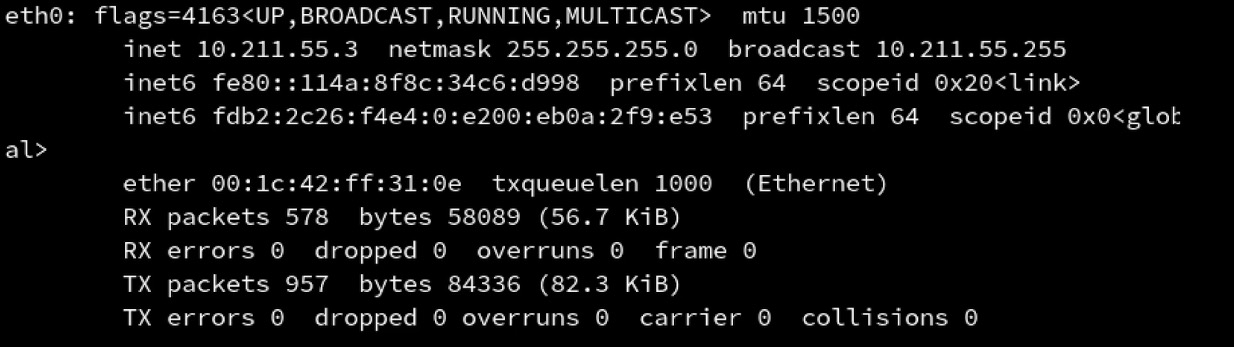
ifconfig 网卡信息

ifconfig <网卡名称>

traceroute 路由追踪

traceroute -w 1 coding.lula.fun

w: 超时时间

mtr 路由追踪

mtr <ip或者域名>

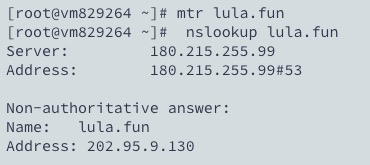
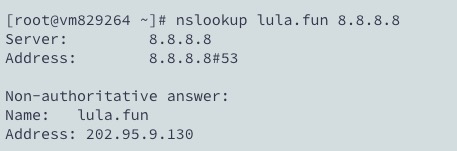
nslookup 查询IP

nslookup <域名> [dns服务器地址]

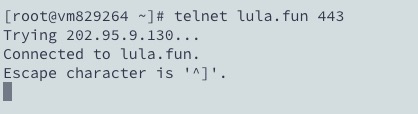
telnet 测试端口

telnet <domain> <port>
tcpdump 抓包

tcpdump -i any -n port 80
tcpdump -i any -n host 127.0.0.1
tcpdump -i any -n port 80 and host 127.0.0.1
tcpdump -i any -n port 80 and host 127.0.0.1 -w /tmp/afile

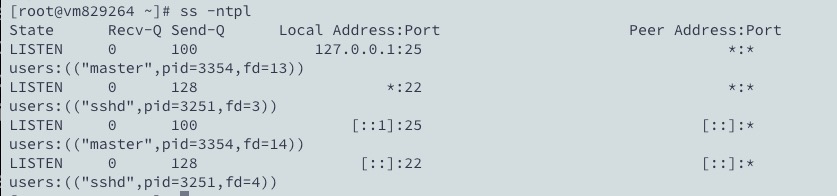
netstat/ss 查看端口占用

netstat -ntpl
ss -ntpl

赞赏作者

如果觉得我的文章对你有用,请随意赞赏

网络故障排除命令

 •