惯性聚合 高效追踪和阅读你感兴趣的博客、新闻、科技资讯
阅读原文 在惯性聚合中打开

推荐订阅源

D
Docker
爱范儿
爱范儿
T
The Exploit Database - CXSecurity.com
量子位
T
Tailwind CSS Blog
T
Threatpost
The GitHub Blog
The GitHub Blog
AWS News Blog
AWS News Blog
云风的 BLOG
云风的 BLOG
K
Kaspersky official blog
P
Proofpoint News Feed
博客园 - 司徒正美
L
LangChain Blog
T
Threat Research - Cisco Blogs
C
CERT Recently Published Vulnerability Notes
罗磊的独立博客
酷 壳 – CoolShell
酷 壳 – CoolShell
博客园 - 叶小钗
S
Secure Thoughts
The Last Watchdog
The Last Watchdog
Spread Privacy
Spread Privacy
H
Hacker News: Front Page
T
Troy Hunt's Blog
Cyber Security Advisories - MS-ISAC
Google DeepMind News
W
WeLiveSecurity
A
Arctic Wolf
Apple Machine Learning Research
cs.AI updates on arXiv.org
P
Proofpoint News Feed
T
Tor Project blog
T
The Blog of Author Tim Ferriss
I
Intezer
P
Privacy & Cybersecurity Law Blog
美团技术团队
N
Netflix TechBlog - Medium
博客园_首页
OSCHINA 社区最新新闻
OSCHINA 社区最新新闻
V
Vulnerabilities – Threatpost
Application and Cybersecurity Blog
G
Google Developers Blog
Attack and Defense Labs
T
Tenable Blog
月光博客
月光博客
Stack Overflow Blog
Stack Overflow Blog
J
Java Code Geeks
腾讯CDC
Microsoft Security Blog
A
About on SuperTechFans
Last Week in AI
Last Week in AI

噜啦 - 爬虫

使用爬虫爬取新闻网站标题 - 噜啦 结合正则表达式爬取网页 - 噜啦
爬虫爬取图片 - 噜啦
博主: 噜啦 · 2019-10-09 · via 噜啦 - 爬虫

爬虫爬取图片

  • 发布时间:
  • 2490 次浏览
  • 1479字数
  • 分类: Python笔记本
  1. 首页
  2. 正文  

代码

from bs4 import BeautifulSoup
import requests
import os
import shutil

headers = {
    "Sec-Fetch-Mode": "navigate",
    "Sec-Fetch-User": "?1",
    "Upgrade-Insecure-Requests": "1",
    "User-Agent": "Mozilla/5.0 (Windows NT 10.0; Win64; x64) AppleWebKit/537.36 (KHTML, like Gecko) Chrome/77.0.3865.90 Safari/537.36"
}

def download_jpg(imgge_url, image_localpath):
    response = requests.get(imgge_url, stream=True)
    if response.status_code == 200:
        with open(image_localpath, 'wb') as f:
            response.decode_content = True
            shutil.copyfileobj(response.raw, f)

def craw(url):
    response = requests.get(url, headers=headers)
    soup = BeautifulSoup(response.text, 'lxml')
    for div in soup.find_all('div', class_='group'):
        for img in div.find_all('img'):
            imgurl = img['src']
            dir = os.path.abspath('./download')
            filename = os.path.basename(imgurl)
            imgpath = os.path.join(dir, filename)
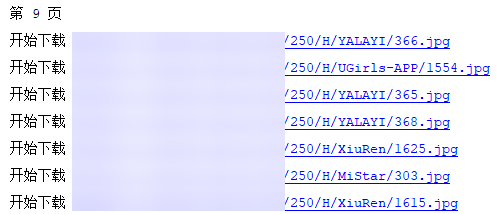
            print('开始下载 %s' % imgurl)
            download_jpg(imgurl, imgpath)


for i in range(1, 10, 1):
    url = 'http://xxxxxx.com/plugin.php?id=group&page=' + str(i)
    print(url)
    print('第 %s 页' %i)
    craw(url)

运行
7PiZ22V1Gu.jpg

营养有点不足,溜了溜了

赞赏作者

如果觉得我的文章对你有用,请随意赞赏

爬虫爬取图片

 •