

惯性聚合 高效追踪和阅读你感兴趣的博客、新闻、科技资讯
阅读原文 在惯性聚合中打开

推荐订阅源

WordPress大学
WordPress大学
V
Visual Studio Blog
P
Privacy International News Feed
月光博客
月光博客
Threat Intelligence Blog | Flashpoint
L
Lohrmann on Cybersecurity
N
News and Events Feed by Topic
K
KPMG report finds enterprise disconnect between AI and its ROI | CIO
Apple Machine Learning Research
阮一峰的网络日志
阮一峰的网络日志
Webroot Blog
Webroot Blog
T
Threatpost
宝玉的分享
宝玉的分享
The Last Watchdog
The Last Watchdog
小众软件
小众软件
L
LINUX DO - 最新话题
C
Cisco Blogs
T
Troy Hunt's Blog
Schneier on Security
酷 壳 – CoolShell
酷 壳 – CoolShell
www.infosecurity-magazine.com
雷峰网
雷峰网
G
GRAHAM CLULEY
有赞技术团队
有赞技术团队
Know Your Adversary
Know Your Adversary
博客园 - 叶小钗
罗磊的独立博客
V
V2EX
博客园 - Franky
P
Proofpoint News Feed
SecWiki News
SecWiki News
腾讯CDC
cs.CL updates on arXiv.org
Jina AI
Jina AI
博客园 - 三生石上(FineUI控件)
S
Secure Thoughts
钛媒体:引领未来商业与生活新知
钛媒体:引领未来商业与生活新知
Google DeepMind News
Attack and Defense Labs
人人都是产品经理
人人都是产品经理
The Cloudflare Blog
PCI Perspectives
PCI Perspectives
V2EX - 技术
V2EX - 技术
Google DeepMind News
Last Week in AI
Last Week in AI
aimingoo的专栏
aimingoo的专栏
Cisco Talos Blog
Cisco Talos Blog
N
News and Events Feed by Topic
让小产品的独立变现更简单 - ezindie.com
S
SegmentFault 最新的问题

噜啦 - 表单

表单:selet - 噜啦 表单: textarea button - 噜啦 input 标签 - 噜啦 表单 - 噜啦
表单相关属性 - 噜啦
博主: 噜啦 · 2019-07-10 · via 噜啦 - 表单

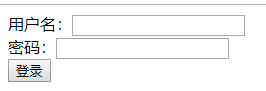
 DEMO

1b549955684d39ff37ef7795efc19ac6.png

CODE

<!DOCTYPE html>
<html>
    <head>
        <meta charset="utf-8">
        <title></title>
    </head>
    <body>
        <!-- form相关属性
             action 表单提交的地址
             method 表单发送数据的方式 默认使用get方式
                get 把数据放在浏览器地址栏发送给后台 可以在浏览器地址栏看到发送内容
                post 隐式提交数据,不可见
                
            name:通用的属性 可以加在任何标签上
            
            什么时候用post?什么时候用get
                涉及到数据库修改的用post,查询用get
         -->
        <form action="#" method="post">
            
            用户名:<input type="text" name="username"/> </br>
            密码:<input type="password" name="pwd"/></br>
            <input type="submit" value="登录" />
            
        </form>
    </body>
</html>

赞赏作者

如果觉得我的文章对你有用,请随意赞赏