

惯性聚合 高效追踪和阅读你感兴趣的博客、新闻、科技资讯
阅读原文 在惯性聚合中打开

推荐订阅源

C
CXSECURITY Database RSS Feed - CXSecurity.com
Stack Overflow Blog
Stack Overflow Blog
月光博客
月光博客
T
Threat Research - Cisco Blogs
小众软件
小众软件
有赞技术团队
有赞技术团队
酷 壳 – CoolShell
酷 壳 – CoolShell
Apple Machine Learning Research
C
Cyber Attacks, Cyber Crime and Cyber Security
cs.CV updates on arXiv.org
T
Tailwind CSS Blog
Cisco Talos Blog
Cisco Talos Blog
V
V2EX
博客园 - 【当耐特】
C
Cybersecurity and Infrastructure Security Agency CISA
Hugging Face - Blog
Hugging Face - Blog
The Cloudflare Blog
The Last Watchdog
The Last Watchdog
Simon Willison's Weblog
T
Threatpost
S
Secure Thoughts
O
OpenAI News
P
Proofpoint News Feed
S
SegmentFault 最新的问题
Forbes - Security
Forbes - Security
让小产品的独立变现更简单 - ezindie.com
Application and Cybersecurity Blog
钛媒体:引领未来商业与生活新知
钛媒体:引领未来商业与生活新知
Last Week in AI
Last Week in AI
宝玉的分享
宝玉的分享
Scott Helme
Scott Helme
T
Tenable Blog
A
Arctic Wolf
L
LINUX DO - 热门话题
爱范儿
爱范儿
奇客Solidot–传递最新科技情报
奇客Solidot–传递最新科技情报
www.infosecurity-magazine.com
V
Visual Studio Blog
Hacker News: Ask HN
Hacker News: Ask HN
Hacker News - Newest:
Hacker News - Newest: "LLM"
腾讯CDC
博客园 - Franky
WordPress大学
WordPress大学
Know Your Adversary
Know Your Adversary
博客园_首页
雷峰网
雷峰网
IT之家
IT之家
PCI Perspectives
PCI Perspectives
L
LINUX DO - 最新话题
H
Heimdal Security Blog

噜啦 - 前端笔记本

表单:selet - 噜啦 表单: textarea button - 噜啦 input 标签 - 噜啦 表单相关属性 - 噜啦 表单 - 噜啦 表格 练习 —— 课程表 - 噜啦 垂直合并单元格 rowspan - 噜啦 水平合并单元格 - 噜啦 表格:结构、相关属性 - 噜啦
input 其他相关属性 - 噜啦
博主: 噜啦 · 2019-07-10 · via 噜啦 - 前端笔记本
  • 发布时间:
  • 1811 次浏览
  • 241字数
  • 分类: 前端笔记本
  1. 首页
  2. 正文  

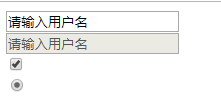
DEMO

a5de124ec660b9dfdfdf5485ccde7f0f.png

CODE

<!DOCTYPE html>
<html>
    <head>
        <meta charset="utf-8">
        <title></title>
    </head>
    <body>
        <!--     
        name 表单的名字
        vaule 表单的值
        readonly 表示只读 内容不能修改 只针对数据框 数据可以被发送
         disabled 表示空间无效 不能用 数据不能被发送
         checked 表示选中状态  checkbox radio
         -->
        <form action="" method="post">
            
            <input type="" value="请输入用户名" readonly /><br>
            <input type="" value="请输入用户名" disabled /><br><!-- 灰色无效 -->
            <input type="checkbox" value="" checked /><br><!-- 表示默认被选中 -->
            <input type="radio" value="" checked /><br><!-- 表示默认被选中 -->
            
        </form>
        
        
    </body>
</html>

赞赏作者

如果觉得我的文章对你有用,请随意赞赏

input 其他相关属性

 •