











DEMO
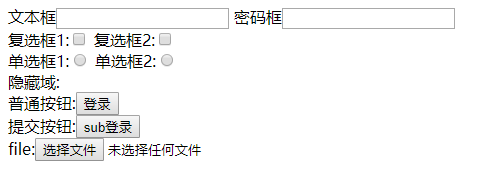
CODE
<!DOCTYPE html>
<html>
    <head>
        <meta charset="utf-8">
        <title></title>
    </head>
    <body>
        <form action="" >
            <!-- inuput 输入的控件(工具) -->
            <!-- 需要掌握集中常见的属性 -->
            <!-- type:text 表示文本输入框
                 type:password 密码框 不可见
                 type:checkbox 复选框
                 type:radio 单选框 实现单选,需要name属性,组成一个组、
                 type:hidden 隐藏当数据不想被用户看见时使用
                 type:buttom 普通按钮 点击以后不会触发提交行为 应用场景:留给JS来触发提交数据
                 type:file 文件上传控件


            -->

            文本框<input type="text" name=""  />
            密码框<input type="password" name=""  /><br>
            复选框1:<input type="checkbox" name=""  />
            复选框2:<input type="checkbox" name=""  /><br>
            单选框1:<input type="radio" name="1"  />
            单选框2:<input type="radio" name="1"  /><br>
            隐藏域:<input type="hidden" /><br>
            普通按钮:<input type="button" value="登录" /><br>
            提交按钮:<input type="submit" value="sub登录" /><br>
            file:<input type="file" />

        </form>
    </body>
</html>
赞赏作者

如果觉得我的文章对你有用,请随意赞赏