惯性聚合 高效追踪和阅读你感兴趣的博客、新闻、科技资讯
阅读原文 在惯性聚合中打开

推荐订阅源

The Hacker News
The Hacker News
F
Full Disclosure
Cloudbric
Cloudbric
Blog — PlanetScale
Blog — PlanetScale
W
WeLiveSecurity
N
News and Events Feed by Topic
T
Troy Hunt's Blog
V2EX - 技术
V2EX - 技术
CTFtime.org: upcoming CTF events
B
Blog
GbyAI
GbyAI
C
Check Point Blog
B
Blog RSS Feed
Application and Cybersecurity Blog
Recorded Future
Recorded Future
The Last Watchdog
The Last Watchdog
N
News and Events Feed by Topic
T
The Blog of Author Tim Ferriss
O
OpenAI News
V
V2EX
人人都是产品经理
人人都是产品经理
cs.AI updates on arXiv.org
IT之家
IT之家
WordPress大学
WordPress大学
www.infosecurity-magazine.com
S
Security @ Cisco Blogs
C
Cisco Blogs
Security Latest
Security Latest
S
Security Affairs
V
Visual Studio Blog
C
Cybersecurity and Infrastructure Security Agency CISA
Hacker News - Newest:
Hacker News - Newest: "LLM"
博客园 - 司徒正美
freeCodeCamp Programming Tutorials: Python, JavaScript, Git & More
Microsoft Azure Blog
Last Week in AI
Last Week in AI
AWS News Blog
AWS News Blog
雷峰网
雷峰网
Apple Machine Learning Research
PCI Perspectives
PCI Perspectives
博客园_首页
U
Unit 42
Google DeepMind News
Hugging Face - Blog
Hugging Face - Blog
Project Zero
Project Zero
Cisco Talos Blog
Cisco Talos Blog
The Register - Security
N
Netflix TechBlog - Medium
L
LINUX DO - 热门话题
H
Hacker News: Front Page

魔帆博客

Python包管理的血泪史:从混乱到秩序的漫长征 | 魔帆博客 Mac mini + iPad 随航梦幻联动!零显示器配置指南,iPad 秒变 Mac 主屏幕 | 魔帆博客 日文中的衬线、非衬线混排 | 魔帆博客 使用 GNU/Linux 搭建多出口软路由 | 魔帆博客 网页排版中的字体衬线 | 魔帆博客 配置和使用 Windows Dev Drive 开发驱动器 | 魔帆博客 解锁iOS侧载自由:使用sideStore轻松搞定ipa签名 | 魔帆博客 Git配置:如何优雅的配置多用户并使用 ssh 密钥验证 | 魔帆博客 Windows 注册表编辑或清除多显示器配置 | 魔帆博客 Git 合并本地两个不同的 Repo 仓库 | 魔帆博客 【记录】使用Golang开发腾讯云函数踩的坑 | 魔帆博客 【笔记】Hydro二次开发总结 前端篇(一) | 魔帆博客 C/C++ 二叉树 | 魔帆博客 Linux 报错Certificate verification failed: The certificate is NOT trusted. | 魔帆博客 Python 数字大小写转换 | 魔帆博客 安装有 RootMagiskXposedPlay 的 WSA 安卓子系统 | 魔帆博客 Fedora 系统升级 32->34 跨版本升级 | 魔帆博客 教程:如何更新安装 docker-compose V2 和使用 docker switch | 魔帆博客 Windows10 系统盘开启 Bitlocker | 魔帆博客
Git 提示 fatal: unsafe repository is owned by someone else 错误 | 魔帆博客
野小新 · 2022-04-26 · via 魔帆博客

最近在使用 Git 和 GitHub Actions 时,应该不少人都遇到了这个问题:

fatal: unsafe repository ('D:/Paxos/scoop/buckets/MorFans' is owned by someone else)
To add an exception for this directory, call:

        git config --global --add safe.directory D:/Paxos/scoop/buckets/MorFans

解决

这个问题可能和 Git安全漏洞公布| GitHub 博客 有关,应该只发生于最近更新的 git 程序

解决方案也很简单,因为这个报错是因为当前目录所有者不是当前操作系统的用户。

下面介绍两种方法解决这个问题:

  1. 修改文件所有者
  2. 添加安全目录

修改文件所有者

Windows 修改所有者方法

如果习惯使用命令行,可以使用 takeown.exe 快速设定所有者为当前用户:

takeown.exe /F .\nonportable /R

命令行批量处理:

Get-ChildItem -Directory | % {takeown.exe /F $_ /R }

或者使用图形界面修改:

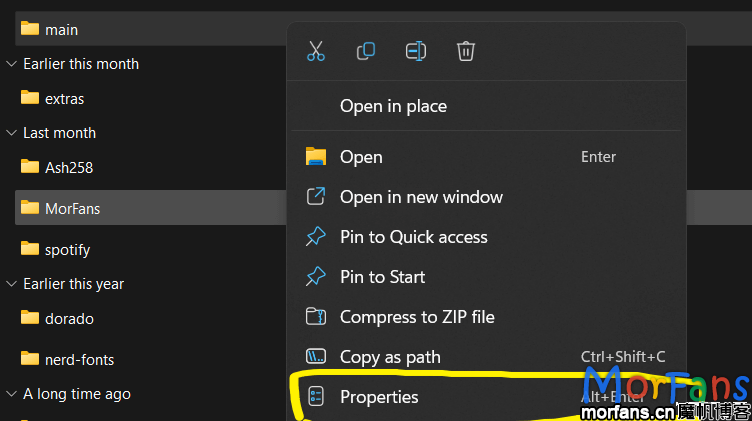
找到 git repo 的文件夹,右键点击属性:

3967533be19f476f98ee2daa3bcf6240
右键进入git repo 的文件夹属性

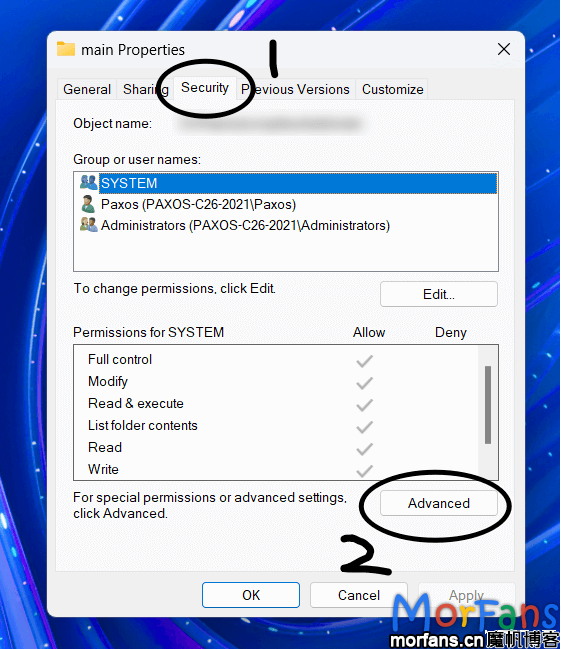
找到 安全,点击高级设置:

dae9ee6aa2434f24bca2b0c9ff527712
进入权限设置

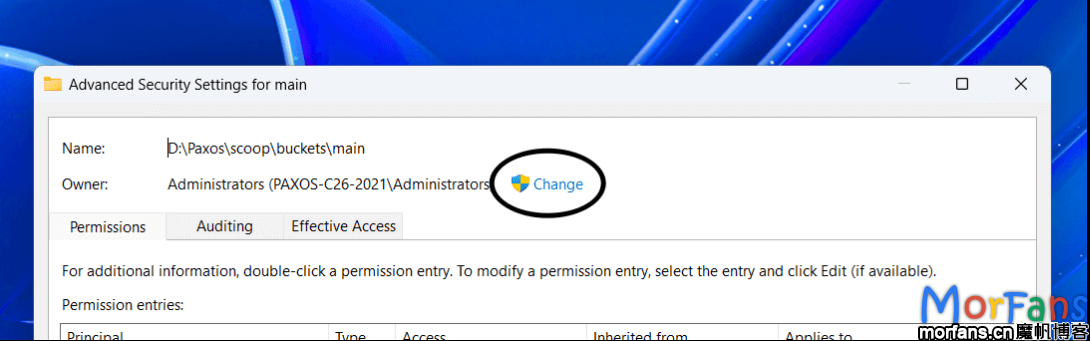
在弹出的窗口点击更改,输入自己电脑的用户名:

f5c49d88abbe4883a4d01d15c4940586
修改当前所有者用户
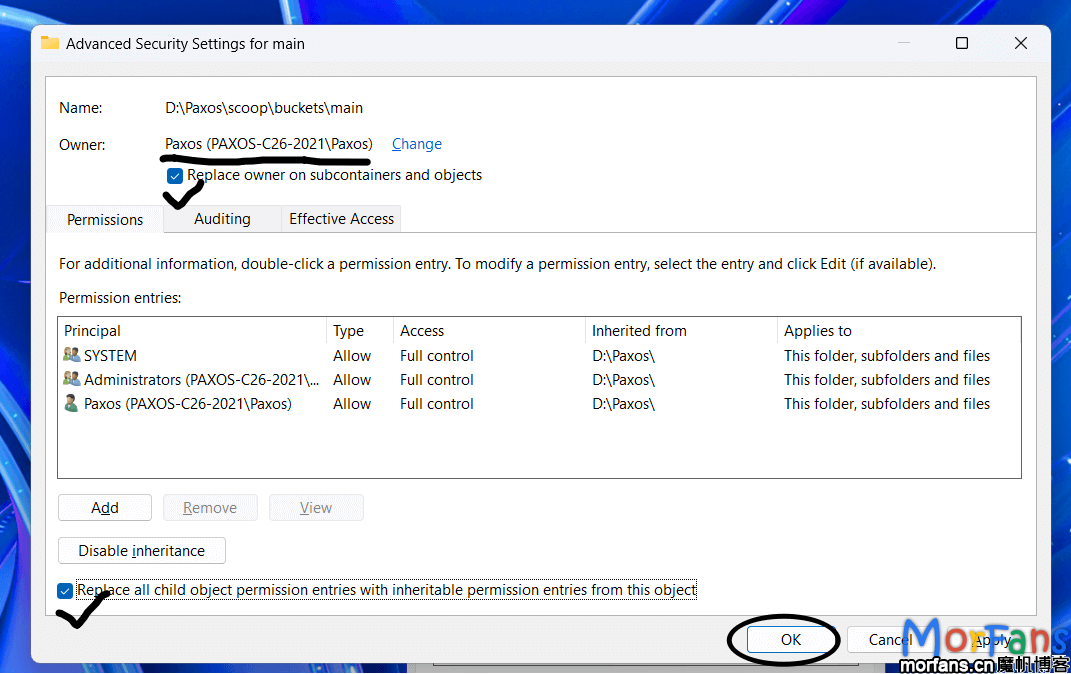
9e1514d625354a8480b32507626db4b3
按照图示操作然后应用设置

Linux 等Unix系系统修改所有者方法

# paxos:morfans => 用户名:组
sudo chown -R paxos:morfans  gitRepo文件夹路径

还可以通过指定 git 的用户身份运行

假设 morfans 是存储库所有者

sudo -u morfans -- git status

添加 git 安全目录

第二个方法就是 git 命令报错时候提示的方法。

如果你是在 GitHub Actions 中遇到这个问题,可能添加 safe.directory 是更方便的选择。

让 git 信任这个目录(如果您知道目录内容是安全的)

git config --global --add safe.directory <Git Repo文件夹路径>

或者手动调整 git 配置文件 C:\Users\<username>\.gitconfig

[safe]
    directory = gitRepo文件夹路径

repo太多了,批量来

Linux 下可以使用 find 命令来批量执行:

如果子目录太多了,可以使用 -maxdepth 参数

find 完整路径 -name '.git' -type d -exec bash -c 'git config --global --add safe.directory ${0%/.git}' {} \;

Windows 下可以使用 powershell 批量执行:

(ls D:\PowerShell\ParentFolder\ -Directory).FullName -replace '\\','/' | %{git config --global --add safe.directory $_}

虽然但是 👀,还是推荐修改文件夹权限,而不是添加 安全文件夹