

惯性聚合 高效追踪和阅读你感兴趣的博客、新闻、科技资讯
阅读原文 在惯性聚合中打开

推荐订阅源

S
Secure Thoughts
B
Blog
MongoDB | Blog
MongoDB | Blog
GbyAI
GbyAI
博客园 - 【当耐特】
D
DataBreaches.Net
Apple Machine Learning Research
阮一峰的网络日志
阮一峰的网络日志
I
InfoQ
人人都是产品经理
人人都是产品经理
Microsoft Azure Blog
量子位
美团技术团队
Recent Announcements
freeCodeCamp Programming Tutorials: Python, JavaScript, Git & More
M
MIT News - Artificial intelligence
O
OpenAI News
SecWiki News
SecWiki News
A
About on SuperTechFans
J
Java Code Geeks
B
Blog RSS Feed
Y
Y Combinator Blog
L
LangChain Blog
Security Archives - TechRepublic
Attack and Defense Labs
小众软件
小众软件
CTFtime.org: upcoming CTF events
Martin Fowler
Martin Fowler
博客园 - 聂微东
雷峰网
雷峰网
有赞技术团队
有赞技术团队
Google DeepMind News
T
The Exploit Database - CXSecurity.com
N
News and Events Feed by Topic
OSCHINA 社区最新新闻
OSCHINA 社区最新新闻
Microsoft Security Blog
Recorded Future
Recorded Future
P
Palo Alto Networks Blog
Blog — PlanetScale
Blog — PlanetScale
N
News | PayPal Newsroom
Scott Helme
Scott Helme
L
LINUX DO - 热门话题
F
Full Disclosure
cs.AI updates on arXiv.org
The Hacker News
The Hacker News
cs.CL updates on arXiv.org
U
Unit 42
博客园_首页
T
Tailwind CSS Blog
T
Tenable Blog

AI

Connect more of your apps to Search Create, edit and star in videos with two Google Vids updates Celebrating 25 years of visual search innovation Expanding Managed Agents in Gemini API: background tasks, remote MCP and more The latest AI news we announced in June 2026 New York City educators and industry leaders gathered at Google’s offices to shape the future of AI in classrooms. Unlocking Britain’s next era of productivity: Building a nation of AI trailblazers Ask an AI expert: What exactly is the full stack? Our latest Google Finance upgrades, including a new app New research shows how AMIE, our medical AI, could help manage health conditions. We’re strengthening our presence in Alabama through new investments and community support. Our new community investments in Virginia support local jobs and expand energy affordability. The latest AI news we announced in May 2026 5 ways Google Search can level up your thrift and vintage shopping How we used Gemini to build Google I/O 2026 Take our I/O 2026 quiz, vibe coded in Google AI Studio. 9 demos of Gemini Omni and Gemini 3.5 in action Check out real-life AI prototypes from the Futures Lab. Catch up on 12 major I/O 2026 moments Catch up on the Dialogues stage at Google I/O 2026. We’re announcing new community investments in Missouri. 100 things we announced at I/O 2026 A new experiment brings better group meetings to Google Beam I/O 2026 How AI Mode is changing the way people search in the U.S. New ways to create and get things done in Google Workspace I/O 2026: Welcome to the agentic Gemini era Everything new in our Google AI subscriptions, fresh from I/O 2026 Gemini 3.5: frontier intelligence with action A new era for AI Search The new AI-powered Google Finance is expanding to Europe. See what happens when creative legends use AI to make ads for small businesses. 5 gardening tips you can try right in Search Google is partnering with XPRIZE and Range Media Partners on the $3.5 million Future Vision film competition. The latest AI news we announced in April 2026 Reduce friction and latency for long-running jobs with Webhooks in Gemini API Celebrating 20 years of Google Translate: Fun facts, tips and new features to try Join the new AI Agents Vibe Coding Course from Google and Kaggle 8 Gemini tips for organizing your space (and life) Here’s how our TPUs power increasingly demanding AI workloads. We're launching two specialized TPUs for the agentic era. 3 new ways Ads Advisor is making Google Ads safer and faster 7 ways to travel smarter this summer, with help from Google A new way to explore the web with AI Mode in Chrome New ways to create personalized images in the Gemini app Bringing people together at AI for the Economy Forum Create, edit and share videos at no cost in Google Vids New ways to balance cost and reliability in the Gemini API We’re creating a new satellite imagery map to help protect Brazil’s forests. The latest AI news we announced in March 2026 Build with Veo 3.1 Lite, our most cost-effective video generation model Watch James Manyika talk AI and creativity with LL COOL J. Transform your headphones into a live personal translator on iOS. Search Live is expanding globally Build with Lyria 3, our newest music generation model Bringing the power of Personal Intelligence to more people Our latest investment in open source security for the AI era How AI is helping improve heart health in rural Australia Gemini in Google Sheets just achieved state-of-the-art performance. How our open-source AI model SpeciesNet is helping to promote wildlife conservation Ask a Techspert: How does AI understand my visual searches? The latest AI news we announced in February Use Canvas in AI Mode to get things done and bring your ideas to life, right in Search.
Create new worlds in Project Genie with these 4 tips
Molly McHugh-Johnson · 2026-03-04 · via AI

Here’s how to write great prompts for Project Genie, which lets you create and explore your own interactive worlds.

General summary

Project Genie lets you create interactive worlds using text and images. If you are a Google AI Ultra Subscriber in the U.S. over 18 you can use it. Start world-building with detailed environment descriptions, unique characters and action-oriented prompts.

Summaries were generated by Google AI. Generative AI is experimental.

Bullet points

  • "Create new worlds in Project Genie with these 4 tips" shows you how to build interactive worlds.
  • Describe your environment with details like weather, objects, and the overall feel you want.
  • Pick a character and how it moves to navigate your world; it can be anything you want!
  • Upload images to create worlds, centering your character with enough background to define it.
  • Use short, direct prompts and switch between first and third-person views to explore.

Summaries were generated by Google AI. Generative AI is experimental.

Basic explainer

Project Genie lets you build and walk around in your own cool worlds using AI. You can type in what you want the world to look like, like a forest or the moon, and even add your own pictures. Then, you pick a character to explore it all, like a giraffe or a robot. To make it work best, use short, clear instructions when you're telling the AI what to do.

Summaries were generated by Google AI. Generative AI is experimental.

Explore other styles:
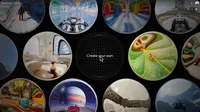
A screen capture of Project Genie, an experimental interface showing a grid of circular images, many of which appear to be 360-degree views, with a large, central black globe labeled Create your own

Your browser does not support the audio element.

Listen to article

This content is generated by Google AI. Generative AI is experimental

[[duration]] minutes

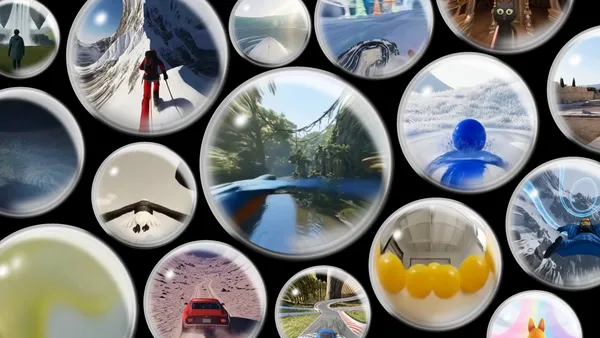
We recently introduced Project Genie, an experimental research prototype that lets you create, explore and remix your own interactive worlds. With Project Genie, you can develop worlds with characters and environments, then navigate them in real time, like by journeying to a new, imaginary planet or diving underwater with sea creatures. Project Genie is currently available to Google AI Ultra Subscribers in the U.S. over 18, with plans to expand further.

You can prompt Project Genie with just text, or with text and images. If you’re ready to bring your imaginary world to life, here are some tips on how to prompt Project Genie as well as features to try.

1. Describe the environment in detail

Start by writing out what kind of environment you want — for example, you could choose a forest, a city, the moon…you get the idea. Be specific with the details: Is the forest lush or wintry? The city could be bustling or empty. Maybe the moon is made of cheese! Also add any structures or objects you want, and weather details, like wind or snow. And think about what you want the world to feel like; sure, it could be photo-realistic and look like what you see around you, or it could look like a cartoon or video game.

2. Choose a character

Your character is what allows you to navigate the world, and it can be anything, from a tiny blue giraffe to a giant pixelated doll. You can add details like how it moves (maybe it flies, rolls on wheels or runs backwards) and what kind of effect it has — maybe every time it hops forward, a puff of smoke follows behind it.

3. Make worlds from your own images

Instead of starting with just text to create an environment, you also have the option to start with your own images. Upload your image and add any other environment-defining details (like whether you want things to look dark and stormy or like they’re made of a slimy substance). Be sure to use an image where your character is centered in the frame and there's enough background visible to define the environment.

4. Use direct, action-oriented language and set the mood with sensory details

Short, declarative statements work best when you’re prompting Project Genie. For example, the text prompt could be “an underwater scene with lots of coral,” and your character could be a goldfish. Need help crafting these kinds of prompts? You can always use the Gemini app for assistance in rewriting or adjusting them. Project Genie will also show you a preview of your world and character using Nano Banana Pro so you can see what they’ll look like and how navigation will appear. If you want to adjust, you can modify your prompt and fine-tune things in real time before you start actually exploring.

5. Try switching between first and third-person perspectives

Once you’ve created an environment and a character, you can decide how to explore it all. You can navigate through the eyes of the character (the first-person view) or by watching the character from above (third-person view). Just select the perspective button to choose which viewpoint you want as you take a tour through your world.
World_SocialShare

Get more stories from Google in your inbox.

Done. Just one step more.

Check your inbox to confirm your subscription.

You are already subscribed to our newsletter.

You can also subscribe with a

Related stories