


惯性聚合 高效追踪和阅读你感兴趣的博客、新闻、科技资讯
阅读原文 在惯性聚合中打开

推荐订阅源

美团技术团队
D
DataBreaches.Net
OSCHINA 社区最新新闻
OSCHINA 社区最新新闻
D
Docker
N
Netflix TechBlog - Medium
Cyber Security Advisories - MS-ISAC
C
Check Point Blog
腾讯CDC
Stack Overflow Blog
Stack Overflow Blog
V
Visual Studio Blog
IT之家
IT之家
月光博客
月光博客
U
Unit 42
K
Kaspersky official blog
T
Threatpost
cs.AI updates on arXiv.org
GbyAI
GbyAI
P
Proofpoint News Feed
Last Week in AI
Last Week in AI
云风的 BLOG
云风的 BLOG
酷 壳 – CoolShell
酷 壳 – CoolShell
I
InfoQ
Engineering at Meta
Engineering at Meta
Recorded Future
Recorded Future
Exploit-DB.com RSS Feed
freeCodeCamp Programming Tutorials: Python, JavaScript, Git & More
S
Security @ Cisco Blogs
MyScale Blog
MyScale Blog
大猫的无限游戏
大猫的无限游戏
Security Archives - TechRepublic
Webroot Blog
Webroot Blog
cs.CV updates on arXiv.org
Hacker News - Newest:
Hacker News - Newest: "LLM"
S
Schneier on Security
S
Secure Thoughts
The Register - Security
B
Blog RSS Feed
The Last Watchdog
The Last Watchdog
P
Palo Alto Networks Blog
爱范儿
爱范儿
B
Blog
让小产品的独立变现更简单 - ezindie.com
N
News and Events Feed by Topic
阮一峰的网络日志
阮一峰的网络日志
L
LINUX DO - 热门话题
C
Cisco Blogs
Spread Privacy
Spread Privacy
F
Full Disclosure
博客园 - 聂微东
T
The Blog of Author Tim Ferriss

刘荣星的博客

CentOS7 python2 安装 elasticsearch 模块 Gentoo Gnome 登陆界面开启触摸板轻击 python3去除emoji表情符号 记录几个内网广播包
在VMWare Workstation虚拟机里使用 yubikey
JavasBoy · 2022-10-31 · via 刘荣星的博客

我在VMWare中安装的linux mint,刚开始简单的以为使用yubikey像使用U盘一样的方式,把Yubikey插到电脑上,然后再VMWare里直接选择连接到客户机,dmessge 里有日志显示,但 gpg --card-status 找不到。

根据Yubikey的帮助文档显示,你需要把不是 Shared Yubikey 连接到客户机里,即需要选择如下图的 Yubico.com YubiKey OTP+FIDO+CCID 连接到虚拟机里。
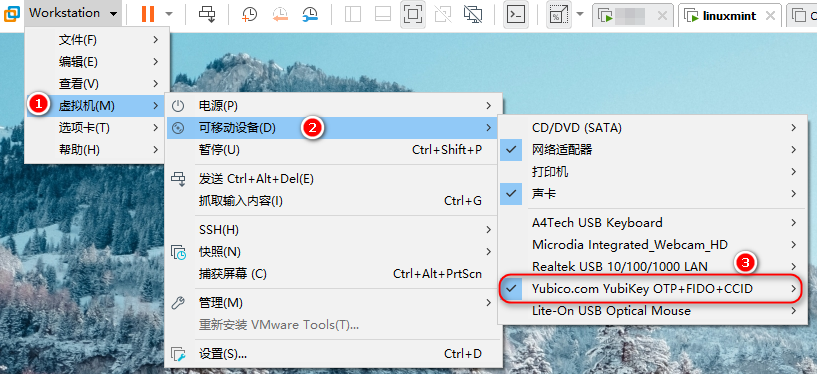
YubiKey Link to VMWare

设置方法:

  1. 在这里 https://support.yubico.com/hc/en-us/articles/360016614920-YubiKey-USB-ID-Values 查询好你对应型号的 Yubikey ID Values,记下来
  2. 关闭客户机
  3. 编辑对应客户机的 .vmx 文件,在里面添加这几行:
usb.generic.allowHID = "TRUE"
usb.generic.allowLastHID = "TRUE"
usb.generic.allowCCID = "TRUE"
usb.quirks.device0 = "0x1050:0x0407 allow"

其中 usb.quirks.device0 的值要对应你的 Yubikey 的型号,上面这个是 Yubikey 4 和 5 的。

最后把虚拟机开机,选择连接即可,然后配置 gpg

# gpg --card-status
gpg: selecting card failed: Service is not running
gpg: OpenPGP card not available: Service is not running

# pkill gpg-agent

# gpg --card-status
Reader ...........: Yubico YubiKey OTP FIDO CCID
...